
Can a Render Farm Run Your Houdini Simulation? The Honest Answer
Houdini is well known as the industry powerhouse for complex 3D simulations, whether you are handling fire, smoke, water, or large-scale destruction. However, every artist working with dynamic FX eventually hits the same bottleneck: watching their local workstation struggle to calculate a simulation frame by frame. When deadlines loom, the immediate question is: Can I offload this Houdini simulation to a render farm to speed things up? While most traditional SaaS render farms DO NOT run your simulations and only render finished frames, there is a way around this limitation. Infrastructure-as-a-Service (IaaS) providers like iRender give you full remote access to high-spec cloud workstations, allowing you to bake heavy simulations directly on powerful cloud hardware without memory bottlenecks.
Below, iRender will break down why a traditional render farm struggles with a Houdini simulation and how IaaS cloud solutions help you solve heavy FX bottlenecks.
Can a render farm run my Houdini simulation?
Unless you are using an Infrastructure-as-a-Service (IaaS) provider that rents you a full remote desktop machine, most managed or SaaS render farms (where you upload a scene file and download final images) will not process your simulation.
Core Difference: Simulation and rendering are fundamentally different computational tasks. Managed render farms are built to process independent render frames in parallel, not to solve sequential physics equations.
To understand why, we need to separate these two steps:
- Simulation: Calculating the physical behavior and motion of particles, fluids, or rigid bodies over time.
- Rendering: Calculating lighting, shading, materials, and camera angles to turn geometric data into final images.
Why simulation does not distribute like rendering
The difference between splitting 300 render frames across 10 machines and running a 300-frame simulation comes down to Time Independence vs. Time Dependency.
Rendering is Time-Independent (Parallel)
To render Frame 50, the engine only needs scene data at that exact moment. It does not care what happened on Frame 49. Because frames do not rely on each other, Frame 1, 50, and 300 can be sent to 10 different machines to calculate simultaneously.
Simulation is Time-Dependent (Sequential)
Physical solvers (Pyro, FLIP, RBD) use step-by-step physics. To calculate a water splash on Frame 50, Houdini must know its exact velocity and position on Frame 49, which depends on Frame 48, all the way back to Frame 1. A second machine cannot jump ahead to calculate Frame 50 because the data from Frame 49 does not exist yet.
Because of this domino effect, physics solvers must process frames sequentially on a single machine. This is a mathematical law of physics algorithms, not a cloud limitation.
The standard workflow most farms expect
Because traditional managed render farms (SaaS) operate strictly on frame-by-frame distribution, they cannot process raw simulation nodes directly on their cloud nodes. Instead, they require a strict three-step workflow for Houdini projects:
- Bake the Cache Locally: Before touching the farm, you must run the entire simulation process on your own workstation. You then export these physical calculations to disk as cache files, typically formatted as .bgeo.sc or .vdb files.
- Upload Scene File and Cache Data: Once your local machine finishes baking, you must upload the main Houdini scene file (.hip) along with the entire folder of generated cache files to the render farm’s storage server.
- Farm Renders Only: Once all files are fully uploaded, the managed farm takes over. The cloud nodes read the pre-baked geometry and volumetric data from your uploaded cache and split the final rendering phase across multiple machines.
What you can actually offload
To avoid wasting budget or setting wrong expectations, it helps to break down exactly which tasks in a Houdini pipeline can be offloaded to cloud infrastructure—and which ones cannot.
- Rendering Finished Frames (Fully Supported): Because render frames are independent of one another, you can easily distribute a 300-frame sequence across dozens of cloud nodes to finish in a fraction of the time.
- Running Multiple Simulations in Parallel (Fully Supported): While a single simulation cannot be split across multiple nodes, you can rent multiple cloud machines to run different simulation tasks simultaneously (e.g., Node A calculates Pyro while Node B solves FLIP fluids).
- Speeding Up a Single Simulation Across Multiple Nodes (Not Supported): Renting 10 machines will not make a single simulation run 10 times faster. Because physics solvers require sequential calculations, a single simulation job is strictly bound to the hardware limits of one machine at a time.
The other model: rent a machine and run everything
If your local computer lacks the system RAM or CPU power to bake heavy simulations, Infrastructure-as-a-Service (IaaS) like iRender is an alternative solution. Instead of uploading files to an automated farm interface, you get full Remote Desktop access to a dedicated cloud server (Windows or Linux).
Why this model solves the problem:
- Run Simulations Directly: You install your own version of Houdini, open your .hip file, and start the simulation directly on the remote server. High-end cloud nodes feature high-core CPUs (like AMD Threadripper Pro) and up to 256GB RAM, giving you the hardware space needed to compute heavy simulations without memory crashes.
- Eliminate Cache Uploads: By simulating directly on the cloud node, cache files write straight to the local NVMe drive of that server. You do not spend any time uploading gigabytes of cache over your home internet connection.
- Render on the Same Node: Once the simulation finishes baking, you can immediately render the shot on the same machine using its onboard GPUs (such as RTX 4090s).
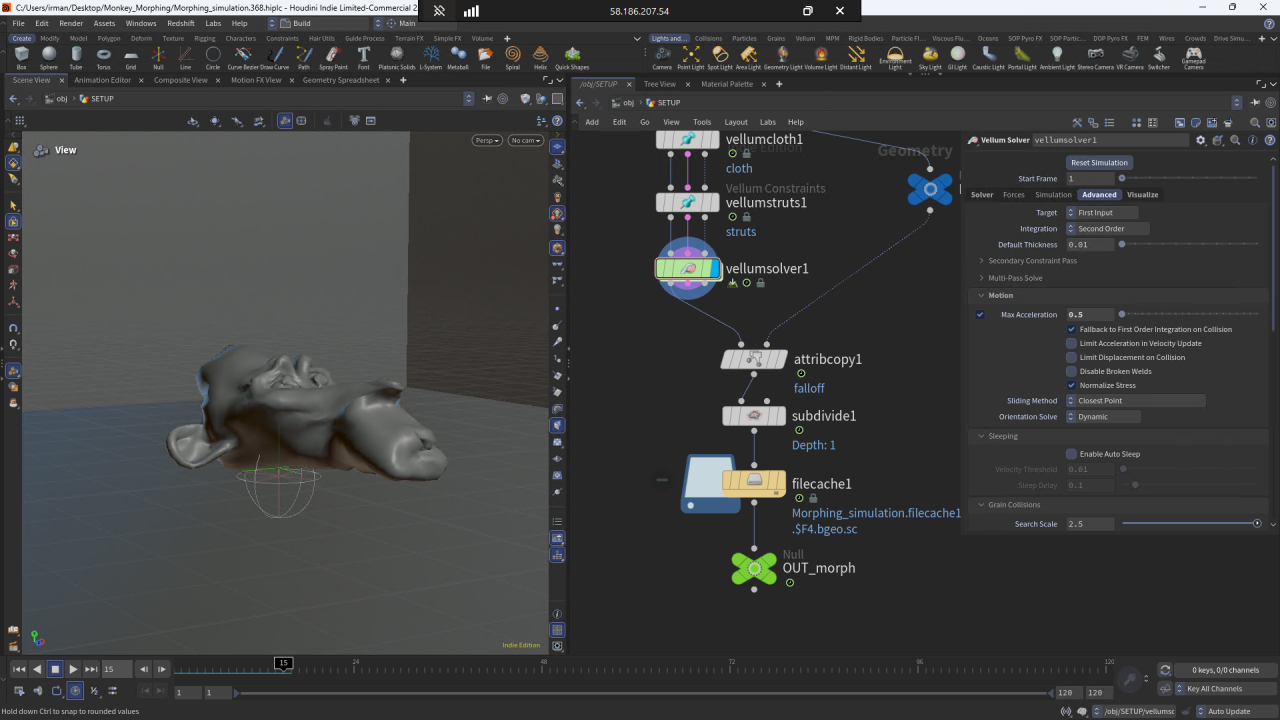
iRender - The Cloud Solution for Heavy Houdini Simulations
When traditional SaaS render farms refuse to run your raw Houdini simulation files, iRender steps in with a dedicated Infrastructure-as-a-Service (IaaS) solution. You get full remote access to a high-spec cloud workstation where you can install your exact Houdini version, open your .hip files, and bake heavy simulation caches directly on ultra-fast cloud storage. To keep your physical calculations running smoothly without RAM bottlenecks, iRender now features next-generation NVIDIA RTX 5090 GPUs packing 32GB of GDDR7 VRAM. This massive VRAM headroom eliminates Out-of-Memory (OOM) crashes when simulating high-res Pyro explosions, millions of FLIP fluid particles, or massive destruction setups.
Combined with powerhouse AMD Threadripper Pro processors and up to 256GB of system RAM, iRender lets you scale seamlessly from 1 to 4 top-tier RTX 5090 or RTX 4090 GPUs, taking your entire FX pipeline from initial simulation to final render with unmatched speed.
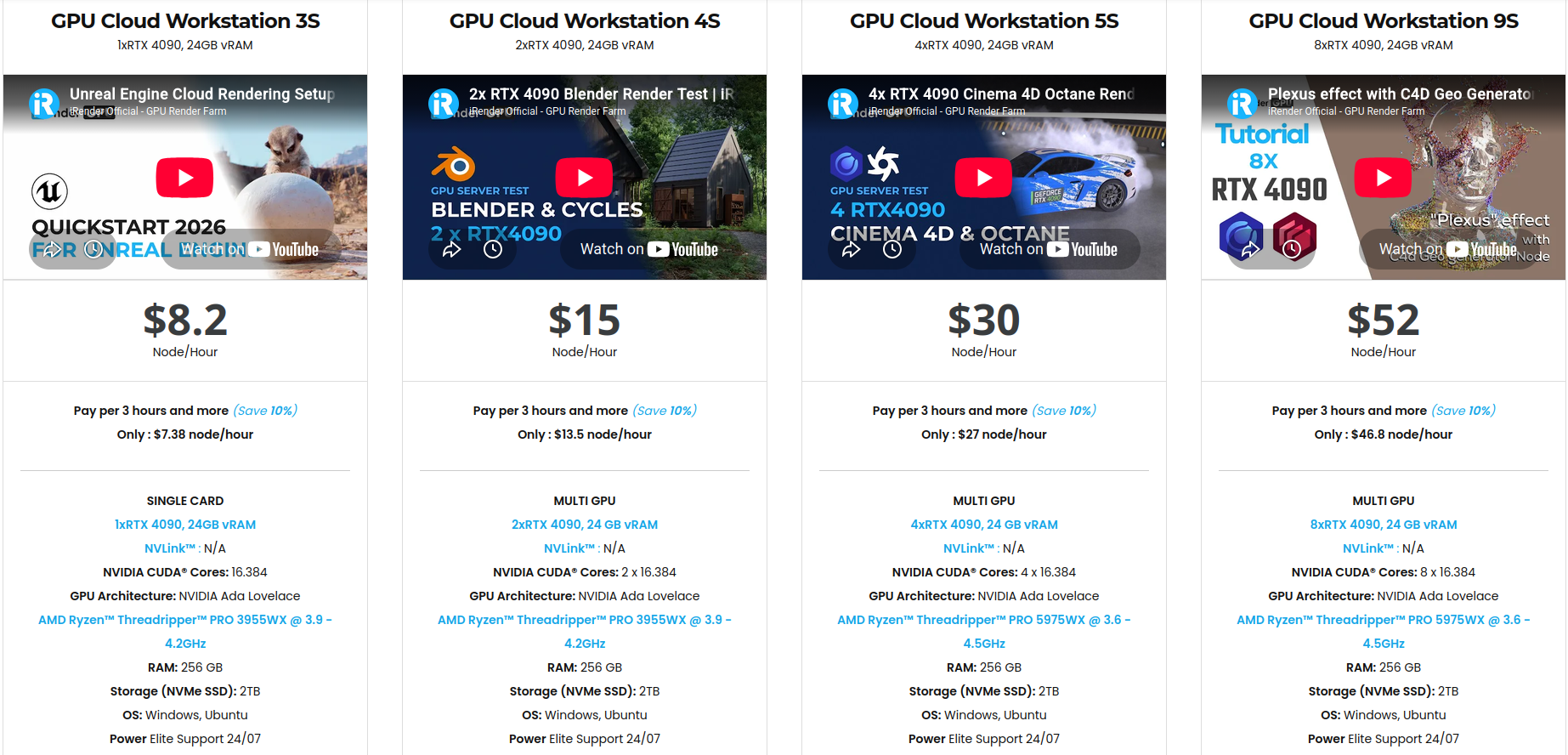
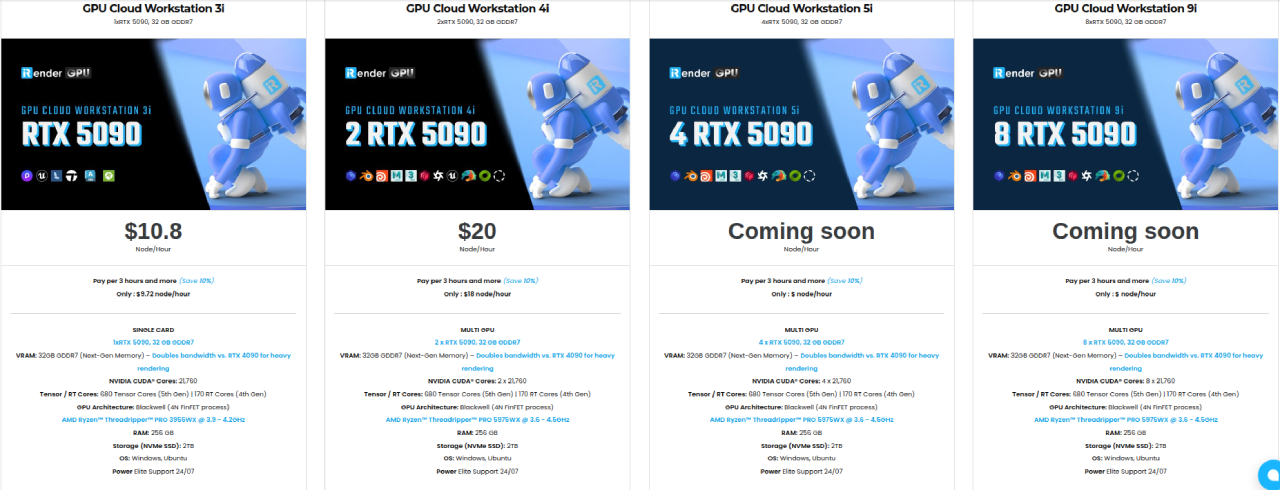
Because you get complete admin access to a desktop environment, you can install your exact Houdini build, load custom HDAs, and set up your pipeline tools just like on your local computer. To save even more time, iRender also provides pre-configured Houdini templates, allowing you to launch an environment with Houdini already set up and get straight to work.
Register today to take advantage of a 100% bonus on your very first deposit!
Let’s watch the tutorial video to see how our service works:






