GPU Requirements for Arch-Viz Apps in 2026: A Practical Buyer's Reality Check
Most arch-viz artists do not need more GPUs. They need one GPU with enough VRAM. Lumion, Enscape, Twinmotion, D5 Render, and Unreal Engine are built around real-time workflows, where viewport performance is primarily determined by the speed and VRAM capacity of a single graphics card. Adding multiple GPUs does not combine their VRAM or automatically make the viewport faster. For large architectural scenes, high-resolution assets, ray tracing, Lumen, and Path Tracing, having enough VRAM is especially important because exceeding the available memory can cause severe slowdowns or instability. This practical GPU requirements arch-viz 2026 buyer guide compares the needs of major arch-viz applications and explains what to prioritize at different budgets. It also looks at cloud GPU workstations as an alternative when buying a high-end GPU is not practical.
What GPU Do ArchViz Apps Actually Need in 2026?
For most arch-viz workflows, one powerful GPU with plenty of VRAM is a better investment than several weaker cards. Lumion, Enscape, Twinmotion, D5 Render, and Unreal Engine are built around real-time GPU rendering, so viewport performance depends primarily on the speed and memory capacity of the GPU doing the work.
Adding more graphics cards does not combine their VRAM into one larger pool. A 24GB card does not become a 48GB card simply because another 24GB card is installed. For large architectural scenes, I would therefore prioritize a fast single GPU with enough VRAM for the assets, textures, lighting, and effects you actually use.
The exact requirement changes with the software and scene, but the buying principle is consistent: choose one strong card first, then make sure the rest of the workstation can keep up. This is the practical starting point for a GPU requirements arch-viz 2026 buyer guide.
App by App, What The Makers Actually Say
Lumion 2026: Lumion identifies the graphics card as the most important component for both viewport work and rendering. It recommends a dedicated modern GPU, sufficient VRAM, a capable CPU, and enough system RAM for larger scenes. Lumion 2026 requires Windows 10 2004 or newer, or Windows 11 24H2 or newer.
Enscape: Enscape relies heavily on the GPU for real-time ray-traced rendering. Its current Windows guidance lists 4GB VRAM as a minimum and 8GB as a recommended level for larger projects, with an RTX 3070 Ti or RX 6800 class GPU listed as recommended. Enscape also uses only one GPU when multiple GPUs are installed.
Twinmotion: Epic provides different hardware levels based on project size and features. Its minimum Windows configuration targets projects below 1GB of geometry and data with at least 6GB VRAM, while its high-end configuration recommends 12GB VRAM and 64GB system RAM. Path Tracer and demanding VR workflows require more capable hardware.
D5 Render: D5 requires a ray-tracing-capable GPU and Windows 10 version 1809 or newer. Its documentation highlights GPU performance and VRAM as important factors for real-time rendering and complex scenes with NVIDIA GTX 1060 6GB or above, while 32GB of system RAM is recommended in its hardware guidance.
Unreal Engine: Epic’s current UE5 requirements recommend Windows 11, a quad-core Intel or AMD CPU at 2.5GHz or faster, 32GB RAM, and at least 8GB graphics memory. Nanite and Lumen can push requirements considerably higher, so larger architectural scenes need additional GPU headroom.
VRAM Is The Number That Decides Your Ceiling
VRAM determines how much of your scene the GPU can comfortably keep available for real-time work. High-resolution textures, detailed geometry, large asset libraries, lighting data, and advanced rendering features can quickly consume that memory. Once a project approaches the GPU’s limit, you may see stuttering, reduced performance, instability, or features becoming difficult to use.
Adding another GPU does not simply double the available VRAM for a real-time application. Each card has its own memory pool, so a scene that requires more memory than one GPU can provide may still exceed the usable limit even when multiple cards are installed. For that reason, I would prioritize VRAM capacity on a single strong GPU before considering additional cards.
Buying Advice By Budget
Low budget: An older-generation GPU with higher VRAM can be a better choice than a newer card with less memory. For large arch-viz scenes, extra VRAM can be more useful than a modest gain in raw GPU speed. This is an important point in any GPU requirements arch-viz 2026 buyer guide.
Medium budget: Put the budget into one powerful high-end GPU rather than two or more mid-range cards. Real-time arch-viz applications generally rely on a single GPU, so a stronger card provides better viewport performance and a larger usable VRAM pool.
High budget: Choose a current-generation high-end GPU with generous VRAM. This gives demanding scenes more room for high-resolution textures, detailed geometry, ray tracing, and other advanced features while providing stronger performance for future projects.
Occasional projects: If you only handle a few arch-viz projects each year, buying an expensive GPU may leave much of its capacity unused. Renting a powerful cloud workstation when you need it can be more economical, especially for short periods of intensive work.
When Renting Beats Buying
If your arch-viz workload is occasional, renting gives you a chance to test the hardware before making a major purchase. It is also useful when you are unsure whether your preferred applications and features run properly on your current operating system. For a practical GPU requirements arch-viz 2026 buyer guide, this is an option worth including in the budget calculation.
For Mac users, cloud rental can be particularly useful when an arch-viz application or specific feature requires Windows. iRender provides remote Windows workstations with an RTX 4090 and 24GB VRAM, allowing you to run supported software through a remote desktop instead of replacing your computer.
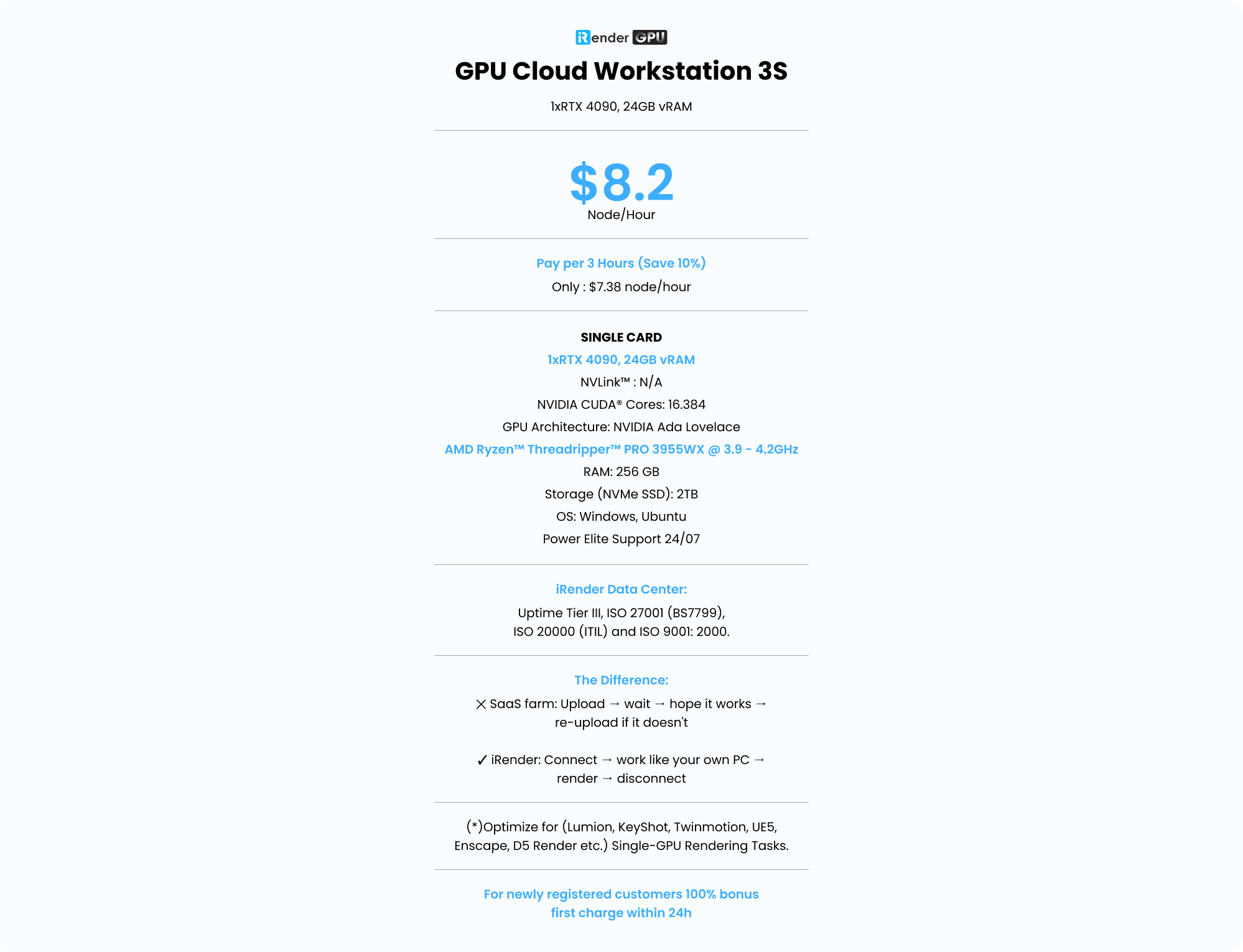
There is one important cost consideration. The rental is charged according to the time the machine is running, so buying your own GPU may become more economical if you use the hardware continuously throughout the year. When the project is finished, shut down the remote machine so you are not paying for idle time. New users can also take advantage of iRender’s 100% first-deposit bonus when trying the service.
Check out iRender workflow for Unreal Engine on RTX 4090:

GPU Requirements of Popular Arch-Viz Applications
This table summarizes the GPU requirements of popular real-time ArchViz applications and whether they support multi-GPU rendering in real-time workflows.
| Software | GPU Requirements | Multi-GPU for Real-Time? | Platform Notes |
| Lumion | A powerful GPU with a high PassMark score and enough VRAM to hold the entire scene | No | No official support for Mac |
| Enscape | One sufficiently powerful GPU; shares GPU resources with the host CAD application | No | Runs as a plugin within CAD applications |
| Twinmotion | Around 6GB VRAM minimum; larger projects require more | No, except for offline Path Tracer workflows | Path Tracer is available only on Windows |
| D5 Render | A GPU with DirectX Raytracing (DXR) support | No, uses only one GPU | Windows only |
| Unreal Engine | A powerful GPU with ample VRAM for Nanite and Lumen | No, except for offline Path Tracer workflows | Primarily used on Windows |
FAQ
Q: How much VRAM do I need for ArchViz in 2026?
You need enough VRAM to handle the complete scenes you normally create. Smaller projects may work with the minimum recommended by the software developer, while large scenes with high-resolution textures and detailed assets can require considerably more. Always check the official requirements for your specific application and version, since hardware recommendations can change over time.
Q: Is one strong GPU better than two mid-range cards for arch-viz?
For real-time ArchViz, the important point is that viewport rendering generally runs on a single GPU, and VRAM does not combine across multiple cards. Two mid-range GPUs therefore do not create one larger VRAM pool or automatically make the viewport smoother than a single powerful GPU.
Q: Should I buy a new GPU or rent cloud rendering for arch-viz?
If you use your GPU heavily throughout most of the year, buying can be more economical. If your workload comes in only a few periods each year, you want to test a configuration before buying, or you use a Mac while your software requires Windows, renting a powerful remote machine can be a more practical option.
Register an account on iRender to claim your 100% bonus for the first deposit and render without limitations.
iRender – Maximum Speed – Absolute Freedom