
Why is iRender IaaS Best for Unreal Engine 5?
Unreal Engine 5 has completely transformed the world of real-time 3D, architectural visualization, and virtual production with game-changing technologies like Lumen, Nanite, and the Path Tracer. However, driving these photorealistic environments requires an immense amount of raw hardware power. Visual artists and studios routinely hit severe bottlenecks: dreaded “Out of Video Memory” (VRAM) crashes, hours lost to shader compilation, and pipeline errors. When turning to traditional automated SaaS (Software as a Service) render farms for help, creators are often met with instant failures, as these legacy background systems simply cannot handle Unreal Engine 5’s complex interface. How does iRender’s IaaS (Infrastructure as a Service) model effortlessly overcome these technical hurdles where traditional SaaS farms fail?
Let’s explore the four core technical advantages that make iRender the ultimate cloud solution for Unreal Engine 5 creators.
1. Eliminating “Out of Video Memory” Crashes
Unreal Engine 5 has redefined visual fidelity with its flagship technologies: Lumen for real-time global illumination and Nanite for virtualized geometry. However, these cutting-edge features—especially when paired with dense 4K/8K texture maps, dynamic volumetric fog, and infinite Quixel Megascans assets—come at an enormous hardware cost: relentless VRAM consumption. When artists push their scenes to the absolute limit and trigger cinematic renders via the Movie Render Queue or the hardware-heavy Path Tracer, consumer-grade graphics cards (typically equipped with just 8GB to 12GB of VRAM) hit a hard limit. The moment the scene’s memory footprint exceeds the hardware’s capacity, the GPU driver panics, resulting in the notorious “Out of Video Memory” (OOM) error and an immediate desktop crash.
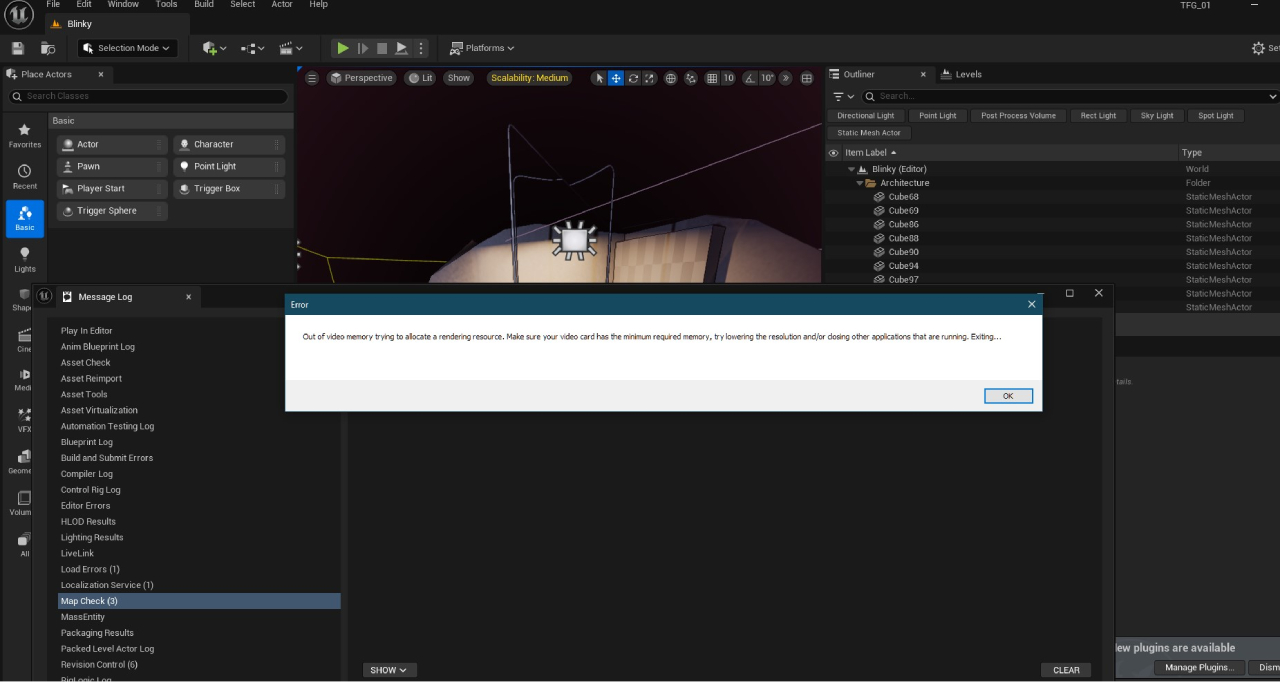
iRender provides dedicated cloud servers powered by the NVIDIA GeForce RTX 4090, offering a massive 24GB of ultra-fast GDDR6X VRAM. This extensive memory pool provides the generous headroom required to load gigantic 3D environments, complex shader graphs, and high-density geometry pipelines simultaneously. By running on a native 24GB VRAM architecture, Unreal Engine 5 artists can render high-resolution 4K/8K cinematic sequences and path-traced frames smoothly, completely free from memory bottleneck crashes or performance throttling.
2. Slashing Shader Compilation Times by 5x – 10x
Ask any Unreal Engine creator about their biggest headache, and they will likely give you the same two-word answer: “Compiling Shaders.” Whether you are opening a project for the first time, importing new materials, switching lighting setups, or adjusting master shaders, UE5 pauses your workflow to translate material code into instructions your GPU can understand. Because shader compilation relies almost entirely on the computer’s CPU rather than the graphics card, running UE5 on standard 6-core or 8-core desktop processors often turns into an agonizing waiting game. Artists are routinely locked out of their projects for hours, staring at a frozen screen while thousands of shaders compile one by one.
iRender eliminates this massive bottleneck by pairing its high-end GPUs with enterprise-grade AMD Ryzen Threadripper Pro processors and up to 256GB of system RAM. Threadripper Pro CPUs feature a massive count of high-speed cores and threads, allowing the system to process multi-threaded shader caching in parallel across dozens of pipelines at once. Combined with ultra-fast RAM that prevents memory slowdowns, iRender turns what used to be a multi-hour waiting period into a quick process that takes just a few minutes. Artists can jump straight into creative work, tweak materials freely, and iterate on scene lighting without losing precious production time.
3. Full UI Access for Movie Render Queue
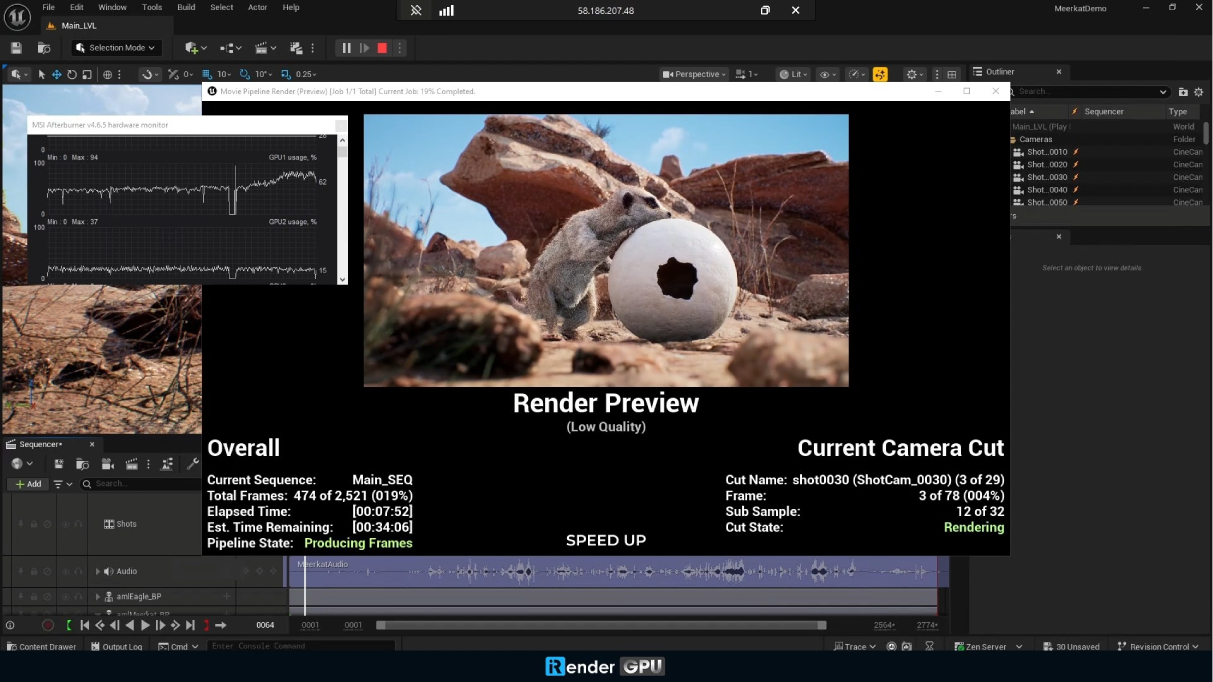
To produce film-quality cinematic animations or high-resolution architectural renders in Unreal Engine 5, artists rely heavily on the Movie Render Queue (MRQ). Unlike basic offline rendering, configuring the MRQ isn’t a one-click task. It requires navigating Unreal Engine 5’s active interface to carefully fine-tune complex settings—such as spatial, high-dynamic-range (HDR) color passes, custom camera tracks in the Sequencer, and real-time viewport previews to catch errors before rendering.
This is precisely where automated SaaS (Software as a Service) render farms completely fail. Because SaaS platforms run on “headless” servers, meaning they operate silently in the background without a visual desktop or display output. They cannot open or interact with the Unreal Engine 5 user interface. When you send a project to a SaaS farm, its automated dispatcher cannot navigate menus, click buttons, or adjust Sequencer settings, causing the job to fail immediately.
iRender solves this fundamentally by using an IaaS (Infrastructure as a Service) model. Instead of forcing your project through a rigid script, iRender gives you a full Windows Remote Desktop cloud workstation. You connect directly to the machine, open Unreal Engine 5, and see the exact same interface you are used to on your local PC. This allows you to open the Movie Render Queue, inspect your visual passes in real time, adjust camera settings, and launch your final cinematic render with complete confidence and control.
4. Unlocking Maximum Path Tracer Performance
For artists seeking the absolute highest level of photorealism, Unreal Engine 5 offers the Path Tracer, a rendering mode that calculates physically accurate lighting, reflections, and shadows just like traditional offline software (such as V-Ray or Corona). However, the Path Tracer is completely reliant on physical hardware. It demands dedicated Ray Tracing (RT) cores to function. While the RTX 4090 features the incredibly powerful Ada Lovelace architecture loaded with these RT cores, running it in a cloud environment introduces a hidden challenge: display detection.
Modern graphics cards are designed with built-in fail-safes. If a GPU is sitting in a remote server rack and detects that no physical monitor is plugged into it, it will often throttle its performance, disable hardware acceleration, or refuse to launch real-time viewports entirely. This is another reason why standard headless cloud servers fail at rendering Unreal Engine 5 cinematics.
iRender elegantly solves this hardware limitation by deploying proprietary virtual display drivers across their workstations. This software tricks the operating system and the RTX 4090 into recognizing a high-resolution, active monitor connected directly to the GPU. By establishing this “fake” display, iRender instantly bypasses all system throttling, unlocking 100% of the graphics card’s raw Ray Tracing power. The result? UE5 artists can export their path-traced cinematic sequences at blazingly fast speeds, utilizing every ounce of the RTX 4090’s performance without any artificial bottlenecks.
Conclusion
Unreal Engine 5 represents the future of real-time 3D, but its cutting-edge features demand an ecosystem built for power and flexibility. While traditional automated SaaS farms fail due to headless limitations, VRAM bottlenecks, and interface crashes, iRender’s IaaS model puts true workstation power back in the artist’s hands. iRender bridges this technological gap by putting true workstation performance back into the artist’s hands. By combining the raw power of the RTX 4090 (24GB VRAM), multi-threaded Threadripper Pro CPUs, proprietary Virtual Display Drivers, and full Remote Desktop freedom, iRender delivers a seamless, crash-free cloud environment. You retain 100% control over your Movie Render Queue, shader compilation, and Path Tracer pipelines—just like working on a local supercomputer.
Unleash Unreal Engine 5 with iRender Cloud Workstations!
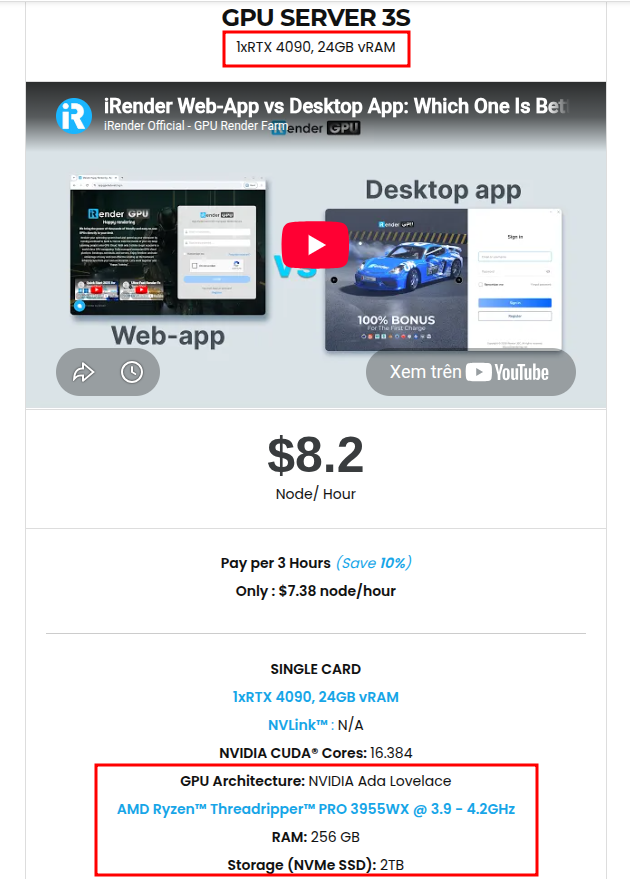
Say goodbye to VRAM crashes, frozen shader compiles, and rigid SaaS limits. iRender’s IaaS model gives you total remote control over dedicated cloud power built for Unreal Engine 5 with RTX 4090 (24GB VRAM), CPU AMD Ryzen™ Threadripper™ PRO 3955WX @ 3.9 – 4.2GHz. Let’s check the configuration for Unreal Engine below:
🚀 Try iRender for UE5 Now — Register today to claim your bonus and experience free rendering!





