
Blender Render Farm 2026: RTX 4090 Benchmark & Setup Guide on iRender
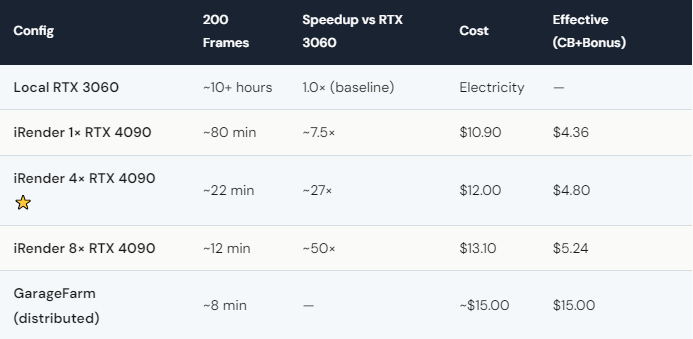
Blender Cycles on iRender’s RTX 4090 renders 5–8× faster than a local RTX 3060 — and with 8× RTX 4090 GPUs, that jumps to 40–60× faster. We benchmarked Blender 4.2 with Cycles on iRender: a 200-frame animation at 1920×1080 finished in ~80 minutes on 1× RTX 4090 ($10.90) and ~12 minutes on 8× RTX 4090 ($13.10). After weekend Credit Back (20%) and 100% first-deposit bonus, the 8-GPU run costs roughly $5.24 effective. Setup takes ~15 minutes: connect via remote desktop, install Blender (or it’s pre-loaded), enable GPU in Preferences → CUDA, open scene, render. Your Blender version, your addons, your render settings. Your renders, your rules.
How Do You Set Up Blender on iRender for the First Time?
The whole process takes about 15 minutes — and you only do it once. Connect to your iRender server via remote desktop (Parsec recommended for low latency). Download and install Blender from blender.org — or if iRender has it pre-loaded, skip this step. Open Blender → Edit → Preferences → System → CUDA → check all RTX 4090 GPUs. Done. Cycles will automatically use all selected GPUs.
Transfer your scene files through iRender’s built-in file transfer or use Google Drive. Open the scene, do a test render of 1 frame to verify textures, lighting, and add-ons work correctly. Then set your frame range and hit Render → Render Animation.
Here’s the Blender-specific advantage of IaaS: any Blender add-on works. Geometry Nodes setups, custom Python scripts, third-party add-ons like HardOps or Botaniq — install them on the server exactly as you would locally. SaaS farms limit you to vanilla Blender with their supported add-on list. On iRender, you bring your full toolkit.
After rendering, download your output frames and shut down the server. This last step is critical — the billing timer runs at $8.20/hour (1 GPU) or $65.60/hour (8 GPUs). An alarm is not optional.
Is iRender or GarageFarm Better for Blender?
For Cycles GPU workloads demanding linear multi-GPU scaling, deploying on a dedicated Blender render farm service like iRender decisively wins on cost-efficiency: $4.80 effective compute versus $15 on GarageFarm for a 200-frame sequence. Beyond raw pricing, iRender grants complete environment control to run any Blender version, custom build, or proprietary add-on—a non-negotiable requirement for studios with tailored production pipelines.
For EEVEE rendering, cloud compute is typically unnecessary overhead—real-time rasterization runs comfortably on local hardware. A modest workstation with a single RTX 3060 renders EEVEE sequences in near-real-time; avoid paying cloud fees for EEVEE unless your USD assets, high-res textures, or volumetric simulations are exceptionally heavy.
When raw batch distribution is the sole metric, GarageFarm’s SaaS model spreads 200 frames across dozens of automated nodes in roughly 8 minutes. An iRender 8× GPU bare-metal server renders that same batch in 12 minutes. While GarageFarm delivers a 4-minute speed advantage for massive fire-and-forget batches, it comes at more than triple the price.
The honest breakdown:
-
Blender Cycles + multi-GPU scaling + custom add-ons = iRender delivers unmatched flexibility and cost-per-frame value.
-
Blender Cycles + automated fire-and-forget batching = GarageFarm takes the edge on pure turnaround speed.
-
EEVEE = Keep your frames local and save your budget.
Audit your pipeline bottlenecks and choose accordingly.






