
Cinema 4D Render Farm: Redshift & Octane Speed Test on 8x RTX 4090
If you work in Cinema 4D professionally, you already know what render times feel like at scale. A single complex frame can take minutes. And when a client deadline moves up without warning, your local workstation becomes the bottleneck that determines whether you deliver or miss.
In this article, we will focus on: Redshift & Octane Speed Test on 8x RTX 4090. Here’s what the numbers show.
Test Environment: Server Specs
Let’s start with the configuration!
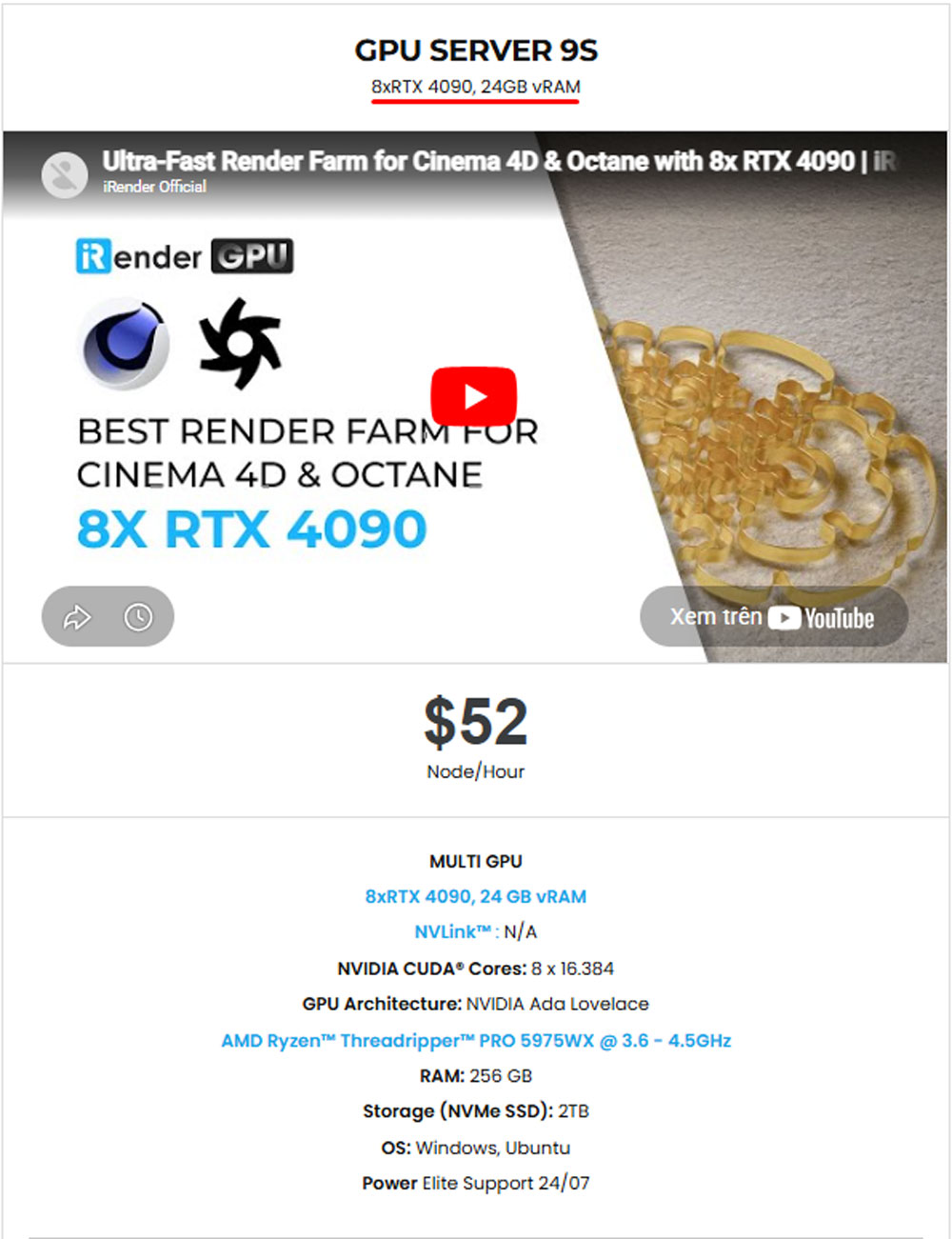
iRender Server Test: Server 9S
- GPU: 8x NVIDIA GeForce RTX 4090 (24GB GDDR6X VRAM each — 192GB total VRAM pooled)
- CPU: AMD Ryzen™ Threadripper™ PRO 5975WX @ 3.6–4.5GHz
- RAM: 256GB DDR4
- Storage: 2TB NVMe SSD
- OS: Windows 10
- Software: Cinema 4D 2024, Redshift 3.6, OctaneRender 2024
RTX 4090 is the most powerful single consumer GPU available right now, built on NVIDIA’s Ada Lovelace architecture with 16,384 CUDA cores, 3rd-generation RT Cores, and 4th-generation Tensor Cores. Running 8 of them in parallel on a single machine represents a class of raw compute power.
Test 1: Cinema 4D + Octane on 8x RTX 4090

OctaneRender is an unbiased spectral path tracer that uses CUDA exclusively for GPU computation. Its architecture distributes rendering work across all available GPUs simultaneously, with each card processing a portion of the sample workload per frame.
In practice, scaling efficiency depends on VRAM headroom, scene texture density, and GPU coordination overhead.
Let’s watch our test video:

Octane Test Results
Test sequence: 420 frames rendered on iRender’s 8x RTX 4090 server (Server 9S).
- Total frames: 420
- Total render time: 1 hour 30 minutes
- Average time per frame: ~12.9 seconds
- Render engine: OctaneRender (CUDA path tracing)
420 frames in 90 minutes: that is a full production-length animation sequence completed in under two hours.
On a single RTX 4090, Octane’s near-linear GPU scaling means the same sequence would take approximately 11–12 hours to render. On a typical mid-range studio machine with a single RTX 3080 or RTX 3090, estimate closer to 15–18 hours. Server 8x RTX 4090 compresses that window to a single working session.
Test 2: Cinema 4D + Redshift on 8x RTX 4090

Redshift is a biased GPU renderer, which means it uses production-grade approximations to accelerate rendering without sacrificing output quality for commercial work. Its multi-GPU approach differs from Octane: rather than distributing sample computation per frame evenly across cards, Redshift assigns individual frames or render buckets to separate GPUs across the sequence. This makes it extremely efficient for batch rendering, where each card independently handles its assigned frames in parallel.
The practical result is that Redshift’s multi-GPU efficiency shows best across long sequences rather than on single complex frames.
Let’s watch our test video:

Redshift Test Results
Test sequence: 360 frames rendered on iRender’s 8x RTX 4090 server (Server 9S)
- Total frames: 360
- Total render time: 1 hour 18 minutes
- Average time per frame: ~13 seconds
- Render engine: Redshift (biased GPU path tracing)
360 frames in 78 minutes. On a single RTX 4090, Redshift’s multi-GPU scaling typically delivers around 6.5–7x efficiency with 8 cards (slightly below linear due to frame-loading and denoiser overhead per frame). That means the same 360-frame sequence on one RTX 4090 would take roughly 8–9 hours. On a single RTX 3090, closer to 13–15 hours.
Octane vs. Redshift on 8x RTX 4090
Here is the direct side-by-side comparison from both tests:
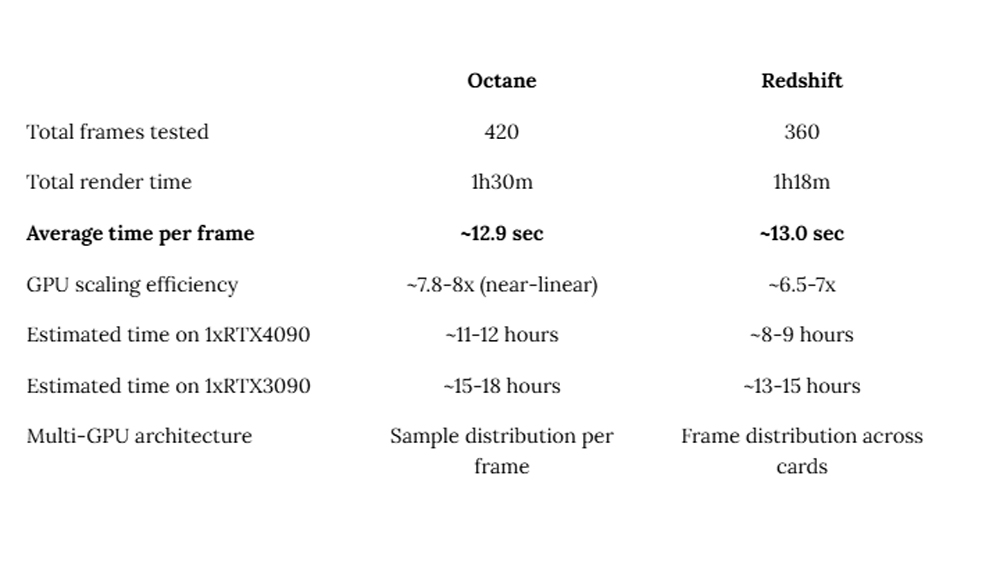
At the per-frame level, both engines delivered nearly identical speeds on the 8x RTX 4090 configuration, at approximately 13 seconds per frame.
Octane benefits artists who prioritize physically accurate, unbiased output. It scales more linearly with additional GPUs, meaning the 8x configuration extracts nearly full theoretical performance. For product visualization, automotive rendering, and sequences where absolute image accuracy is non-negotiable, Octane on 8x RTX 4090 is exceptional.
Redshift benefits artists working within Cinema 4D’s native ecosystem. Its tight integration with C4D’s object model, material system, and scene manager is a genuine production advantage that goes beyond raw render speed. Its biased rendering approach also makes preview iteration faster, and the built-in AI denoiser is among the best available in any GPU renderer. On 8x RTX 4090, the frame-loading overhead that can slow Redshift becomes negligible relative to total render time.
Conclusion
The data from these two tests is specific and reproducible: 420 frames rendered in 90 minutes with Octane, 360 frames in 78 minutes with Redshift. Both on iRender’s 8x RTX 4090 server, both average approximately 13 seconds per frame. For Cinema 4D studios working on commercial deadlines, scaling project volume, or simply done with overnight renders on local machines, iRender’s multi-GPU servers provide the most direct path to production-speed rendering without hardware investment.
iRender Farm benefits all the demands for rendering Cinema 4D, Redshift, Octane
With 192GB total VRAM, each RTX 4090 contributes 24GB of GDDR6X VRAM. For Cinema 4D projects with dense geometry, extensive 4K or 8K texture libraries, or volumetric particle simulations, this headroom prevents VRAM overflow. It is the most common cause of unexpected render crashes on underpowered machines. Scenes that would exceed memory limits on a 24GB single-GPU setup run comfortably here.
Scene parsing, texture streaming, EXR frame writing, and cache operations all depend on storage throughput. iRender’s server has 2TB NVMe SSD.
AMD Ryzen Threadripper PRO 5975WX. GPU rendering keeps the CPU relatively unloaded during active render passes, but scene parsing, simulation baking, proxy generation, and cache management run on CPU. The Threadripper PRO handles all of this without competing with GPU threads and has no CPU bottleneck during active renders.
iRender operates differently from traditional render farms that require proprietary job submission pipelines. You get full remote desktop control over the server, exactly like sitting in front of a local workstation. You install your own plugins, set your own render settings, manage your own output paths. We have pre-installed C4D + Redshift machine so you don’t need to take time install them.
Our Server 9S costs 52$/hour on pay-as-you-go pricing, with 10–20% discounts available on daily, weekly, and monthly subscription plans. You pay only for the hours you actually use.
Besides, we have a new user offer: iRender currently provides a 100% bonus on your first top-up, your initial deposit is doubled, and iRender credits never expire.
Start your first render: Render C4D Now and claim your 100% first top-up bonus.
For more detailed information, please contact us via Live chat 24/7 or WhatsApp: +(84) 912-785-500 or Email: [email protected].
iRender – Happy Rendering!
Related Posts
The latest creative news from Cinema 4D Cloud Rendering , 3D VFX Plugins & Cloud Rendering.


[/vc_section]





