
iRender Credit Back Explained: How to Get Up to 20% Back on Every Render
iRender’s Credit Back is a cashback system that automatically returns 10–20% of your spent credits into your Extra Balance after every rendering session. The rate depends on when you render: 10% during off-peak hours, 12% during Happy Hours (Monday–Friday, 9 AM–7 PM GMT+7), and 20% during Golden Hours (all day Saturday and Sunday). Credits are returned immediately after you end a session. You can use returned credits for future pay-as-you-go sessions. When combined with the 100% first-deposit bonus (which doubles your initial top-up) and promotional vouchers (up to 25%), the effective cost of an RTX 4090 drops from $8.20/hour to roughly $3.00–4.00/hour. Credit Back applies to all server configurations, from 1× to 8× RTX 4090.

How Does Credit Back Work in Practice — a Real Example?
Let’s walk through a concrete scenario. Say you’re a Blender artist who just signed up for iRender. You deposit $230 for the first time.
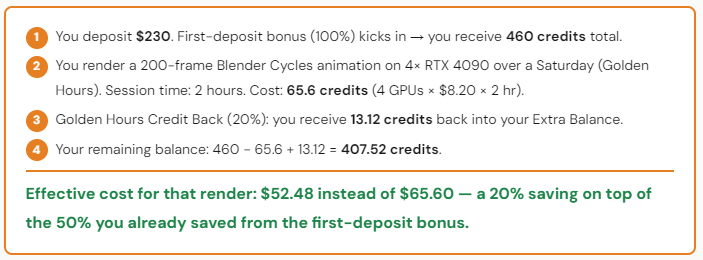
That 13.12 credits you got back? It’s enough for about 1.5 hours of additional rendering on a single RTX 4090. Free. And it happens every single session — not just the first one. Over a month of regular use, Credit Back accumulates into meaningful savings.
One detail worth knowing: returned credits go into your Extra Balance, which is separate from your Main Balance. Extra Balance works for pay-as-you-go sessions. You can track all Credit Back records in the Credit Back tab on your dashboard — it shows Billing ID, credits spent, credits returned, and your post-balance after each session.
Can You Stack Credit Back with Other Promotions?
Yes, and this is where it gets interesting. iRender runs three separate savings programs that all stack on top of each other.
Layer 1: First-deposit bonus (100%). Double your initial credits. Deposit $118, get 236. This applies once, on your first top-up. After that, subsequent deposits are at face value — unless you use a voucher.
Layer 2: Credit Back (10–20%). Returns credits after every session. Automatic. No action needed. Render during Golden Hours for maximum return.
Layer 3: Promotional vouchers (15–50% bonus). As your Extra Balance grows, you can redeem vouchers that add bonus credits to your next top-up. Vouchers come in 15%, 25%, and 50% tiers. You can also earn coupons (30–150 credits) by sharing your rendered work with the community.
When all three layers stack, the math looks like this: you start with credits that cost 50% less (Layer 1), get 20% back each session (Layer 2), and add 15–25% bonus on future top-ups (Layer 3). The listed rate is $8.20/hour. The effective rate after stacking: approximately $3.00–4.00/hour.
That’s not a promotional figure we made up — it’s straightforward arithmetic that any user can verify from their dashboard. The savings are real. The only thing we can’t do is stop you from forgetting to shut down the server.






