
RTX 5090 for Architectural Visualization: D5, Lumion, Twinmotion and Unreal Engine Tested
EXECUTIVE SUMMARY // KEY PRODUCTION TAKEAWAYS
This article evaluates the NVIDIA RTX 5090 for architectural visualization across four primary real-time rendering engines: D5 Render, Lumion, Twinmotion, and Unreal Engine. Because these real-time applications rely heavily on single-GPU processing due to temporal frame dependencies, multi-GPU configurations offer limited practical benefits.
- The GPU’s core advantages lie in its expanded 32GB VRAM capacity and DLSS 4 Multi Frame Generation. The additional memory allows artists to manage massive scenes – such as detailed BIM models, dense vegetation, and 8K textures-without triggering out-of-memory crashes. Additionally, DLSS 4 enhances viewport fluidity during client presentations, although it does not speed up offline final rendering.
- Regarding final export times, performance gains over the RTX 4090 are moderate. Benchmarks show mixed rendering improvements in D5 Render, a 15% to 38% time savings in Lumion stills and 4K video exports, and an overall ~17% performance boost in Unreal Engine 5.5. Twinmotion tests similarly showed little speed benefit from enabling DLSS during image exports.
- Upgrading from an RTX 30-series or older GPU delivers significant workflow improvements. However, for existing RTX 4090 users, an upgrade is primarily justified if scene assets regularly exceed 24GB of VRAM or require DLSS 4. We recommends testing demanding scenes via cloud GPU platforms like iRender prior to purchasing.
“I’m using an RTX 3080 10GB. Should I upgrade to an RTX 5090 for Lumion and D5?” Yes, if you’re running out of VRAM or producing long animations. The upgrade offers less value if you already own an RTX 4090 and your scenes fit within its 24GB of memory. This article explores RTX 5090 architectural visualization across four popular real-time visualization applications: D5 Render, Lumion, Twinmotion, and Unreal Engine. All four primarily rely on a single GPU for real-time rendering, making the RTX 5090’s 32GB VRAM and DLSS 4 Multi Frame Generation important advantages. Final image and video rendering gains over the RTX 4090 are generally more moderate. These comparisons will help you decide whether to buy the card or test one through iRender before committing.
Is the RTX 5090 worth it for archviz?
For RTX 5090 architectural visualization, the upgrade makes sense when you need more VRAM, render long animations, or want DLSS 4 Multi Frame Generation for smoother client presentations. The RTX 5090 offers 32GB of VRAM and faster viewport performance, while final rendering improvements are more moderate. If you already have an RTX 4090 and your scenes fit comfortably within 24GB, the benefits may not justify the cost.
Why all four apps care about one GPU, not many
Real-time engines typically render each frame on a single GPU because modern techniques such as Temporal Super Resolution (TSR) and temporal anti-aliasing (TAA) rely on information from previous frames. Epic Games explains that temporal upscalers combine current-frame data with historical information, using depth and velocity buffers to track scene changes. This dependency makes it difficult to distribute consecutive frames across separate GPUs without introducing data-transfer overhead.
Traditional multi-GPU rendering can use alternate frame rendering, where one card processes odd-numbered frames and another handles even-numbered frames. This approach works best when frames can be rendered independently, as in certain offline rendering workflows.
Twinmotion Path Tracer is an exception because it can support multiple NVIDIA GPUs under specific configurations. However, this support applies to offline Path Tracer rendering, not the real-time viewport, and requires compatible SLI or NVLink configurations. Modern GeForce RTX 4090 and RTX 5090 cards do not support either technology.
For real-time architectural visualization, investing in one powerful GPU is generally more practical than combining two older cards. Multi-GPU support remains limited across these applications, so a second card may add cost without improving viewport performance. For anyone comparing the best GPU for archviz 2026, a single high-performance card with sufficient VRAM is a sensible starting point.
What actually changes with 32GB of VRAM
DLSS 4 Multi Frame Generation (MFG) is exclusive to the RTX 50 series and can generate up to three AI-created frames for each traditionally rendered frame. This makes camera movement smoother when exploring a scene on a 4K display or presenting a design to clients. However, it does not accelerate final image exports, and generated frames can add perceived input latency. Unreal Engine’s Movie Render Queue also does not use real-time Frame Generation for offline output.
Lumion does not support DLSS 4. Instead, its ray-tracing workflow uses NVIDIA Real-Time Denoiser (NRD), a denoising technology designed to work with both NVIDIA and AMD GPUs. This allows Lumion to improve ray-traced image quality without relying on DLSS, which is tied to supported NVIDIA hardware.
DLSS 4 Multi Frame Generation: what it does for D5, Twinmotion, and Unreal
DLSS 4 Multi Frame Generation (MFG) is exclusive to the RTX 50 series and can generate up to three AI-created frames for each traditionally rendered frame. This makes camera movement smoother when exploring a scene on a 4K display or presenting a design to clients. However, it does not accelerate final image exports, and generated frames can add perceived input latency. Unreal Engine’s Movie Render Queue also does not use real-time Frame Generation for offline output.
Lumion does not support DLSS 4. Instead, its ray-tracing workflow uses NVIDIA Real-Time Denoiser (NRD), a denoising technology designed to work with both NVIDIA and AMD GPUs. This allows Lumion to improve ray-traced image quality without relying on DLSS, which is tied to supported NVIDIA hardware.
App-by-app: what we measured
D5 Render
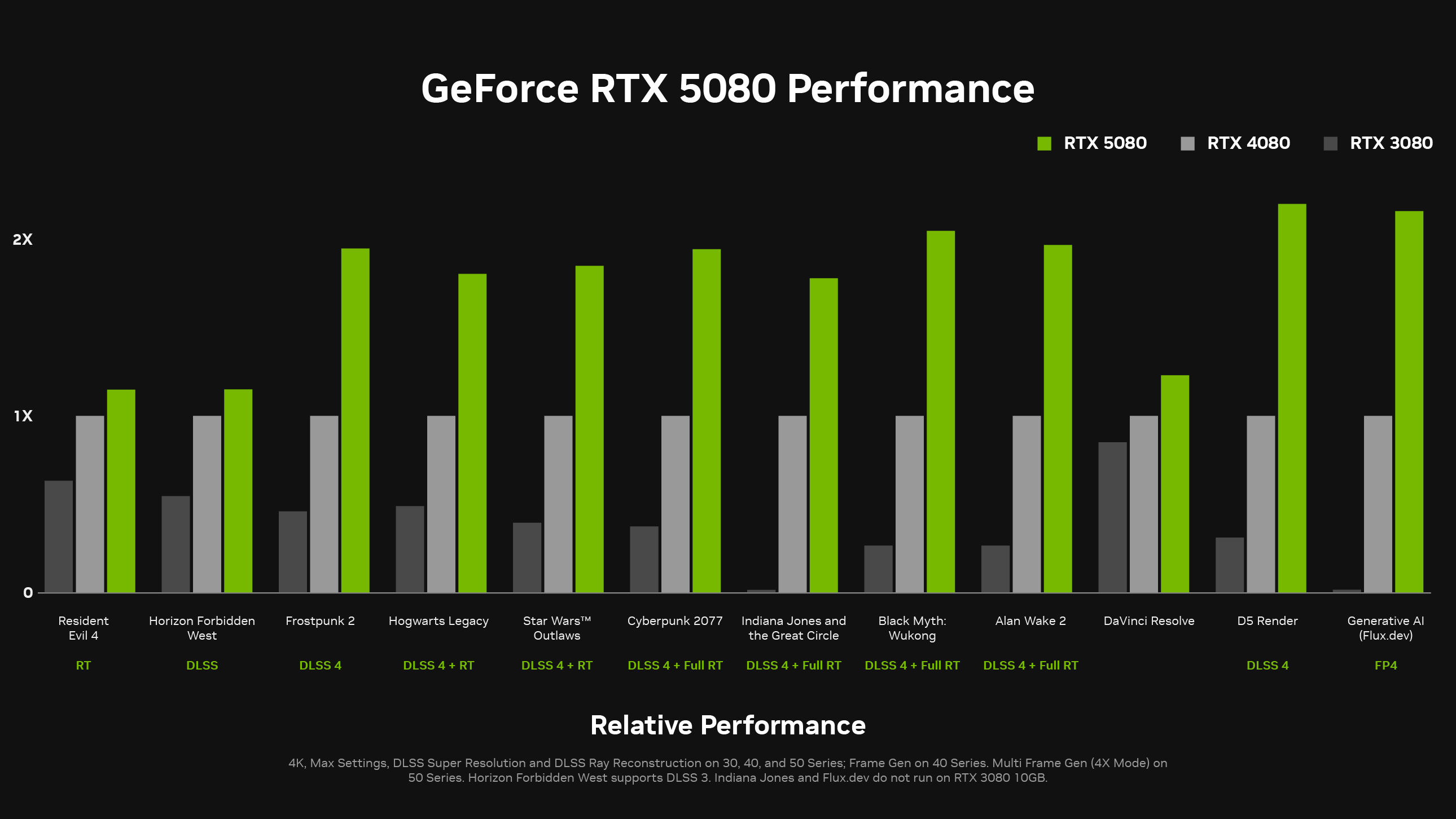
NVIDIA claims that the RTX 5090 can deliver around twice the performance of the RTX 4090 in certain workloads. However, this figure should not be treated as a guaranteed rendering speed improvement. D5 Render’s public benchmark results offer a more practical way to compare the two GPUs, although results vary across scenes and workstation configurations.
The fastest recorded results for each GPU show a more mixed picture:
-
-
-
- 2K image rendering: The RTX 5090 32GB recorded 20.467 seconds, while the RTX 4090 24GB finished in 19.091 seconds.
- Video and image test: The RTX 5090 recorded 39.883 seconds, compared with 47.799 seconds for the RTX 4090.
- 1080p video (5 seconds): The RTX 5090 finished in 18.467 seconds, while the RTX 4090 took 24.050 seconds.
-
-
These results do not show a consistent 2x improvement. In the 2K image test, the RTX 4090 was actually faster. The other tests favored the RTX 5090, but the gains were more moderate than NVIDIA’s headline figure suggests. For RTX 5090 D5 Render performance, scene complexity, CPU, and system memory can all influence the final result.
Lumion
Lumion community discussions provide another useful comparison between the RTX 5090 Founders Edition and RTX 4090 Founders Edition. The following results cover still images rendered with Default and Ray Tracing (RT High) settings, plus a 4K, 30 fps video export. They offer a practical reference, although they represent specific hardware and scenes rather than a controlled benchmark across all systems.
| Test | RTX 5090 FE | RTX 4090 FE | Time Saved |
|---|---|---|---|
| Image 1, Default | 43 sec | 51 sec | 15.7% |
| Image 1, RT High | 1 min 18 sec | 1 min 54 sec | 31.6% |
| Image 2, Default | 48 sec | 1 min 4 sec | 25.0% |
| Image 2, RT High | 1 min 27 sec | 2 min 15 sec | 35.6% |
| Clip 1, Default, 3 stars, 4K, 30 fps | 4 min 23 sec | 7 min 5 sec | 38.1% |
Across these tests, the RTX 5090 completed every task faster than the RTX 4090. The advantage was smaller with Default image rendering and more pronounced with RT High. Video export also showed a substantial improvement, making the RTX 5090 Lumion combination worth considering for artists who regularly produce animation.
Twinmotion
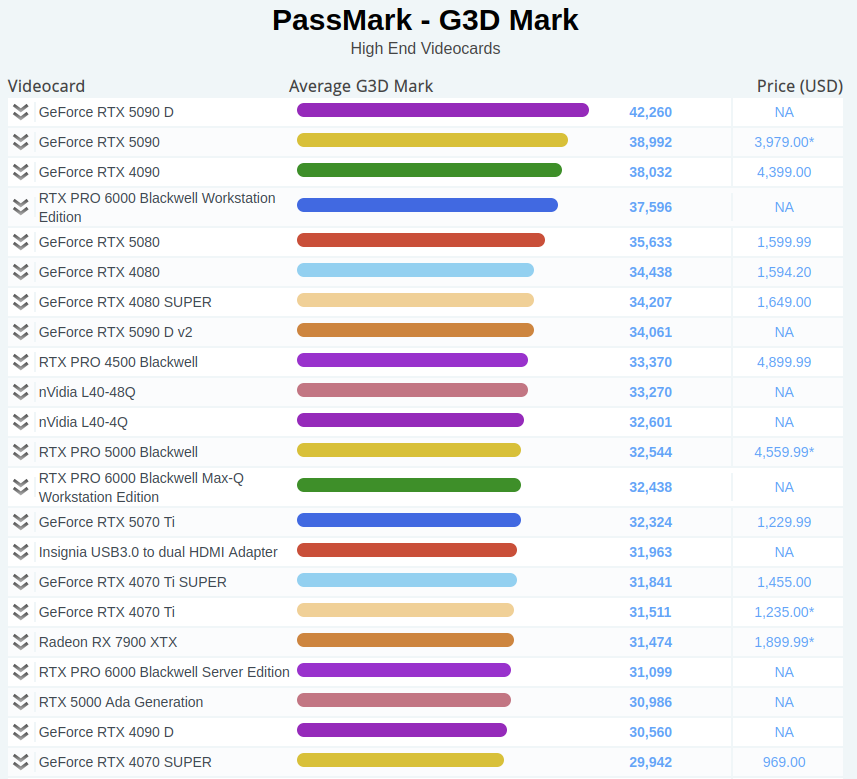
Official RTX 5090 benchmarks for Twinmotion are still limited, so I would look at hardware specifications and independent tests before deciding to upgrade. The RTX 5090 has 32GB of GDDR7 VRAM, compared with 24GB of GDDR6X on the RTX 4090. Neither card supports NVLink, and their VRAM cannot be combined. Twinmotion Path Tracer requires Windows and a compatible DirectX 12 GPU with DXR support, while the macOS version does not offer Path Tracer. For demanding scenes, one RTX 5090 or RTX 4090 is generally a more practical choice than two cards. PassMark scores from VideoCardBenchmark.net also show a relatively small gap: 38,992 for the RTX 5090 versus 38,032 for the RTX 4090, a difference of approximately 2.5%. The RTX 5090 D scores higher, although its availability may be a concern.
An independent test from YouTube channel nStudio_id used Autodesk Revit’s Snowdon Towers sample scene with an AMD Ryzen 9 9950X, an RTX 5090 32GB, Windows 10, and Twinmotion 2025.1.1. The results cover 2K still images with DLSS on and off, plus video exports in Standard, Lumen, and Path Tracer modes.
| Test | Standard | Lumen | Path Tracer |
|---|---|---|---|
| 2K image, DLSS off | 8.19 sec | 13.12 sec | 35.24 sec |
| 2K image, DLSS on | 9.04 sec | 14.02 sec | 36.17 sec |
| Video export | 32.02 sec | 38.02 sec | 3 hr 11 min 31 sec |
DLSS did not improve still-image rendering speed in this test. In fact, the measured times were slightly longer with DLSS enabled, showing that its benefits depend on the task. These results provide a useful reference for RTX 5090 Twinmotion performance, but they should not be treated as universal figures for every project.
Unreal Engine
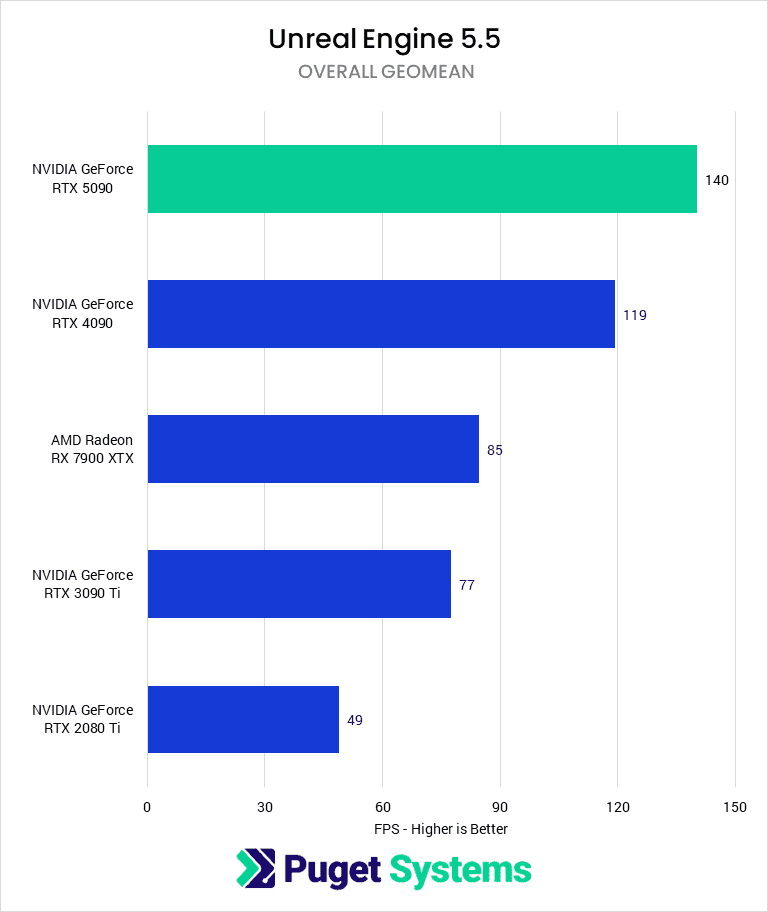
Puget Systems’ tests show the RTX 5090 outperforming the RTX 4090 by around 17% overall in Unreal Engine, with gains of 16% in rasterization and 19% in ray tracing. GPU Lightmass was approximately 18% faster in Unreal Engine 5.5. These improvements are useful, although they fall short of a 30% increase. The 32GB VRAM capacity remains valuable for professional projects with large scenes.
Like Twinmotion, Unreal Engine’s real-time viewport and Movie Render Queue generally use a single GPU. Path Tracer multi-GPU support requires compatible SLI or NVLink configurations, which the RTX 5090 does not provide. For RTX 5090 Unreal Engine workflows, the main benefits are greater VRAM capacity and moderate performance gains rather than multi-GPU scaling.
Recommended RTX 5090 setup for four archviz applications
| Software | Number of GPUs Used | DLSS 4 Multi Frame Generation | Biggest RTX 5090 Benefit | Sources / Notes |
|---|---|---|---|---|
| D5 Render | 1 | Supported by NVIDIA’s listed applications | Smoother viewport navigation and more VRAM for vegetation | NVIDIA claims up to 4x higher FPS; forum benchmarks show more moderate rendering improvements |
| Lumion | 1 | Not yet confirmed | 32GB VRAM for large scenes and 4K video exports | Lumion ranks the RTX 5090 in its top performance tier |
| Twinmotion | 1 (Path Tracer may support multiple GPUs) | Support from 2025.1.1 version | Path Tracer and Lumen performance at 4K | Path Tracer requires DXR support and at least 8GB VRAM |
| Unreal Engine 5 | 1 | Available through an NVIDIA plugin | Around 17% faster than the RTX 4090 in Puget Systems’ UE 5.5 tests | Movie Render Queue supports DLSS Super Resolution only |
RTX 5090 vs RTX 4090 vs older cards: who should upgrade?
The right upgrade depends on your current GPU and daily workload. I would look at VRAM limits, viewport performance, and rendering times before deciding whether the RTX 5090 is worth the investment.
-
-
-
- Using an RTX 30 series or older: Upgrading can deliver a substantial performance improvement, especially in demanding real-time scenes. Depending on the application and workload, some tasks may run two or three times faster, although results vary.
- Using an RTX 4090 or another RTX 40 series card: Upgrade mainly if your projects regularly exceed 24GB of VRAM or you need DLSS 4 Multi Frame Generation. These are meaningful reasons to move to a newer GPU. If your current card handles your scenes comfortably, the performance gains may not justify the cost.
- Using a laptop or Mac: A separate Windows workstation with an RTX 5090 can provide access to NVIDIA-specific features and Windows-only workflows without replacing your existing computer.
-
-
Remember to budget for supporting hardware. The RTX 5090 may require a power supply rated at 1,000W or higher, sufficient case clearance, and adequate cooling. Check the actual street price before committing.
Try an RTX 5090 before you buy one
For real-time rendering applications, renting a cloud workstation lets you use a single powerful GPU while interacting with the viewport. iRender offers a Windows workstation with one RTX 5090 32GB through its GPU Cloud Workstation 3i package, with a price of around $10.80 per hour. You can install D5 Render, Lumion, Twinmotion, or Unreal Engine, then test your most demanding scene for one or two hours. Measure viewport FPS and export times against your local machine. iRender also offers RTX 4090 workstations for a direct comparison using the same scene. This approach provides practical evidence before you spend thousands of dollars on a new GPU. Traditional SaaS and managed render farms generally cannot provide the same interactive desktop experience.
However, a cloud workstation requires you to manage your own setup time. Billing starts when the machine is switched on, including time spent installing applications or signing in. Allow around 15 to 30 minutes for initial setup, and remember to save a machine image after each session. You must provide your own software licenses for D5 Render, Lumion, and Twinmotion, as these are not included with the workstation rental.
Right now, iRender is launching the 100% bonus for new user’s first deposit, check it out.
Check out some of iRender workflow on real-time render engines:


Common RTX 5090 problems in archviz apps
The RTX 5090 is relatively new, and some architectural visualization applications have encountered compatibility or stability issues. Check current driver recommendations and application updates before starting a demanding production.
-
-
-
- Lumion 2024: NVIDIA driver 576.02 may cause crashes on RTX 5000 series GPUs. A hotfix is available for affected users. Follow Lumion’s official instructions for installing the driver and applying the relevant hotfix.
- D5 Render: Older application versions may not recognize the RTX 5090 correctly. Update D5 Render and check its compatibility notes if the GPU is missing or performance appears abnormal.
- Unreal Engine Movie Render Queue: Heavy workloads can expose power or stability problems. High-resolution output, extensive anti-aliasing samples, and high-resolution tiling can increase GPU load. Make sure your power supply and system cooling are adequate before running long render jobs.
-
-
FAQ
Q: Is the RTX 5090 good for Lumion, D5 Render, and Twinmotion?
Yes. All three applications primarily use a single GPU for real-time rendering, so a powerful card can improve viewport performance directly. The RTX 5090’s 32GB VRAM also provides more room for complex scenes and high-resolution assets. DLSS 4 Multi Frame Generation can make viewport navigation smoother in supported applications, although final image and video rendering gains over the RTX 4090 are generally more moderate. For RTX 5090 architectural visualization, the biggest advantages are extra VRAM and smoother real-time interaction.
Q: Do I need two GPUs for real-time archviz rendering?
No. Real-time rendering in applications such as D5 Render, Lumion, Twinmotion, and Unreal Engine generally relies on one GPU. Adding a second card will not automatically improve performance, and VRAM cannot be combined across GPUs. Twinmotion’s Path Tracer is an exception because it can support multiple GPUs under specific configurations, but this applies to offline rendering rather than real-time viewport performance.
Q: Should I upgrade from an RTX 4090 to an RTX 5090 for archviz?
Consider upgrading if your projects regularly exceed the RTX 4090’s 24GB VRAM limit or you need DLSS 4 Multi Frame Generation. Puget Systems measured around 17% higher overall performance in Unreal Engine tests, which is a useful improvement but not a dramatic leap. Before buying, test an RTX 5090 with your own scenes on a cloud workstation and compare viewport performance, memory usage, and export times.
Register an account on iRender to claim your 100% bonus for the first deposit and render without limitations.
iRender – Maximum Speed – Absolute Freedom.

Related Posts
The latest creative news from Twinmotion Cloud Rendering, Unreal Engine Cloud Rendering, Lumion Cloud Rendering, D5 Render Cloud Rendering






