
Top Hardware Choices for DaVinci Resolve in 2025
DaVinci Resolve remains a powerhouse for video editing, color grading, and post-production in 2025. But to fully leverage its potential—especially for 4K/8K workflows, Fusion, and real-time playback—you need more than just any computer. Here’s a breakdown of the best hardware choices for different Resolve users in 2025, tailored for both beginners and professionals. Let’s explore this blog with iRender!
Why Hardware Matters in DaVinci Resolve
Hardware matters in DaVinci Resolve because it directly affects playback speed, render performance, and how efficiently you can work with effects, color grading, and high-resolution footage. Resolve is highly GPU-accelerated, making a powerful graphics card essential, while CPU and RAM also play key roles—especially for Fusion and large timelines. Fast storage ensures smooth media handling and caching. That makes picking the right components critical for a smooth editing experience.
1. Processor (CPU)
While Resolve leans hard on the GPU, the CPU still plays a major role—especially in Fusion and when managing heavy timelines. If you come from the 3D world, think of it like the physics engine or procedural systems in Houdini.
In 2025, a minimum of an Intel Core i7 (8th generation or newer) or an AMD Ryzen 7 3000 series is required for a smooth editing experience at HD resolutions. However, for 4K editing and more demanding tasks like multi-layer timelines or frequent exports, a more powerful chip such as:
- Intel Core i9-13900K or AMD Ryzen 9 7950X
- 12–16 cores / 24+ threads
- Base clock speed of 3.5 GHz or higher
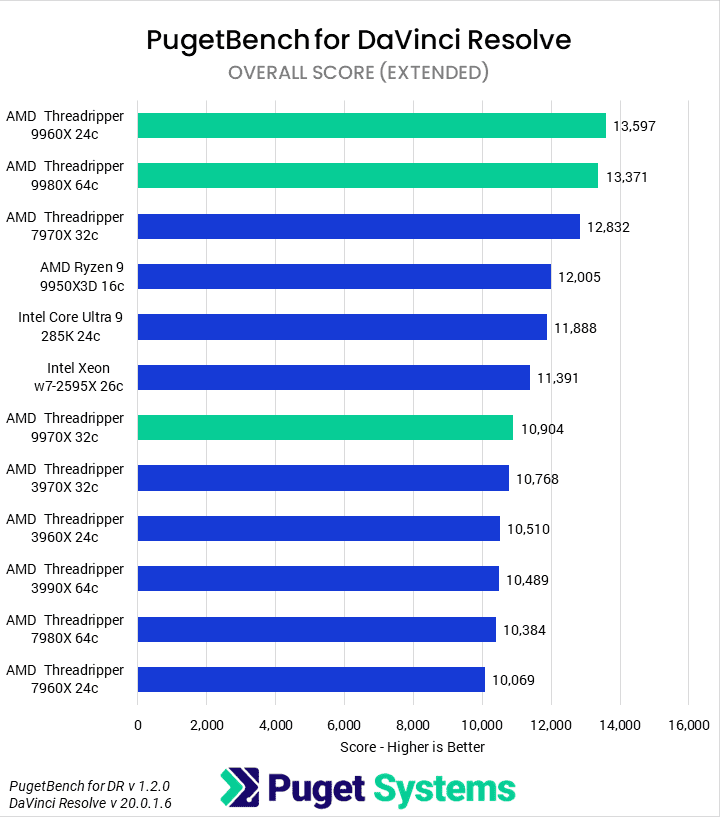
Professional users dealing with heavy VFX or 6K/8K content should consider workstation-grade CPUs like AMD Threadripper or Intel Xeon processors:
- AMD Ryzen Threadripper 7000 series or Intel Xeon W-series
- 24–64 cores (ideal for pro colorists, VFX artists, and studios)
- Excellent thermal and power delivery is required
, which offer higher core counts, better thermal control, and stability under intense workloads. These CPUs deliver significant performance gains in render speed and multitasking, especially when paired with fast RAM and a strong GPU.
2. Graphics Card (GPU)
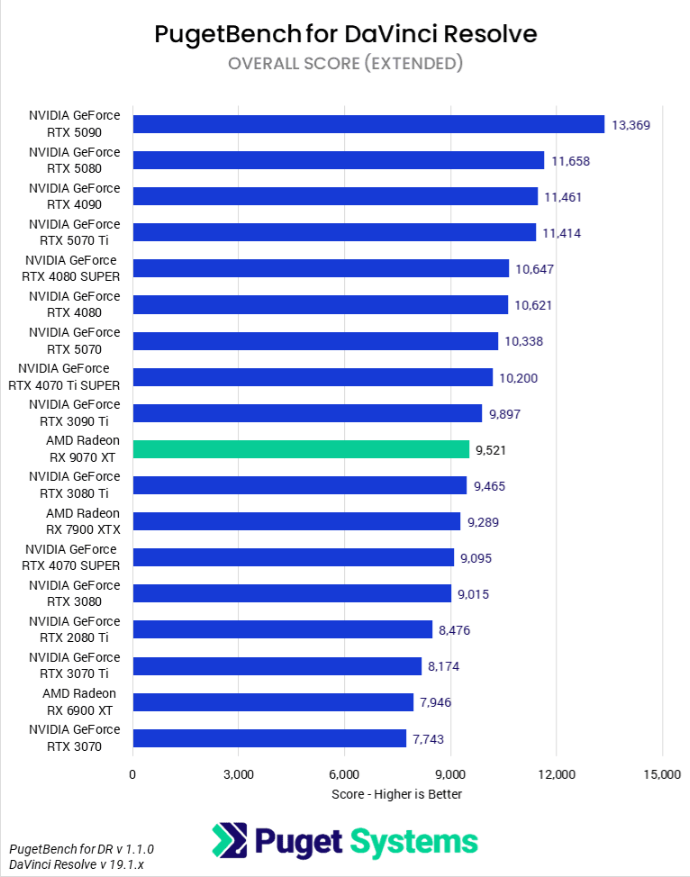
The GPU is arguably the most important hardware component for DaVinci Resolve in 2025, thanks to its GPU-accelerated engine. Most of the heavy lifting for real-time playback, color grading, noise reduction, and Fusion effects is done by the graphics card.
For entry-level users, an NVIDIA GTX 1660 or AMD RX 580 with at least 4 GB VRAM is sufficient for HD video. However, for 4K editing, users should aim for
- NVIDIA RTX 3060 Ti / 3070 / 3080
- AMD Radeon RX 6700 XT or 6800 XT
- At least 8–12 GB VRAM
Professionals will benefit greatly from high-end cards that offer blazing-fast rendering and buttery playback:
- NVIDIA RTX 4090 / 4080
- 16–24 GB VRAM (or more)
- Studio drivers recommended for stability
- Multi-GPU setup supported in DaVinci Resolve Studio
DaVinci Resolve Studio also supports multi-GPU configurations, enabling even faster processing in color, Fusion, and export stages. NVIDIA GPUs are generally preferred for Resolve due to better CUDA acceleration and superior software compatibility.
3. RAM (System Memory)
For DaVinci Resolve, 16GB of high-speed RAM is ideal for a smooth experience. Although the software can run with just 8GB, it’s generally insufficient for most workflows.
If you’re a power user or working on professional-level projects, consider upgrading to 32GB or even up to 128GB of fast RAM. Just be sure your motherboard is compatible with the RAM type and capacity you plan to install.


4. Storage (Drives and Media Access)
For optimal performance in DaVinci Resolve, a three-drive setup is generally recommended, with specific roles assigned to each drive based on your budget and performance needs:
- OS & Software (SSD or NVMe): This drive should contain your operating system and DaVinci Resolve itself. Using a solid-state drive (SSD) significantly improves system and application startup times. For even faster performance, you can opt for an NVMe drive, though the gain is modest compared to a regular SSD.
- Project Files (SSD, NVMe, or NAS): Storing your active projects and assets on a separate drive helps with file organization and provides a layer of protection—if your OS ever crashes or needs to be reinstalled, your project files remain untouched. Both SSD and NVMe drives are suitable here, depending on your workflow and budget. If you’re working in a team, high-speed network-attached storage (NAS) can also be a good option for collaborative access.
- Media Cache & Scratch Disk (NVMe Preferred): This drive is critical for performance and is best suited to a fast NVMe SSD. Although a standard SATA SSD can still work, NVMe delivers quicker read/write speeds which improves timeline playback and responsiveness. Using a dedicated drive for cache and scratch files also minimizes wear on other drives and protects your core data in the event of a failure, since these temporary files can always be regenerated.
- Additional Drives (SSD or HDD): Beyond these three main drives, many users also include extra storage. This could be more drives for asset management or traditional hard drives used for interim backups or archiving. These can serve as staging areas before transferring data to an external or cloud-based backup solution.
Conclusion
Having the right hardware setup—powerful CPU, high-performance GPU, sufficient RAM, and fast storage—is essential to fully unlock the potential of DaVinci Resolve in 2025. Whether you’re editing 4K videos, grading high-resolution footage, or working with Fusion effects, your system needs to keep up with the creative demands. However, building and maintaining a high-end workstation can be costly and complex—especially when hardware upgrades or deadlines catch you off guard. That’s where iRender comes in.
iRender is a high-performance cloud render farm optimized for DaVinci Resolve and other demanding software. With powerful multi-GPU servers (featuring NVIDIA RTX 4090, 3090, and more), fast NVMe storage, and flexible hourly or monthly rental plans, you can access the performance you need without investing in expensive hardware.
Scale your workflow with iRender and unlock the real power of your creativity.
iRender is a high-performance GPU cloud platform optimized for demanding creative software, such as DaVinci Resolve, Blender, Cinema 4D, and more. With access to powerful RTX 4090/3090-based machines, you can:
- Accelerate rendering and real-time editing in Resolve 20
- Take full advantage of Studio-only AI tools without local hardware limits
- Avoid crashes caused by underpowered systems or unstable GPU drivers
iRender is also proud to be one of the best GPU service providers on the market. We provide you with high-configuration models with advanced specifications such as AMD Ryzen™ Threadripper™ PRO 3955WX @ 3.9 – 4.2GHz or AMD Ryzen™ Threadripper™ PRO 5975WX @ 3.6 – 4.5GHz, 256GB RAM, and 2TB NVMe SSD storage. Most importantly, we always update to the latest GPU technology, with 1/2/4/6/8 x RTX3090/RTX4090.
Under the IaaS (Infrastructure as a Service) model, you will have full control over the entire rendering process and use it as your machine. Therefore, you can install any software and plug-ins you want, add your license, and render or modify your project yourself.
Below is information about our package and the price:
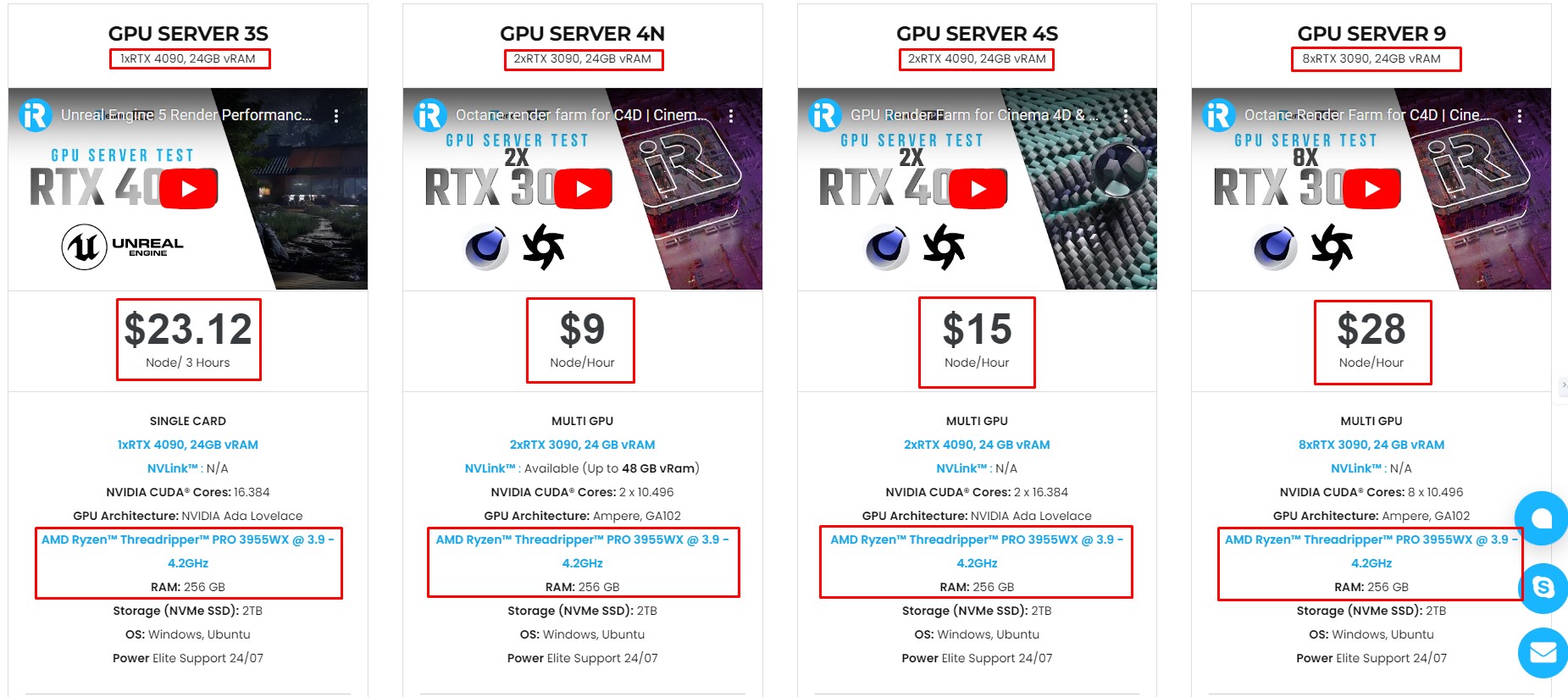
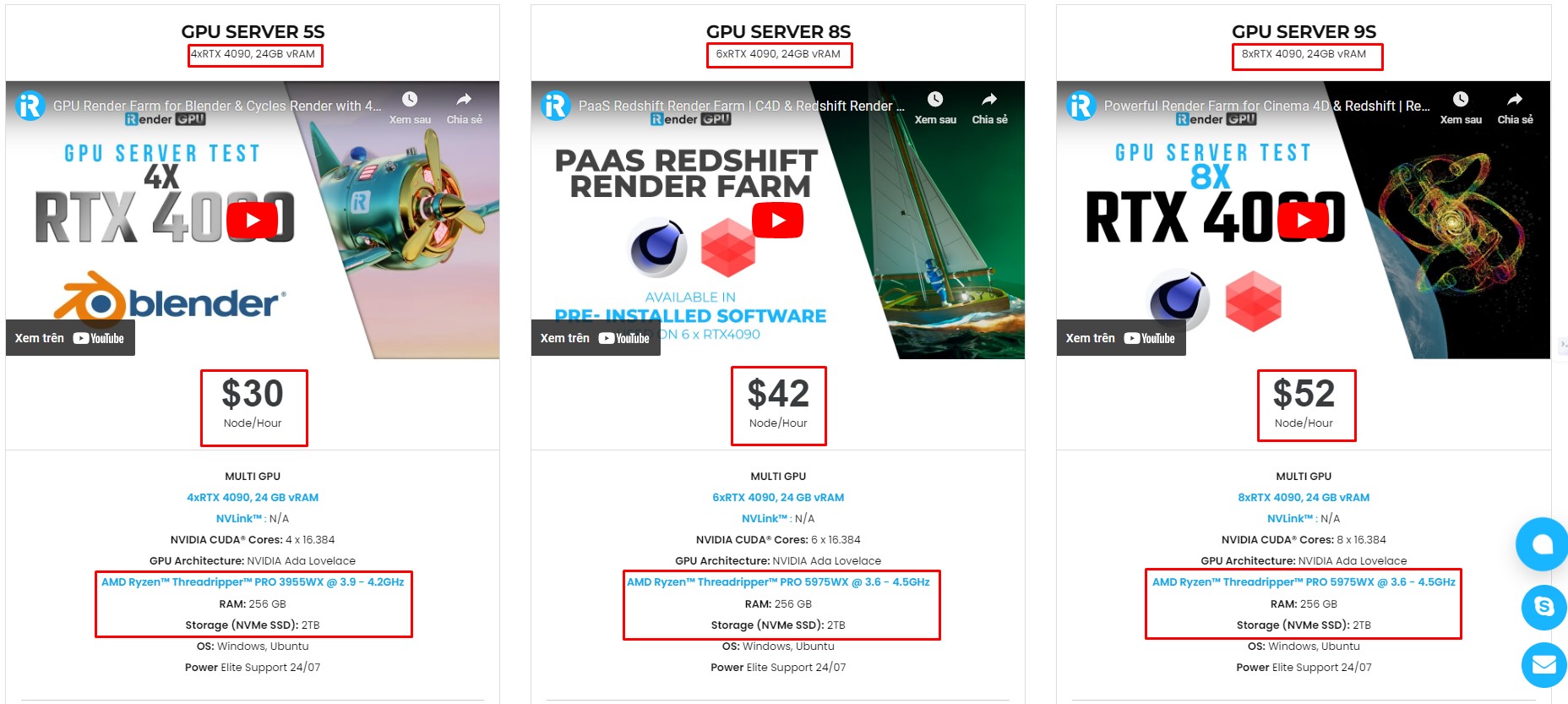
Not only does it have powerful configurations, but iRender also provides you with many more services. Free and convenient transfer tool, iRender drive for macOS and Linux users. For Windows users, we recommend the iRender GPU application, you will not need to access our website anymore. The price at iRender is also very flexible with hourly rental (pay as you use), and daily/weekly/monthly rental with a 10-20% discount.
We’re always happy to help you with any questions. If you have any problems or questions, don’t hesitate to contact our 24/7 support team. Or via Whatsapp: 0912 785 500 for free advice and support.
Right now iRender has a SPECIAL PROMOTION program with a 100% bonus for the first transaction within 24 hours of your registration. It means that you can get an extra 100% of the money you recharged the first time. And points never expire, so you can use them at any time.
Sign up for an account today to experience and enjoy our services.
Thank you & Happy Rendering!
Source and image:pugetsystems.com, proxpc.com

Related Posts
The latest creative news from 3D VFX Plugins Cloud Rendering





