
Arnold Render Times Too Long? Sampling, Denoising and GPU Tips
Arnold feels slow mostly because of how its samples are set, not because Arnold is doing anything wrong. Camera (AA) samples are the master multiplier, so every step up roughly squares your ray count. The fastest wins: turn on adaptive sampling so clean areas stop early, use the Arnold denoiser to clear the rest at low samples, and trim ray depth and light samples to what the scene actually needs. Switching to Arnold GPU on an RTX card can cut a compatible frame several times over, though some features are CPU only. After all of that, a heavy sequence that still takes too long is a horsepower problem, solved by rendering on more GPUs at once.
Arnold has a reputation for being slow, and a lot of that reputation comes from people leaving the sampler on defaults and cranking numbers when they see noise. I did the same thing for years. The first real Arnold lesson that stuck with me was understanding what camera samples actually do to the ray count, because once you see it you stop treating that slider like a volume knob.
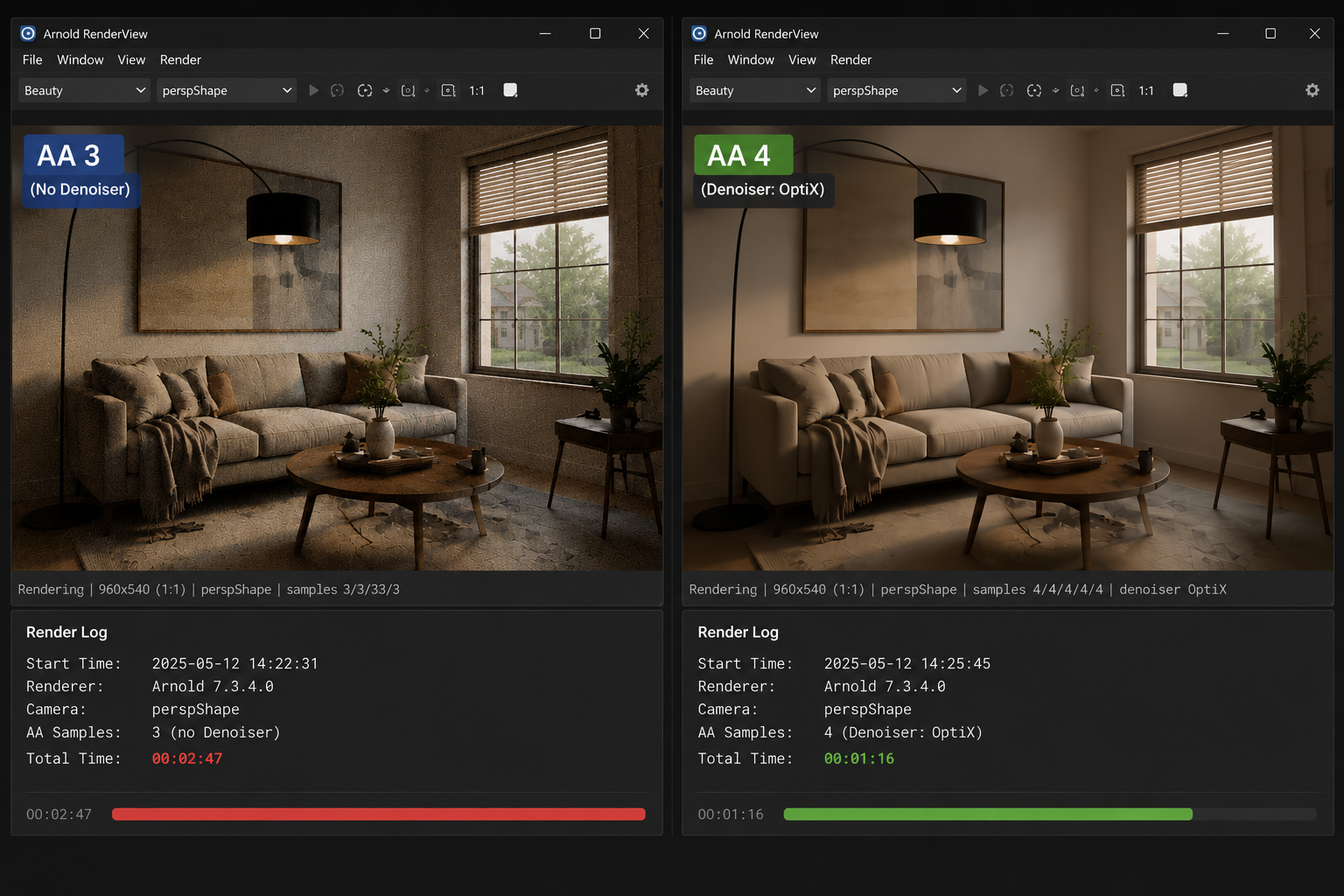
Here is the part that matters. Arnold fires rays per pixel based on your Camera (AA) samples, and then more rays branch off for diffuse, specular, and the rest. Camera samples are squared, so going from 3 to 6 does not double your cost, it roughly quadruples the base rays before the other samples even multiply on top. That single setting is why two scenes with similar geometry can render ten minutes apart.
| Camera (AA) samples | Approx time / frame | Noise level | Best used for |
|---|---|---|---|
| 3 | ~4 min | Visible noise in shadows | Quick lookdev, blocking |
| 4 | ~6.5 min | Acceptable with denoiser | Most stills with denoise on |
| 6 | ~15 min | Clean | Hero frames, close-ups |
| 9 | ~33 min | Overkill for most shots | Rarely needed if denoiser is used |
| 4 + adaptive + denoiser | ~6 min | Clean | The setup I reach for first |
How do I actually cut Arnold render time without ruining quality?
Let adaptive sampling do the deciding
Instead of forcing every pixel to the same high sample count, set a sensible max Camera AA and turn on adaptive sampling with an adaptive threshold. Arnold then spends rays where there is still noise and stops early where the image is already clean. On a recent interior, switching from a flat AA 6 to AA 6 max with adaptive sampling pulled a frame from about 14 minutes down to roughly 6, and I could not tell the two apart.
Use the denoiser so you can afford low samples
The Arnold denoiser, or the OptiX denoiser for near real time feedback, lets you run lower samples and clean up what is left. The combination of a modest AA, adaptive sampling, and a denoiser is what gets most of my shots clean and fast. Where it gets touchy is very low samples on fine detail like hair or sharp speculars, so check those areas before you trust a setting across a whole sequence.
Stop paying for bounces you cannot see
Ray depth adds up fast. Most scenes do not need deep diffuse or specular bounces, and dropping them a step or two shaves real time off every frame. Glossy and refraction depth are the usual suspects on interiors with lots of glass. Tune them to the scene rather than leaving studio defaults that were built to never fail on anything.
Should I render Arnold on CPU or GPU?
Arnold started as a CPU renderer and it is still excellent there, which is worth saying plainly because not every workflow should jump to GPU. Arnold GPU runs on NVIDIA RTX cards through OptiX and can be much faster on compatible scenes. A frame that took me around 38 minutes on a 16 core CPU came down to about 7 minutes on a single RTX 4090. That is a real shift for the right scene.
The catch is that Arnold GPU does not support every feature, and it lives inside your GPU VRAM, so a scene that does not fit in 24GB will struggle. Check the Arnold GPU feature list against your shaders before you commit a whole project to it. For CPU heavy workflows or features that are CPU only, staying on CPU and rendering an overnight batch on a SaaS render farm can be the simpler path.
It is tuned and it is still too slow. What now?
Say your sampler is dialed in, the denoiser is on, ray depth is sane, and a single frame is as fast as it is going to get. A 200 frame sequence at 6 minutes a frame is still 20 hours on one machine. That is the point where you spread the work across more GPUs rather than keep squeezing settings.
iRender suits this because you keep your own Arnold setup. You get a full RTX 4090 workstation with 256GB RAM, and you install your exact Arnold version, your Maya or your 3ds Max or your C4D, your plugins. The render matches your local result because you built the machine, which is what “your renders, your rules” means in practice. You can run a single 8 GPU server on a hero frame, or spin up several machines to chew through a sequence in parallel.
Watch the same things that catch everyone on any pay per use server. The meter starts when the machine boots, so prepare your scene before connecting. You close the machine yourself when the batch is done, and an idle server left running overnight quietly burns credit, so set auto-shutdown. The first setup takes 15 to 30 minutes, then your saved image gets you going in a couple of minutes.
Arnold scene tuned but the sequence is too big for one machine?: Render Arnold on a cloud GPU server
Want to test your Arnold setup on real hardware first?: Try iRender now and get a 100% bonus on your first deposit





