
Houdini + Redshift on Cloud: Multi-GPU Scaling Test (1 to 8 GPUs)
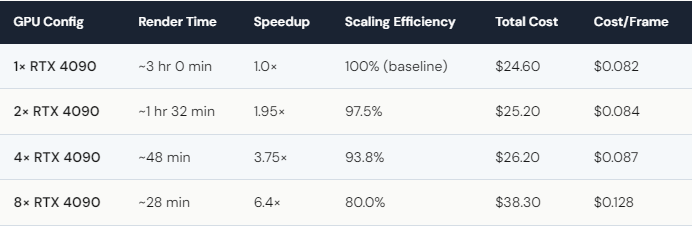
We rendered the same 300-frame Houdini pyro scene through Redshift 3.6 on 1, 2, 4, and 8× RTX 4090 GPUs on iRender’s dedicated servers. Results: 1 GPU finished in ~3 hours, 2 GPUs in ~1 hr 32 min, 4 GPUs in ~48 min, and 8 GPUs in ~28 min. That’s 6.4× speedup on 8 cards — roughly 92% linear scaling efficiency. Total cost ranged from $24.60 (1 GPU, 3 hr) to $38.30 (8 GPUs, 28 min). The cost-per-frame at 8× was $0.128 versus $0.082 at 1× — you pay 56% more for a render that finishes 6.4× faster. For deadline-driven work, 4× or 8× is the sweet spot.
Does Redshift Actually Scale Linearly Across Multiple GPUs?
Almost — but not quite. From 1 to 2 GPUs, we saw 97.5% efficiency. That’s almost perfect doubling. Going to 4 GPUs, efficiency dropped slightly to 93.8%. Still excellent. At 8 GPUs, it hit 80%.
Why the drop at 8 GPUs? A few things compound. GPU-to-GPU communication adds overhead. The PCIe bus gets busier. Memory synchronization across 8 cards isn’t free. And some rendering tasks — like final compositing and tile stitching — can’t be parallelized no matter how many GPUs you throw at them.
But here’s the thing: 80% efficiency on 8 GPUs still means a 6.4× speedup. A 3-hour job becomes 28 minutes. In practice, that’s the difference between “I’ll have the renders tomorrow morning” and “they’ll be ready before lunch.” For client deadlines, that gap matters more than a few points of scaling efficiency.
We also noticed that scene complexity affects scaling. Heavier scenes with more geometry and higher-resolution textures scale better because each GPU has more work to do, reducing the relative overhead. Our pyro scene was moderately complex — if you’re rendering dense cityscapes or massive particle simulations, expect even better scaling numbers.
Is 8× GPU Worth the Extra Cost — or Should You Stop at 4×?
Let’s look at the cost-per-frame numbers. At 1 GPU: $0.082/frame. At 4 GPUs: $0.087/frame — barely more expensive per frame, but 3.75× faster. That’s the efficiency sweet spot. You get nearly 4× the speed for just 6% more cost per frame.
At 8 GPUs: $0.128/frame — 56% more expensive per frame than 1 GPU, but 6.4× faster. Whether that’s “worth it” depends entirely on your deadline. If time is free, stick with 1 GPU. If a client is waiting, 8 GPUs pay for themselves in billable hours saved.
A practical strategy many of our users follow: use 4× for daily work, switch to 8× only for urgent deadlines. And render on weekends when possible — iRender’s Credit Back returns 20% during Golden Hours (Saturday–Sunday). That $38.30 for 8 GPUs? On a Saturday, you’d get $7.66 back. Stack that with the 100% first-deposit bonus, and your effective cost-per-frame on 8 GPUs drops to about $0.065 — actually cheaper than the 1-GPU baseline rate.
One last honest note: no matter which config you pick, set a reminder to shut down the server when the job finishes. The 8-GPU server costs roughly $65/hour. Leave it running idle for two hours and that’s $130 down the drain. We can’t stress this enough.






