
High-Speed Enscape Cloud Rendering Service.
We Concentrate On People and The Joy Of Creation.
Optimize for Enscape GPU Rendering Tasks.
One of the few GPU Render Farms supporting both Single (Real-time Rendering) and Multi-GPU rendering.

Power real-time Enscape walkthroughs with dedicated bare-metal cloud GPUs.
iRender delivers dedicated bare-metal cloud workstations engineered for seamless Enscape real-time visualization, powered by flagship single RTX 4090 (24GB) and RTX 5090 (32GB GDDR7) GPUs. Operating under an unvirtualized IaaS model, we grant you full Administrator control via low-latency Remote Desktop to launch your native CAD/BIM software (Revit, SketchUp, Rhino, Archicad), leverage hardware-accelerated Ray Tracing, and batch-export crisp 8K panoramas and video walk-throughs without local hardware bottleneck.
Deploy your dedicated workstation now and take full command: “Your Renders, Your Rules.”

Cloud Rendering Service for Enscape High-End Rendering
iRender: Enscape Cloud Rendering – GPU Nodes: RTX 4090.
Optimize for Enscape GPU Rendering Tasks on the Cloud.
Support all 3D Software with Enscape: SketchUp Pro, Rhinoceros, Revit ArchiCAD, Vectorworks and so on.
Overview of Enscape
Enscape is a powerful real-time rendering and virtual reality plugin designed specifically for the architecture, engineering, and construction (AEC) industries. As an intuitive extension, it integrates seamlessly with leading design software, including SketchUp, Rhino, Revit, Archicad, and Vectorworks.
Despite its widespread adoption, many Enscape users struggle to find a compatible cloud render farm. Most traditional render farms cater primarily to multi-GPU workflows using software like Blender, 3ds Max, Cinema 4D, or Houdini. In contrast, cloud platforms offering dedicated single-GPU servers optimized for software like Enscape, Lumion, Unreal Engine, and KeyShot remain exceptionally rare.
To solve this challenge, iRender introduces a high-performance single-GPU server package tailored specifically to meet the hardware demands of Enscape, ensuring a smooth, fast, and effortless rendering experience.
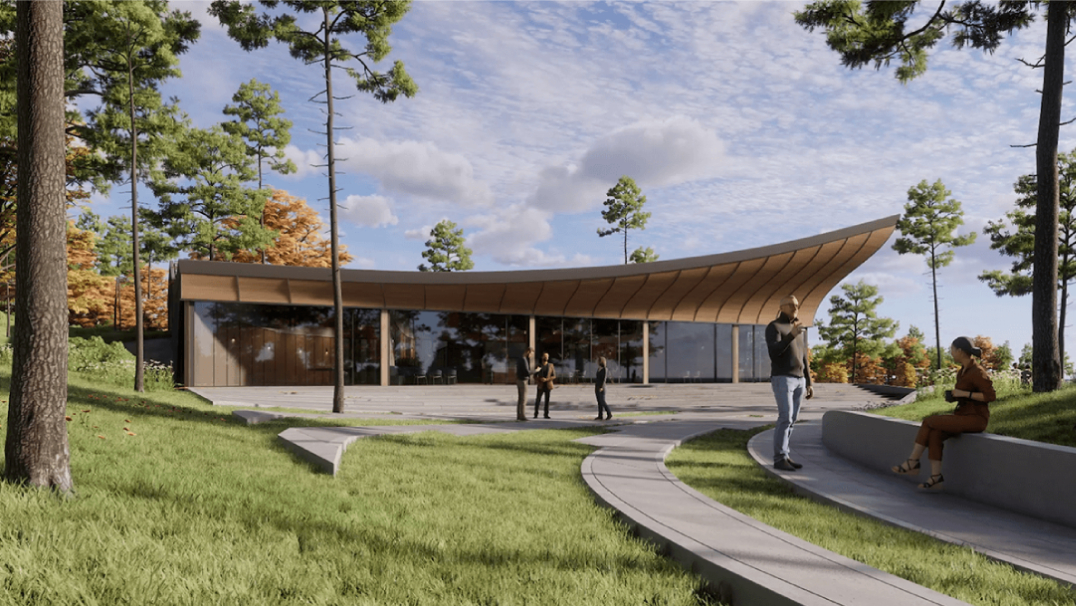
Why Choose iRender for Enscape Real-Time Rendering?
Why Choose IaaS Over SaaS for Enscape Real-Time BIM Pipelines?
Enterprise infrastructure evaluation for real-time LiveSync rendering and high-end Enscape workflows.
| Technical Criteria | iRender (Bare-Metal IaaS GPU Cloud) 🚀 | Traditional Render Farm (Automated SaaS) ⚙️ |
|---|---|---|
| Real-Time LiveSync | Interactive LiveSync Preview Grants low-latency Remote Desktop access. Architects launch native CAD/BIM software (Revit, SketchUp, Rhino, Archicad) alongside Enscape simultaneously. Modifications to geometry, materials, lighting, and asset placements reflect instantly in the viewport. |
Technically Impossible SaaS batch environments lack interactive graphical user interfaces (GUI) and desktop hosting mechanics. Because Enscape cannot run standalone via command lines without its host CAD application, automated SaaS farms are entirely incompatible. |
| GPU Architecture Dependency | Dedicated Single-GPU Nodes (RTX 4090 / RTX 5090) Deploys dedicated nodes featuring 1 physical RTX 4090 (24GB) or flagship RTX 5090 (32GB GDDR7). Perfectly aligns with Enscape’s real-time Vulkan and DirectX Raytracing pipeline, which operates strictly on 1 primary GPU—eliminating multi-GPU scaling overhead and idle hardware costs. |
Multi-GPU Resource Mismatch SaaS farms are architected to split packages across multi-GPU or distributed CPU structures, which conflicts with Enscape’s single-GPU engine mechanics and results in absolute zero hardware acceleration. |
| CPU Single-Core Match | High-Frequency Clock Rates (Threadripper™ PRO) Utilizes AMD Ryzen™ Threadripper™ PRO 3955WX processors engineered with high single-core boost clocks and 256GB RAM. Drastically accelerates massive BIM design loading, geometry translation, and high-speed data streaming into the Enscape engine. |
High-Core CPU Bottlenecks Automated SaaS platforms rely on high-core server processors with low per-core frequencies. This creates severe single-thread bottlenecks, dragging down scene translation and asset synchronization speeds. |
| VRAM & Asset Library | Dedicated 24GB – 32GB Headroom Provides unshared 24GB GDDR6X (RTX 4090) and 32GB GDDR7 (RTX 5090) memory to comfortably load complex master plans, high-poly vegetation proxies, and 8K displacement textures. Allows unrestricted local caching of the entire offline Enscape Asset Library on fast 2TB NVMe drives. |
Shared Memory Constraints & Missing Assets Restricted virtual allocations face strict memory limits. Shared server clusters frequently fail to download external cloud-dependent assets or custom texture libraries, resulting in broken geometries or missing models. |
| Pipeline Customization | 100% CAD/BIM Integration Full Administrator root privileges allow users to install exact CAD/BIM host versions (Revit, SketchUp, Rhino, Archicad), manage proprietary material scripts, and activate their native Enscape licenses seamlessly. |
Rigid Version Mismatches Workflows are strictly confined to fixed server configurations. SaaS nodes cannot accommodate the intricate, version-locked dependencies between hosting CAD applications and the Enscape plugin extension. |
| Data Security & Isolation | Enterprise Bare-Metal Isolation Proprietary architectural blueprints are stored within isolated physical hardware in an International Tier 3 Data Center. Automated post-session data sanitization permanently overwrites all client files, guaranteeing complete IP confidentiality. |
Shared Network Vulnerabilities Project models must traverse automated extraction scripts across shared public networks, increasing exposure risks and violating NDAs for sensitive corporate architectural blueprints. |
The iRender Advantage: Architectural Solved for Enscape Pipelines
1. Strict Single-GPU Hardware Dependency: Enscape utilizes Vulkan and NVIDIA RTX graphics APIs to handle real-time path tracing pipelines. This rendering architecture is engineered to exploit the computing power of only 01 primary graphics card driving the active viewport. Adding secondary or multiple GPUs yields absolute zero performance acceleration, resulting in severe hardware underutilization. To maximize Enscape’s single-GPU performance, iRender perfectly matches this runtime bottleneck by deploying dedicated bare-metal nodes configured with a single, standalone NVIDIA RTX 4090 (24GB VRAM), ensuring that the engine utilizes 100% of the raw GPU power without forcing clients to pay for redundant, unallocated multi-card resource pools.
2. Mandatory Real-Time LiveSync & Desktop GUI Requirements: Automated SaaS render farms function as static batch processing loops triggered purely via background command lines. However, Enscape cannot operate as a standalone executant; it runs strictly as an active plugin inside a host CAD/BIM environment (Revit, SketchUp, Rhino) using real-time directory linkages (LiveSync). Because SaaS setups completely strip away the Graphical User Interface (GUI), launching or rendering an Enscape model on automated farms is technically impossible. Operating within iRender’s dedicated physical Windows environment grants artists full interactive control via low-latency remote desktop streaming, allowing you to initialize host CAD apps alongside Enscape natively, activate standard plugin license keys, and manipulate the LiveSync viewport on-the-fly with zero rendering delay.
3. High Frequency CPU Single-Core Bottlenecking: Enterprise-scale architectural project files hold immense geometric complexity, containing millions of high-polygon counts and dense asset proxy configurations streamed from Revit or SketchUp scene graphs. Compiling these massive architectural datasets, translating geometry, and synchronizing asset coordinates to the Enscape scene buffer relies entirely on CPU single-core clock speeds. iRender bypasses system thermal throttling by backing up its RTX 4090 workspaces with cutting-edge AMD Ryzen Threadripper Pro processors engineered with high single-core base and boost frequencies, eliminating data starvation bounds, loading multi-gigabyte project data sets in seconds, and maintaining a fluid 4K real-time viewport walkthrough frame rate.
4. Direct Asset Library Caching & Uncapped Memory Allocation: Enscape relies heavily on pulling assets dynamically from its cloud-dependent Asset Library or proprietary custom material packages. Traditional SaaS setups isolate temporary nodes into restricted virtual storage zones, frequently breaking network asset path links, failing to map textures, or triggering fatal Out-of-Core memory swap crashes when scenes exceed virtual card boundaries. By leveraging standalone physical NVMe storage partitions with up to 256GB to 512GB of system RAM on iRender infrastructure, architects retain complete sovereignty to download and cache local Enscape library assets, pool dense 8K transparent texture materials into the 24GB dedicated VRAM, and prevent application crashes during heavy project baking cycles.
What Other Benefits Can You Get from iRender?
Powerful configuration
iRender provides high-performance, bare-metal cloud workstations tailored for demanding 3D rendering and real-time visualization pipelines. Through our unvirtualized IaaS model, you gain direct Administrator access to a dedicated remote workstation via low-latency Remote Desktop. This allows you to install your native CAD/BIM host applications (Revit, SketchUp, Rhino, Archicad), deploy the Enscape plugin, and load proprietary asset libraries—delivering the responsive feel of a local desktop backed by enterprise processing power.
Because Enscape operates strictly on a single-GPU architecture, multi-GPU configurations provide zero rendering acceleration while inflating operational costs. To maximize real-time viewport responsiveness and eliminate out-of-memory crashes on heavy BIM models, iRender offers dedicated single RTX 4090 (Package 3S) and flagship single RTX 5090 (Package 3i) bare-metal nodes:
Enscape Cloud Workstation Specifications
Dedicated single-GPU bare-metal nodes optimized for Enscape real-time CAD/BIM LiveSync, RTX ray tracing, and 8K panorama exports.
| Service Package (Single GPU) | Dedicated Node Hardware Configuration |
|---|---|
| Dedicated Single-GPU Architecture • Zero Multi-GPU Overhead | |
| Package 3S 1x RTX 4090 (24GB GDDR6X) BIM Standard |
AMD Ryzen™ Threadripper™ PRO 3955WX
256GB Host RAM 2TB NVMe PCIe 4.0 SSD Ideal for: fluid LiveSync BIM navigation (Revit, SketchUp, Rhino, Archicad), complex interior artificial lighting, and rapid 4K batch still exports.
|
| Package 3i 1x RTX 5090 (32GB GDDR7) +33% VRAM Headroom |
AMD Ryzen™ Threadripper™ PRO 3955WX
256GB Host RAM 2TB NVMe PCIe 4.0 SSD Ideal for: massive multi-gigabyte BIM master plans, heavy asset library scattering, hardware-accelerated Ray Tracing, and uncompressed 8K panoramas & video walkthroughs.
|
Full control of your working environment
With iRender, you gain access to powerful, dedicated GPU cloud servers built specifically for 3D rendering, AI training, VR/AR, and complex simulations.
Beyond the limitations of traditional SaaS render farms, iRender provides a fully customizable remote workstation. You hold total administrative control—allowing you to install any preferred software, set up custom plugins, and manage your pipeline exactly as you would on your own computer, all within a highly secure environment.
Free File Transfer Tool
Managing heavy project assets shouldn’t be a hassle. iRender provides a proprietary, 100% free file transfer tool called iRender GPU.
-
Seamless Syncing: You can upload all your project data, textures, and assets to the app at any time without booting up or connecting to the cloud server.
-
Ready-to-Use Storage: Once uploaded, your files automatically sync directly to the Z drive on your remote workstation, ready for instant access as soon as you launch your session.
Flexible Pricing
Controlling your budget is easy with iRender. Our RTX 4090 package is $8.2/hour, but you can save more with our flexible rental options:
-
Fixed Rental: Save 10% instantly by reserving early.
-
Daily / Weekly / Monthly Packages: Best for large-scale or long-term projects. . This helps you avoid extra charges if you forget to shutdown the server on time.
Customer support
If you run into any trouble, our support team is always here for you. Whether you need help picking a server, logging in, transferring your files, or fixing an error, we will walk you through it step by step. We respond quickly so you can get right back to rendering.
Easy to use
What you need to do is just 5 simple steps including: Creating an iRender account, Recharging money, Transferring your files to the remote server, Selecting a package and connecting to the server then finally Taking full control of the server and doing whatever you want.
We ensure that we provide you the easy-to-use interesting and effective solution. With just one or two clicks to create an image, and 7 to 15 minutes to boot the system in the first time, you will use the servers (GPUs & CPUs) like your own PC. Additionally, you just need to set up a working environment once, and save as Images to keep it for life.
With the aim to effectively equip users, reduce the procedure of using application and website at the same time, iRender has released a desktop app called iRender GPU App.
How to install iRender GPU App:
- Download and install the app on your local PC.
- Register/login the app by your iRender account and follow this instruction to use it.
Check out the video tutorial below for a visual step-by-step guide:
With the above advantages and the machine configuration package that iRender has just released, we believe that Enscape users will have the most comfortable, quickest, and most effective rendering time.
So, do not hesitate anymore, let’s HERE to get FREE COUPON to test our GPU servers and reach a new level of cloud rendering.
Your Renders, Your Rules!

We Focus On People And The Joy Of Creation.
“IRENDER – YOUR RENDERS, YOUR RULES”
Real-Time Rendering & Archviz
Master real-time rendering on RTX 5090 (32 GB) & AMD Ryzen™ Threadripper™ PRO. Technical benchmarks & guides for Unreal Engine 5, D5 Render, Lumion, Keyshot, Twinmotion, and Archviz.


"We all know that talent is never enough but devotion is the only way to success"




