
Houdini Production Blueprint: Karma XPU vs Octane vs Redshift, Which Fits Your Pipeline?
You are building a Houdini pipeline for the next two years, and choosing the wrong renderer now can mean rebuilding materials, changing licenses, retraining artists, and reworking production later. That is why Houdini Karma XPU vs Octane vs Redshift should be compared as a pipeline decision rather than a simple render-speed contest. Each engine approaches USD and Solaris integration, materials, licensing, GPU memory, and production workflows differently. This article compares those differences to help you decide which renderer better fits the way your team actually works.

Choosing a renderer is a pipeline decision, not a speed contest
Changing render engines in the middle of production can be expensive. Existing materials may need to be rebuilt, licenses can change, artists may need time to learn a new workflow, and established USD or Solaris pipelines may require additional integration work. A renderer that performs well in a benchmark can still be a poor fit if adopting it disrupts the rest of the production pipeline.
For Houdini Karma XPU vs Octane vs Redshift, the decision should start with four questions: How does the renderer fit your USD and Solaris workflow? What does licensing add to your production cost? Can you reuse your existing material library? And how familiar is your team with the engine? Project requirements should come next, because a studio producing USD-heavy VFX shots may value very different capabilities from a team working with texture-heavy scenes or scanned assets.
Licensing: what comes with Houdini and what does not
Licensing is one of the clearest cost differences between these three renderers. SideFX currently bundles Karma licenses with Houdini Core and FX: a workstation license includes 5 Karma tokens, while Local Access and Global Access licenses include 10. Additional commercial Karma tokens are currently available as an annual rental. The bundled tokens can also be used on a render farm or cloud.
Octane and Redshift require their own licensing outside the Houdini license. OTOY currently offers OctaneRender Studio+ as a monthly or annual subscription, while Maxon offers Redshift subscriptions on monthly and annual plans, with floating licenses available through sales.
For a small studio, this difference can influence the pipeline decision before render performance even enters the discussion. If you already use Houdini Core or FX, Karma reduces the need for a separate renderer subscription, while choosing Octane or Redshift adds another license to budget and manage.

How each engine fits a USD and Solaris pipeline
Karma has the most direct path into a Solaris workflow because it is built as part of Solaris, uses USD as its scene description format, and runs as a Hydra render delegate. For a pipeline already centered on LOPs and USD, this reduces the amount of renderer-specific integration required between scene assembly, look development, lighting, and final rendering.
Redshift also integrates with Solaris through USD and Hydra. Maxon documents support for rendering Solaris USD scenes with Redshift and recommends generic USD nodes where possible to make scenes more portable between renderers. However, renderer-specific settings and materials still need to be considered when moving between delegates.
Octane’s current Houdini integration also supports Solaris through USD and Hydra. As of OctaneRender for Houdini 2026.5, OTOY has unified the Houdini and Solaris plugins, replacing the previous standalone Hydra Solaris plugin. It still supports specific Houdini builds, so version compatibility should be checked before committing a production pipeline to it.
The practical advantage of USD is portability, but it does not make three renderers interchangeable. Generic USD scene data can travel well, while renderer-specific materials, properties, and features may still require adjustments when switching engines.
Where each engine is strongest
Each renderer becomes more attractive under a different production workflow. Karma XPU has the clearest advantage when the project is already built around Solaris and USD. It is deeply integrated with that environment, comes with Karma licenses bundled with Houdini Core and FX, and is designed around MaterialX, USD Preview Surface, and supported Karma-specific shaders.
Redshift is particularly useful when GPU memory management matters. Its out-of-core architecture can move texture and geometry data to system RAM when necessary, making it relevant for texture-heavy scenes that put pressure on GPU memory. This does not remove memory limits or guarantee better performance, but it gives Redshift another way to handle scenes that exceed available VRAM.
Octane is worth considering for pipelines working heavily with captured or reconstructed 3D data. Recent Octane development includes path-traced Gaussian splats, neural radiance caching, and meshlet-based geometry workflows. These features can be relevant for projects built around scanned environments or other dense captured datasets, rather than being a general reason to choose Octane for every Houdini production.
The constraints you must check before committing
Before locking a renderer into production, check its limitations against the actual project. Karma XPU does not support every shader available in Houdini. SideFX currently supports USD Preview Surface, MaterialX, and compatible Karma-specific VOPs, while traditional VEX shaders are not supported by XPU. Existing material libraries may therefore need adjustment before moving to an XPU pipeline.
For Octane, GPU and driver compatibility should be checked against the exact plugin release before deployment, especially on RTX 50 series systems. Do not assume that a driver working for another renderer will automatically meet the requirements of the Octane build you plan to use.
Memory is another constraint across GPU rendering workflows. Adding GPUs does not automatically create one larger VRAM pool. Karma XPU, for example, addresses each GPU separately and SideFX explicitly states that memory is not pooled. Before choosing hardware or a multi-GPU setup, test whether the production scene fits the memory behavior of the renderer you intend to use.
A decision guide by project type
The right choice becomes clearer when you compare the three engines against the needs of your pipeline rather than render speed alone. Licensing, USD and Solaris integration, memory behavior, existing materials, and hardware requirements can all affect the decision.
| Criteria | Karma XPU | Redshift | Octane |
|---|---|---|---|
| License | Bundled with Houdini Core and FX | Separate license required | Separate license required |
| USD and Solaris | Native integration with Solaris | Solaris integration through Hydra/USD | Solaris integration through Hydra/USD |
| Heavy GPU memory use | Per-device VRAM, with XPU memory management | Out-of-core texture and geometry support | Check memory requirements against the scene and current Octane build |
| Distinct pipeline strength | Direct Houdini, Solaris and MaterialX workflow | Out-of-core memory management | Gaussian splat and captured-data workflows in supported versions |
| Check before committing | XPU shader compatibility | License and memory behavior | Houdini plugin, GPU and driver compatibility |
Scale your Houdini rendering with iRender
Once you have chosen the renderer that fits your Houdini pipeline, the next question is whether your local hardware can handle the production workload. iRender provides remote GPU workstations where you can install Houdini and your chosen renderer, configure the environment for your project, and work much like you would on your own machine.
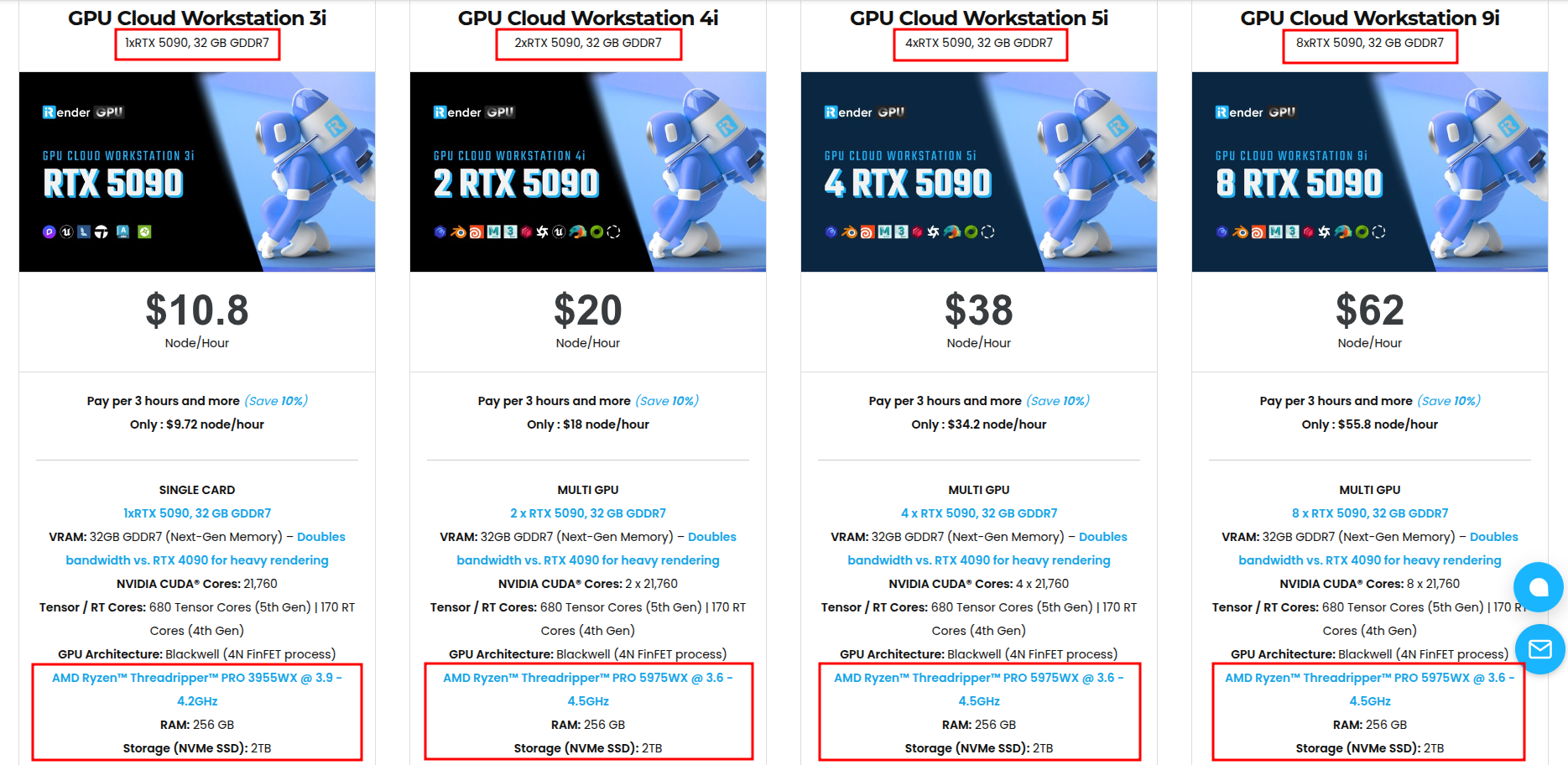
iRender has recently added NVIDIA RTX 5090 with 32GB GDDR7 per GPU, with configurations ranging from 1 to 8 GPUs. This gives Houdini artists another hardware option for Karma XPU, Redshift, and Octane workflows, particularly when a project requires more GPU rendering capacity.
Available configurations include:
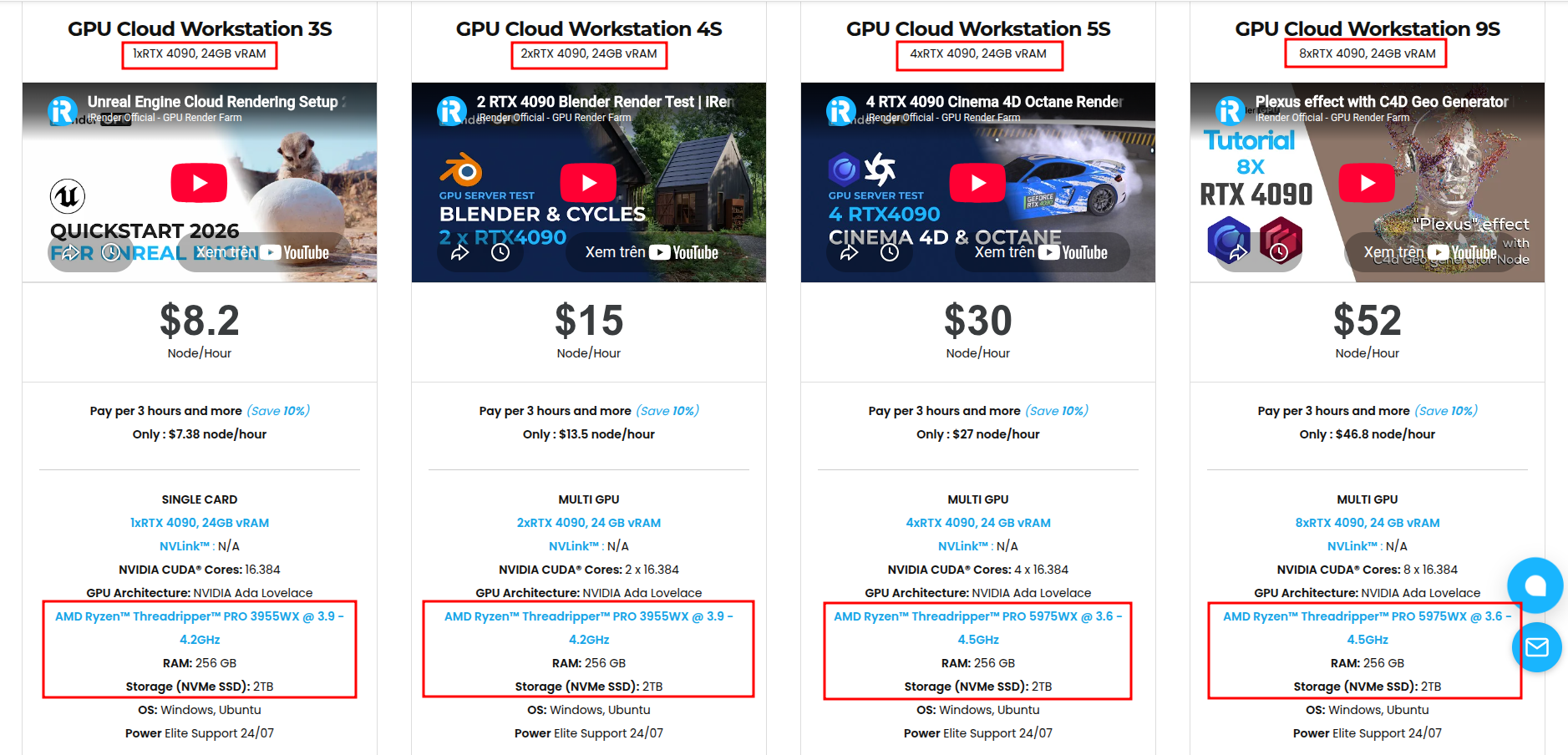
- CPU: AMD Ryzen™ Threadripper™ PRO 3955WX (3.9-4.2GHz) and AMD Ryzen™ Threadripper™ PRO 5975WX (3.6-4.5GHz)
- GPU: 2/4/8 RTX 4090 with 24GB vRAM and 1/2/4/8 RTX 5090 with 32GB vRAM
For new users, iRender currently offers a 100% bonus on the first deposit within 24 hrs of registration, giving you additional rendering credits to get started with larger projects.
Maximum Speed – Absolute Freedom
Source: SideFX Docs, SideFX, OTOY Forums, Maxon Docs
Let’s see how our service works:

FAQ
1. Do I need a separate license for Karma in Houdini?
Not necessarily. Karma licenses are bundled with Houdini Core and FX, so users of these Houdini editions already receive Karma render tokens.
2. Which renderer fits a USD pipeline best in Houdini?
Karma has the most direct integration with USD and Solaris because it is designed to work natively within the Solaris environment.
3. Should I switch renderers in the middle of a project?
Switching renderers mid-project can require changes to materials, renderer-specific settings, licenses, pipeline tools, and artist workflows. Test the migration requirements carefully before moving an active production to another engine.






