
Cloud Render Farm Pricing Explained: How to Calculate Your Real Cost in 2026
Cloud rendering has become an essential part of modern 3D workflows in 2026. Whether you’re producing animations in Blender, building VFX scenes in Autodesk Maya, or creating motion graphics in Cinema 4D, scaling compute power through the cloud allows artists to meet tight deadlines without investing in expensive hardware. However, one of the biggest challenges remains: understanding the real cost behind different pricing models. Render farms may look similar, but in reality, they operate on very different pricing structures.
In this article, we’ll break down “Cloud Render Farm Pricing Explained: How to Calculate Your Real Cost in 2026”.
There are many different pricing models, each with its own unique approach. Below, we will explore three methods:
- Unit-Based Pricing (Compute Time)
- IaaS Hourly Pricing
- SaaS Render Farms (Upload & Render)
1. Unit-Based Pricing (Compute Time)
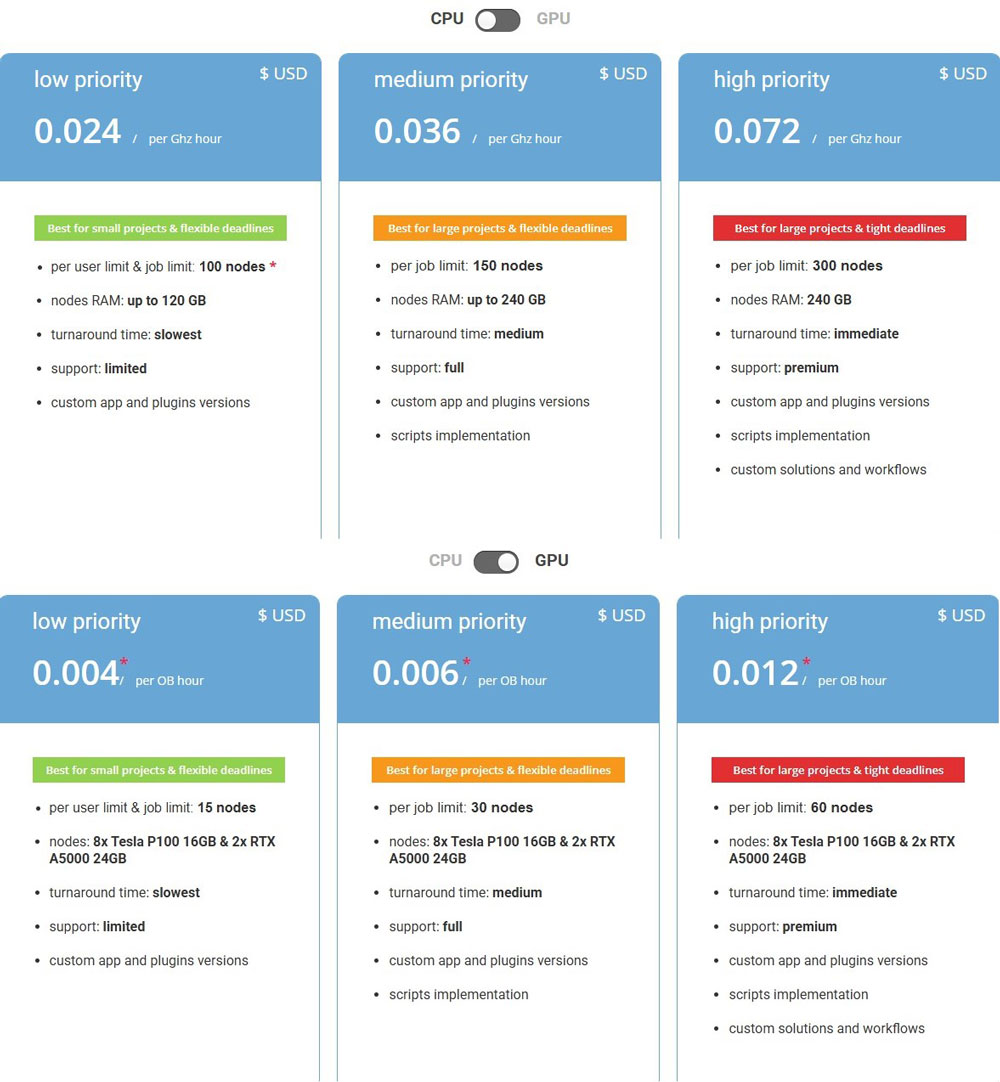
Unit-based pricing is one of the most transparent and widely used models in render farms, especially for CPU-based rendering.
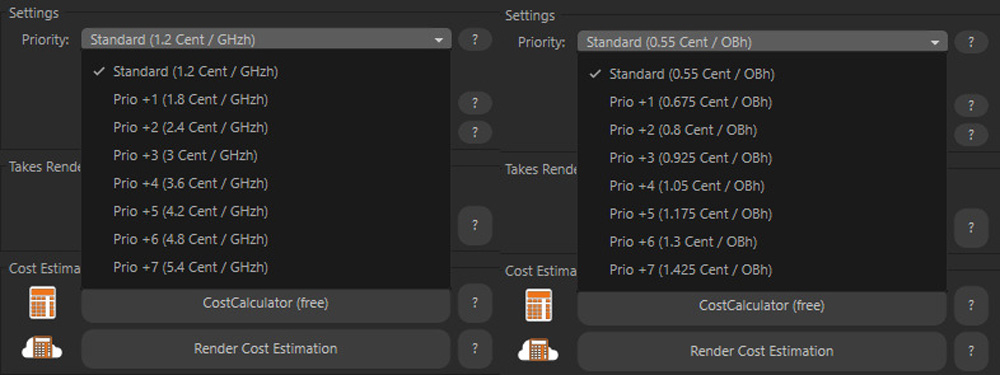
A GHz-hour represents one gigahertz of processing power used for one hour. For example, a dual-processor server with 44 cores running at a base clock of 2.20 GHz delivers roughly 96.8 GHz per real-time hour. This approach avoids the unpredictability of per-frame pricing, since render times can vary dramatically depending on scene complexity. A simple interior shot in V-Ray might take only a few minutes per frame, while a heavy exterior scene with tools like Forest Pack and high-resolution textures could take 10–15 times longer. By pricing in GHz-hours, users effectively pay only for the actual compute they consume. Most render farms estimate usage based on test frames before rendering begins, giving users a relatively accurate cost preview. However, it’s worth noting that not all providers define GHz-hours the same way.
For GPU rendering, unit-based pricing typically shifts to OctaneBench-hours (OBh) or GPU-hours. OctaneBench is a standardized benchmark. In theory, 1 OBh should represent equivalent compute performance across different providers.
In reality, hardware differences still matter significantly. A newer GPU like an RTX 5090 can render 2–3 times faster than an RTX 3090, meaning a higher OBh rate may still deliver better value per dollar. For example, Super Renders Farm offers pricing starting from $0.003/OBh, which can be highly competitive depending on the GPU tier behind it.
Another key factor is VRAM capacity. Many modern render engines (such as Redshift or Octane) are limited more by VRAM than raw compute power. A scene exceeding VRAM limits may fail or fall back to slower out-of-core rendering, which directly impacts efficiency but is often not reflected in pricing.
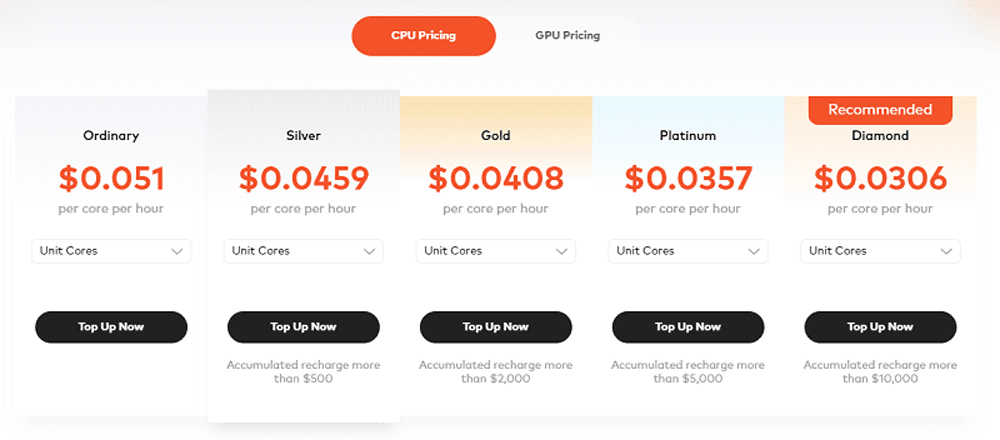
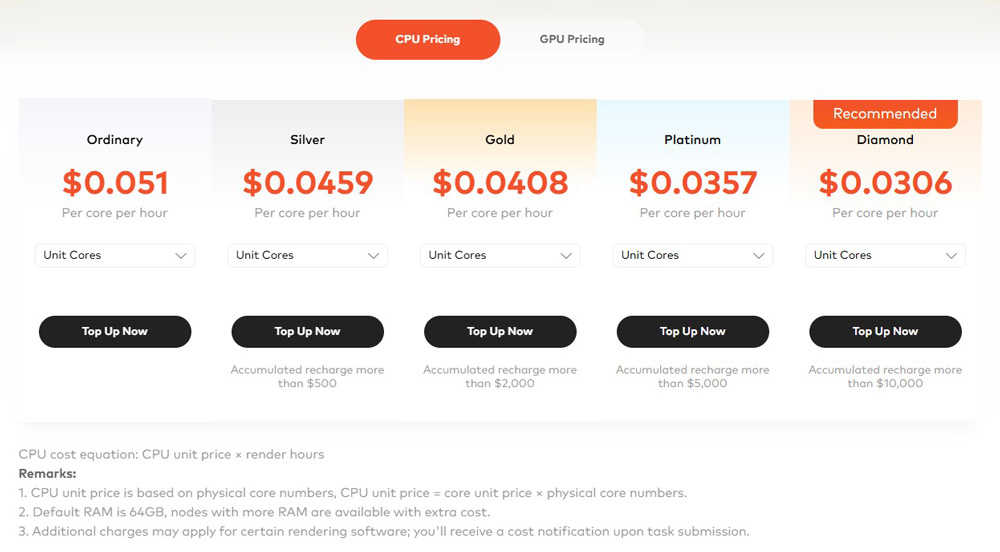
A kind of unit-based pricing is core-hour pricing, where users are charged based on the number of CPU cores used per hour. For instance, Fox Render Farm applies rates ranging roughly from $0.0051 to $0.0306 per core/hour, depending on configuration and scale.
2. IaaS Hourly Pricing
At the second level, we have Infrastructure-as-a-Service (IaaS), where users rent raw computing power and build their own rendering pipeline. Platforms like Amazon Web Services and Google Cloud Platform are commonly used for this approach.
In this model, pricing is completely transparent. You pay directly for what you use: GPU instances per hour, storage, and data transfer. For example, a GPU instance might cost $3 per hour, and if you run 10 machines for 5 hours, your base compute cost would be $150.
However, unlike unit-based systems, IaaS requires you to handle everything yourself.
A more specialized approach to IaaS rendering can be seen in services like iRender. Unlike general-purpose cloud providers, iRender focuses specifically on rendering workloads while still maintaining the flexibility of IaaS.
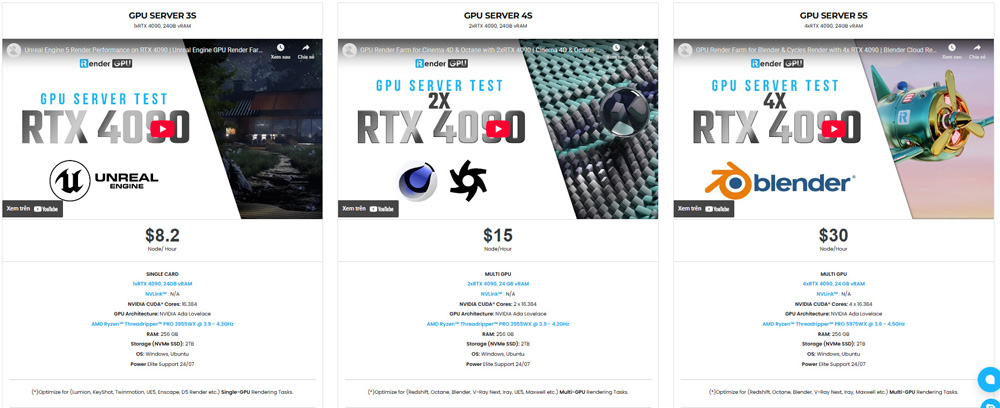
The key difference lies in its pricing structure. With iRender, users still rent dedicated GPU machines and have full control over their environment, but without incurring extra charges for storage or data transfer. This removes one of the biggest hidden costs typically associated with IaaS platforms. All servers run on RTX 4090 (Ada Lovelace architecture, 24GB VRAM), offered across five tiers depending on how many GPUs you need per node:
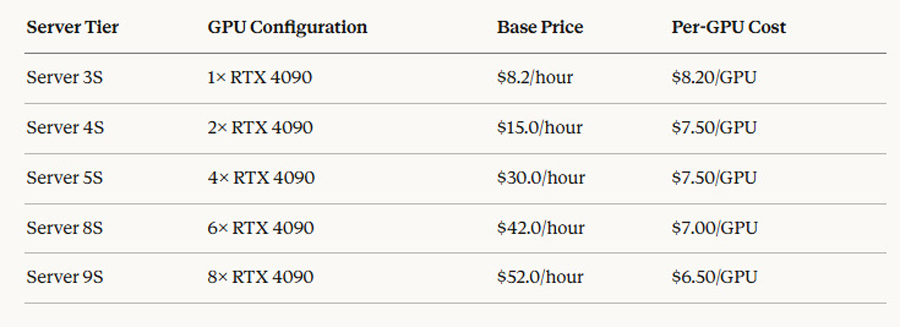
Every tier includes the same hardware baseline: AMD Ryzen Threadripper PRO, 256GB RAM, 2TB NVMe SSD, and full remote desktop access on Windows or Ubuntu.
Duration and volume discounts can reduce costs significantly:
- Commit to 3 hours upfront will save 6%
- Commit to 1 full day will save 10%
- Commit to 1 week will save 20%
Volume deposit from $575, bonus credits ranging from 10% to 30%.
New users who recharge within 24 hours of registration receive a 100% credit bonus, effectively doubling the available render budget for the first session.
Additionally, pricing is calculated strictly based on actual usage time, meaning you only pay for the hours your machines are actively running. There are no complex billing layers or unexpected fees, making it easier to estimate and control your budget. This hybrid approach combines the transparency of IaaS with some of the cost predictability usually found in SaaS platforms.
The biggest advantage of IaaS is scalability and flexibility. You can choose exactly how many GPUs to use, how long to run them, and how to configure your pipeline. Users can achieve a balance between cost efficiency and ease of use without worrying about hidden fees like storage or bandwidth.
3. SaaS Render Farms (Upload & Render Model)
The third level is SaaS (Software-as-a-Service). In this approach, everything is managed for you. You simply upload your project, configure your settings, and the platform takes care of the rest.
A well-known example of this model is GarageFarm.NET. These platforms are designed to provide a seamless rendering experience with minimal technical overhead. Pricing in SaaS render farms is typically based on render time, either in GPU hours or through a credit system. However, unlike unit-based pricing, SaaS platforms often provide clearer estimates and include additional services such as software licensing, auto-scaling, and technical support.
For instance, if your project requires 50 GPU hours at a rate of $4/hour, your base cost would be $200. What makes SaaS appealing is that this price usually includes everything; there is no need to worry about installing Redshift, configuring nodes, or managing errors. The trade-off is that SaaS solutions tend to have a higher per-hour cost compared to raw IaaS.
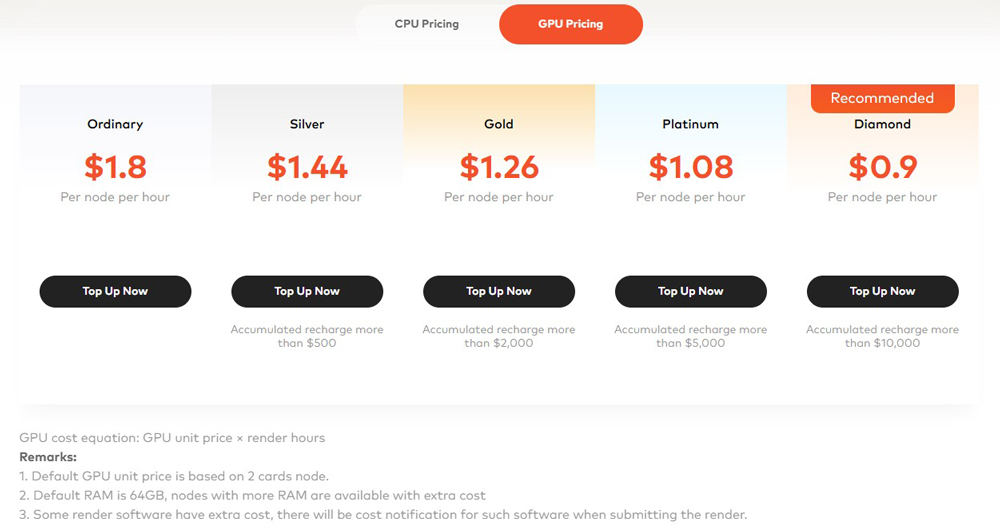
Another render farm has a same structure is Fox Renderfarm. Let’s take a look at their price:
Conclusion
Understanding cloud render farm pricing in 2026 requires more than just looking at hourly rates. Each render farm has its own pricing and operating methods. Simply looking at the prices listed on their website won’t allow you to calculate the most reasonable and accurate cost for your project. Therefore, you can try rendering a few frames, and from there you can calculate the total project cost in your own way.
Hope this article helps you understand how the render farm cost calculator and pricing work, and choose the best one suitable for your budget. iRender pricing page shows all five GPU tiers clearly, and new users receive a 100% credit bonus on their first recharge within 24 hours, enough to run a meaningful test at no net cost.
iRender - IAAS Render Farm for Rendering and Training AI
iRender provides a remote machine rental service by offering flexible configurations of 1, 2, 4, 6, and 8 GPU machines using the top-tier RTX 4090. Built with powerful CPUs (AMD Ryzen™ Threadripper™ PRO 3955WX @ 3.9 – 4.2GHz and AMD Ryzen™ Threadripper™ PRO 5975WX @ 3.6 – 4.5GHz), 256GB RAM, and 2TB NVMe SSD storage, our machines can handle even the most demanding scenes in your 3D projects.
We grant you complete access to your rented machines. You can use your C4D, renderers, plugins, and/or any other software of any version on our machine. We treat your rented machines like your personal workstations – no restrictions apply. This freedom enables you, 3D artists, to realize creative visions without limitations. Moreover, iRender offers an iRender GPU app. In this all-in-one application, you can free your workflow from accessing iRender website, and just have to work on the iRender GPU app. This app is only for Window users.

Let’s check out some our quick start!

Enjoy our FREE TRIAL to try our RTX 4090 machines and boost your rendering now!
For more detailed information, please contact us via Live chat 24/7 or WhatsApp: +(84) 912-785-500 or Email: [email protected].
iRender – Happy Rendering!






