
V-Ray Rendering Slow? How to Diagnose CPU, GPU and Scene Bottlenecks
A slow V-Ray render is usually one specific bottleneck, not everything at once. Before changing settings, find out where the time goes. If all CPU cores are pinned and the GPU is idle, you are on V-Ray CPU and the sampler or scene is the cost. If the GPU is maxed, you are on V-Ray GPU and VRAM or the noise threshold is the cost. If neither is fully used, the scene itself is choking on heavy geometry, displacement, or light calculation. Read the render stats first, then fix the one thing that is actually slow. After that, a heavy sequence that still drags is solved by spreading it across more GPUs, not by guessing at sliders.
The trap with V-Ray is that it gives you a thousand sliders, so when a render is slow the instinct is to start turning them. I have wasted whole afternoons that way, lowering subdivs that were never the problem while the real cost sat untouched. The fix that changed how I work was boring: look at what the machine is doing before touching a single setting.
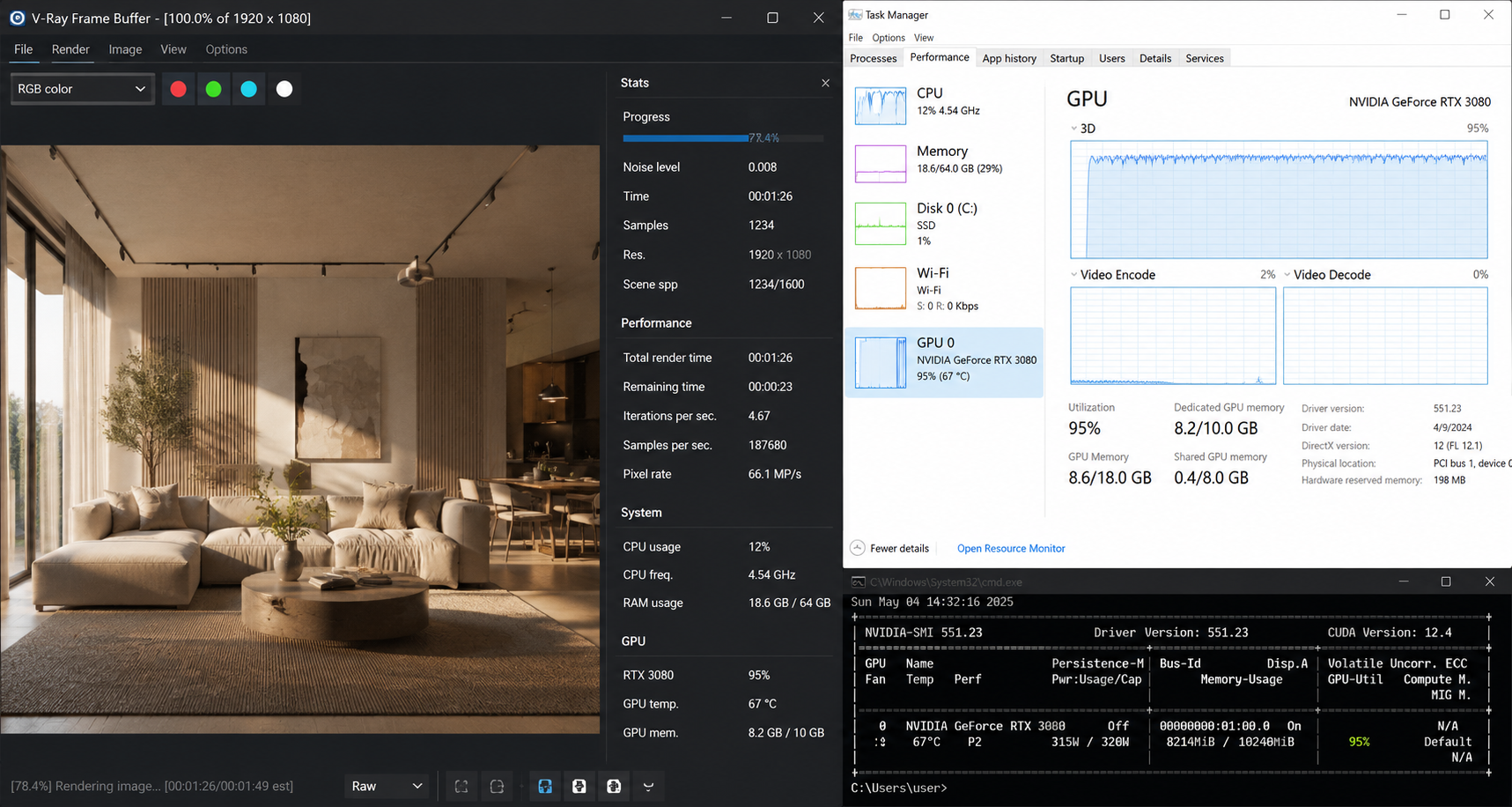
Open the render stats and your system monitor at the same time. The pattern you see there tells you which of three things is actually slow, and that decides everything else.
| What you see | Likely bottleneck | How to confirm | What to do |
|---|---|---|---|
| All CPU cores pinned, GPU idle | V-Ray CPU, sampler heavy | Engine set to CPU, Task Manager shows 100% CPU | Raise noise threshold, enable adaptive lights |
| GPU at 100%, slow anyway | V-Ray GPU, VRAM or threshold | nvidia-smi shows VRAM near full | Cut texture size, raise noise threshold |
| Neither CPU nor GPU fully used | Scene prep, geometry, light cache | Long pause before pixels appear | Optimize displacement, proxies, light cache |
| Long delay before first bucket | Light cache or irradiance map build | Stats show GI precompute time | Tune GI settings, reuse cache for stills |
| Fast preview, slow final | Output resolution and sampling | Time scales with pixel count | Confirm denoiser on, check max subdivs |
Why is V-Ray slow when all my CPU cores are maxed?
This means you are on the CPU engine and the sampler is doing too much work. The biggest lever in modern V-Ray is the noise threshold on the image sampler. A threshold of 0.01 chases a very clean image and can take forever, while 0.04 to 0.05 looks nearly identical on most shots and finishes far sooner. On one interior, moving the threshold from 0.01 to 0.05 pulled a frame from about 11 minutes to roughly 4.5, and with the denoiser on I could not see the difference.
Two more things eat CPU time on busy scenes. Lights without adaptive lighting force V-Ray to evaluate every light for every shaded point, so turning on adaptive lights helps a lot in scenes with many sources. And max subdivs left high on materials and lights from an old template will quietly inflate every frame. Let the noise threshold drive quality rather than cranking per-element subdivs.
Why is V-Ray slow even though my GPU is at 100 percent?
On V-Ray GPU a fully used card is normal, so a maxed GPU does not mean it is healthy. The usual cause is VRAM pressure. When a scene gets close to your card memory, V-Ray starts paging textures and geometry in and out, and the render slows in a way that looks like the GPU is busy when it is really waiting. Watch VRAM with nvidia-smi while a frame renders. If you are pinned at the ceiling on 24GB, cut texture sizes, use proxies for heavy geometry, and resize maps that are far from camera.
The noise threshold matters here too. V-Ray GPU is fast, but a very low threshold still costs you, so set it where the denoiser can finish the job.
What if neither CPU nor GPU is fully used?
That gap is the scene preparing itself. Heavy displacement, dense geometry without proxies, and global illumination precompute all happen before the buckets really get going, and they show up as a long quiet stretch where nothing seems to render. If you see a big delay before the first pixels, your time is going into light cache or irradiance map building, or into loading geometry that should be a proxy. For stills you can often build and reuse a GI cache, and for animation you want a GI approach that stays stable across frames so you are not rebuilding it every time.
Should I move to V-Ray GPU?
For a lot of scenes V-Ray GPU on an RTX card is a large speed jump. A frame that ran around 33 minutes on a 16 core CPU came down to about 6 minutes on a single RTX 4090 in one of my tests. V-Ray CPU is still strong and supports the full feature set, and some studio pipelines stay on CPU for a reason, so this is not a blanket recommendation. Render a representative frame both ways on your own scene before you decide.
It is diagnosed and tuned. Still too slow. What now?
When a single frame is as fast as your scene allows and a sequence still will not finish in time, more GPUs are the answer rather than more settings. A 200 frame V-Ray GPU sequence at 6 minutes a frame is 20 hours on one machine, and that machine is locked the whole time.
iRender works for this because you keep your own V-Ray setup. You get a full RTX 4090 workstation with 256GB RAM, and you install your host app, your V-Ray version, your plugins, so the render matches your local result. That control is what “your renders, your rules” means. Run an 8 GPU server on a hero frame, or several machines in parallel on a sequence.
The things to watch are the same on any pay per use machine. Billing begins at boot, so package your scene first. You shut the server down yourself, and an idle machine left running after the render finishes wastes credit, so use auto-shutdown. First setup is around 15 to 30 minutes, then your saved image gets you going quickly. If you only need quiet overnight batch frames and no live desktop, a SaaS render farm can be simpler. iRender fits when you want full control of your V-Ray environment and GPU power on demand.
V-Ray tuned and the sequence is too big for one machine?: Render V-Ray on a cloud GPU server
Want to benchmark your V-Ray scene on real hardware first?: Try iRender now and get a 100% bonus on your first deposit





