
15 Proven Ways to Reduce Your Render Time (Without Losing Quality)
Which Optimizations Give You the Biggest Bang for Zero Effort?
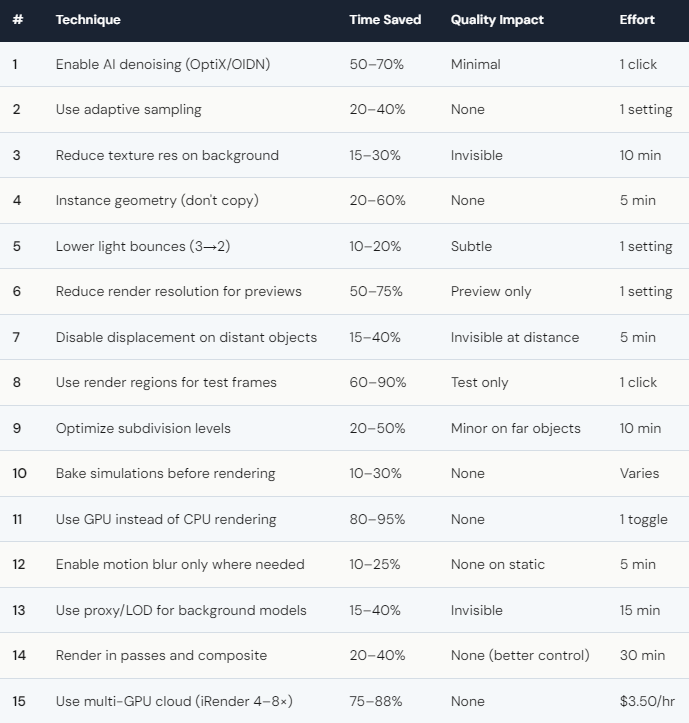
AI denoising is the single most impactful change you can make. In Redshift, enable OptiX denoiser in the AOV tab. In Blender Cycles, enable “Denoise” in the Render Properties and set denoiser to “OptiX” or “OpenImageDenoise.” In V-Ray, use the V-Ray Denoiser render element. The result: you can reduce your sample count by 50–70%, and the denoiser fills in the noise with AI-predicted clean data. The quality loss is minimal — often invisible. The time savings are dramatic.
Adaptive sampling is the second freebie. Instead of rendering every pixel to the same sample count, the engine reduces samples on simple areas (flat walls, clear sky) and concentrates on complex areas (glass, caustics). Redshift, Blender Cycles, and V-Ray all support this. Enable it, set a noise threshold, and let the engine decide where to spend compute. Typical savings: 20–40%.
Instancing is the most underused optimization. If your scene has 100 identical trees, and they’re duplicated (not instanced), the GPU stores 100 separate copies of the same mesh. Instanced, it stores one copy referenced 100 times. Memory drops 60%+, and rendering is faster because there’s less geometry to process. In Blender: Alt+D instead of Shift+D. In Maya: use Instance instead of Duplicate. In C4D: use Instance objects or Cloner with Instance mode.
When Should You Stop Optimizing and Just Use Faster Hardware?
There’s a point of diminishing returns. If you’ve applied tips 1–14 and your render still takes 3 hours, the remaining optimization potential is maybe 10–15% — that’s cutting 3 hours to 2.5 hours. The effort to squeeze those last minutes isn’t worth it.
That’s where tip #15 comes in. Multi-GPU cloud rendering on iRender takes your already-optimized scene and renders it 4–8× faster. That 2.5-hour optimized scene finishes in 20–35 minutes on 4× RTX 4090. The effective cost after Credit Back (20% weekends) and first-deposit bonus: roughly $7–12. Cheaper than the hour of your time you’d spend trying to squeeze another 10% through manual optimization.
The smartest workflow: apply the free optimizations (tips 1–10) — they take 15–20 minutes and save 40–60%. Then render the optimized scene on cloud multi-GPU for maximum speed. Optimization + hardware = the fastest possible render at the lowest cost. Your renders, your rules — and the best rule is “do both.”
One honest note: not every optimization works for every engine. OptiX denoising requires NVIDIA GPUs. Adaptive sampling behaves differently across engines. Test each optimization on a single frame before applying to a full batch. A 2-minute test can prevent hours of wasted rendering if a setting produces unexpected artifacts.





