
3ds Max Cloud Rendering 2026: V-Ray & Corona Benchmark on RTX 4090
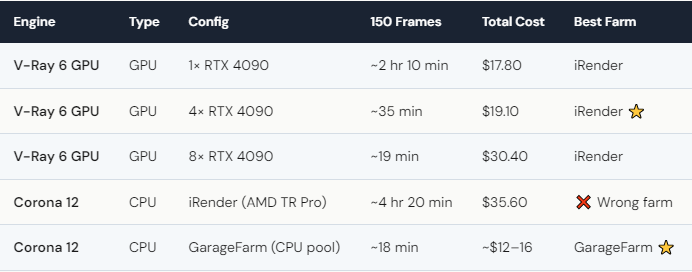
3ds Max cloud rendering depends entirely on your engine choice. We tested both V-Ray 6 GPU and Corona 12 on iRender’s RTX 4090 servers. V-Ray GPU on 4× RTX 4090 rendered a 150-frame interior animation in ~35 minutes ($19.10 total). Corona (CPU-only) on the same server took ~4 hr 20 min ($35.60) — because Corona doesn’t use GPUs at all. For Corona users, a SaaS farm like GarageFarm ($12–15/hr) is genuinely the better option: their massive CPU pools finish Corona renders faster and cheaper than a GPU-focused IaaS farm. For V-Ray GPU users, iRender delivers the best multi-GPU value. The right farm depends on the right engine.
Why Is V-Ray GPU Perfect for iRender — but Corona Isn’t?
V-Ray 6 has a mature GPU rendering mode. It uses CUDA cores on the RTX 4090, scales across multiple GPUs, and benefits from 24GB VRAM per card for large textures and geometry. The RTX 4090’s ray tracing cores accelerate V-Ray’s Light Cache and Brute Force GI calculations. Everything about V-Ray GPU is designed for the hardware iRender provides.
Corona is a different story. It’s a CPU-only renderer — always has been, probably always will be. Chaos Group (now Chaos) has explicitly stated Corona will remain CPU-focused. This means renting an RTX 4090 server to run Corona is like buying a sports car to drive in a parking lot. The GPU sits idle while the AMD Threadripper CPU does all the work.
For Corona, SaaS farms like GarageFarm distribute your scene across hundreds of CPU cores simultaneously. What takes 4+ hours on a single-machine CPU finishes in 18 minutes across their pool. At $12–16 per job, it’s both faster and cheaper than iRender for this specific workflow. We’re being honest because it matters: if you only use Corona, GarageFarm or RebusFarm is the right choice.
What If You Use Both V-Ray and Corona?
Many arch-viz studios use V-Ray GPU for fast iteration and previews, then switch to Corona for final high-quality renders. If that’s your workflow, the smart approach is using both farms.
Use iRender for V-Ray GPU work: interactive rendering, animation previews, multi-GPU batch renders. The 4× RTX 4090 configuration is the sweet spot — 35 minutes for 150 frames at ~$19. After weekend Credit Back (20%) and first-deposit bonus (100%), effective cost drops to roughly $7.60. That’s less than two cups of coffee for a complete interior animation.
Use GarageFarm for Corona finals: submit the scene through their plugin, let the CPU pool handle distribution, download clean frames. No server management, no GPU knowledge needed.
This dual-farm approach costs less and delivers better results than forcing either engine onto the wrong platform. Your renders, your rules — and the smartest rule is using the right tool for the right job, even if that tool isn’t always ours.
One V-Ray tip: enable AI denoising (NVIDIA OptiX) in V-Ray GPU settings. On RTX 4090, it’s hardware-accelerated and cuts render time by 40–60% with minimal quality loss. Combined with multi-GPU, this turns a 2-hour render into a 20-minute job.






