
AI Tools for Faster Rendering in Redshift
Redshift is widely known as a fast, production-ready GPU renderer, but achieving clean, noise-free results can still require high sample counts and long render times, especially in complex scenes. To address this, Redshift integrates powerful AI-based denoising tools that help artists significantly reduce render time without sacrificing visual quality.
By intelligently removing noise at lower sample levels, these AI tools allow you to render faster, iterate more efficiently, and meet tight production deadlines.
In this article, iRender takes a closer look at the two primary AI tools for faster rendering in Redshift: NVIDIA OptiX Denoiser and Intel Open Image Denoise (OIDN), and how to use them effectively in real-world workflows.
Redshift AI Denoising Overview

Unlike traditional denoisers that rely on simple filtering, Redshift’s AI denoisers are powered by machine learning models trained on high-quality rendered images. These models analyze noise patterns and reconstruct a cleaner image based on learned data, allowing Redshift to converge much faster.
Redshift currently offers two main AI denoising options:
- NVIDIA OptiX Denoiser
- Intel Open Image Denoise (OIDN)
Each has its own strengths and ideal use cases.
NVIDIA OptiX Denoiser

Image Source: NVIDIA
NVIDIA OptiX Denoiser is an AI-accelerated denoiser designed specifically for NVIDIA RTX GPUs. It leverages Tensor Cores to process noise extremely quickly, making it ideal for interactive workflows.
How to Enable OptiX in Redshift:
- Open Redshift Render Settings
- Go to the Sampling tab
- Enable Denoising
- Select NVIDIA OptiX as the denoiser
Once activated, Redshift can produce usable, clean images with dramatically fewer samples, resulting in much faster renders.
The OptiX AI denoising technology, combined with NVIDIA Tensor Cores, delivers improved performance over previous-generation GPUs and enables fluid interactivity in complex scenes.
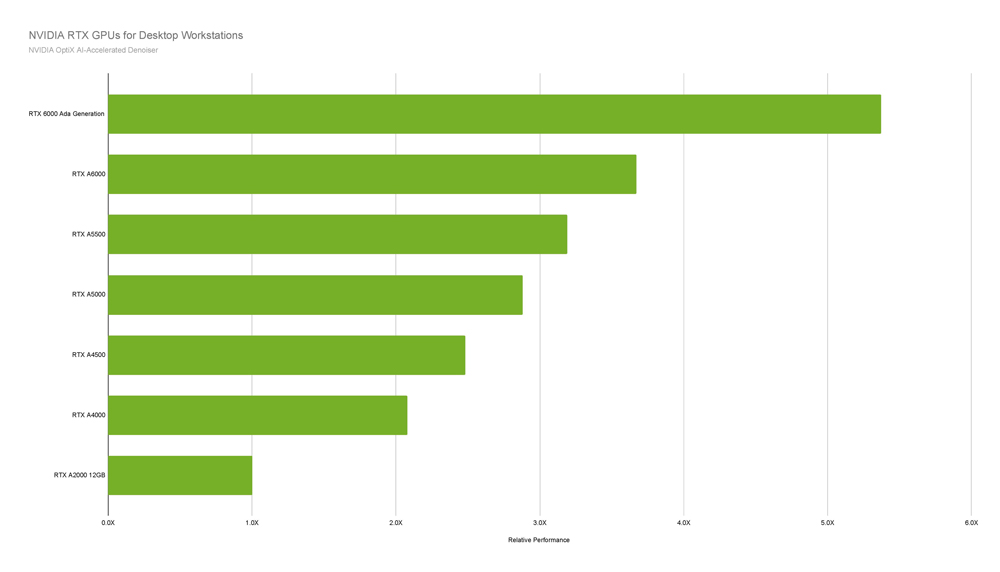
Image source: NVIDIA
Tests run on a workstation with Intel Core i9-12900K, 3.20GHz, 5.20GHz Turbo, 32GB RAM, Windows 11 Enterprise. Performance testing completed with NVIDIA OptiX 6.5 and driver version 528.49, 4K render resolution.
Why OptiX Is So Fast
- Runs directly on the GPU
- Optimized for real-time and near-real-time feedback
- Excellent for IPR (Interactive Preview Rendering) and look development
In many scenes, OptiX allows artists to reduce sample counts by several times while maintaining acceptable image quality—making it feel almost like a “magic button” for speed.
Limitations of OptiX
- While extremely fast, OptiX can sometimes:
- Slightly blur fine details
- Struggle with complex textures such as hair, fabric, or micro-surface details
- Introduce flickering in animations if pushed too aggressively
Because of this, OptiX is best suited for preview renders, lighting tests, and still images where speed is the top priority.
Overall, NVIDIA OptiX is a GPU-based AI denoiser built for high performance and reliable stability. By leveraging deep learning, it removes noise from partially rendered images and delivers real-time visual feedback during the rendering process. OptiX is widely supported by leading render engines such as Arnold, V-Ray, Blender, and Unreal Engine, and it requires an NVIDIA GPU (Maxwell architecture or newer) to operate.
Because it runs directly on the GPU, OptiX is especially well-suited for interactive previews and animation workflows where consistent results across frames are critical. Newer NVIDIA OptiX models also introduce temporal denoising, which helps minimize flickering and improve visual continuity in animated sequences.
Intel Open Image Denoise (OIDN)

Intel Open Image Denoise (OIDN) is another AI-based denoiser integrated directly into Redshift. Unlike OptiX, OIDN is hardware-agnostic and works on a wider range of systems.
Intel OIDN takes a different approach to AI denoising. This open-source solution is hardware-agnostic, running on both CPUs and GPUs across NVIDIA, AMD, and Intel platforms. As part of the Intel Rendering Toolkit and released under the Apache 2.0 license, OIDN is freely available and accessible to a wide range of users.
OIDN is widely recognized for its accuracy and detail preservation. Unlike GPU-only black-box denoisers, it leverages additional render data such as albedo and normal AOVs to better interpret scene lighting and geometry. With the introduction of GPU acceleration in version 2.0, OIDN has become even more flexible and suitable for modern production workflows.
Key Advantages of OIDN
- Produces more natural and stable results
- Preserves fine details better than OptiX in many cases
- More reliable for final-quality stills and animations
OIDN analyzes additional render data such as albedo and normal information, allowing it to reconstruct details more accurately and reduce temporal artifacts.
Performance Considerations
OIDN is generally slower than OptiX, especially on high-resolution images. However, the trade-off is higher visual fidelity and better consistency across frames, making it a strong choice for production renders.
When Should You Use AI Denoising Tools in Redshift?

Image Source: NVIDIA
AI denoising is most effective in Redshift when working with computationally expensive effects such as subsurface scattering (SSS), volumetrics, and complex global illumination. These features typically require very high sample counts to resolve noise cleanly, which can significantly increase render times. In such cases, AI denoising allows artists to render at much lower sample levels while still achieving visually acceptable results, often turning a noisy low-sample image into a production-ready render and reducing render times from minutes to seconds per frame. However, AI denoising is not free of cost; it introduces additional processing overhead. If a scene already renders cleanly in a very short time, enabling denoising may actually increase the total render duration. For this reason, understanding scene complexity and establishing a baseline render time is essential before deciding whether AI denoising will provide a real performance benefit.
iRender: High-Performance Bare-Metal Redshift Render Farm on RTX 4090 & RTX 5090
iRender delivers dedicated Bare-Metal cloud infrastructure engineered to handle the most demanding 3D rendering and visual effects pipelines. Instead of legacy automated SaaS queues with rigid environments, iRender provides direct, on-demand access to high-density multi-GPU nodes powered by top-tier NVIDIA GeForce RTX 4090 (24GB) and next-generation RTX 5090 (32GB GDDR7) graphics cards. Backed by enterprise AMD Ryzen™ Threadripper™ PRO processors and massive PCIe bandwidth, our high-performance Redshift render farm gives technical directors and studios the raw VRAM and compute density required to eliminate out-of-core penalties and accelerate production bucket delivery.
When renting an iRender server, you gain full administrator control over a remote personal workstation. Environments come pre-installed with major DCCs including Cinema 4D, Houdini, and Maya alongside Redshift, allowing you to deploy your custom plugins, pipeline scripts, and asset caches seamlessly without rebuilding established workflows.
Enterprise Server Hardware Specifications:
-
Processor: AMD Ryzen™ Threadripper™ PRO 3955WX (3.9–4.2GHz, 16 cores) or AMD Ryzen™ Threadripper™ PRO 5975WX (3.6–4.5GHz, 32 cores)
-
GPU Configurations: 1x, 2x, 4x, to 8x NVIDIA RTX 4090 (24GB VRAM) & RTX 5090 (32GB GDDR7 VRAM)
-
System RAM: 256GB high-frequency memory for heavy caching and geometry compilation
-
Storage: 2TB to 4TB High-Speed NVMe SSDs for rapid scene loading and cache reads
Let’s check out some of our test videos on Cinema 4D Redshift!


Enjoy our FREE TRIAL to try our RTX 4090 machines and boost your rendering now!
For more detailed information, please contact us via Live chat or WhatsApp: +(84) 912-785-500 or Email: [email protected].
iRender – Your Renders, Your Rules!
Related Posts
The latest creative news from Cinema 4D Cloud Rendering , Redshift Cloud Rendering, Octane Cloud Rendering, 3D VFX Plugins & Cloud Rendering.






