
Best Render Farm for Freelancers & Small Studios: Budget Guide 2026
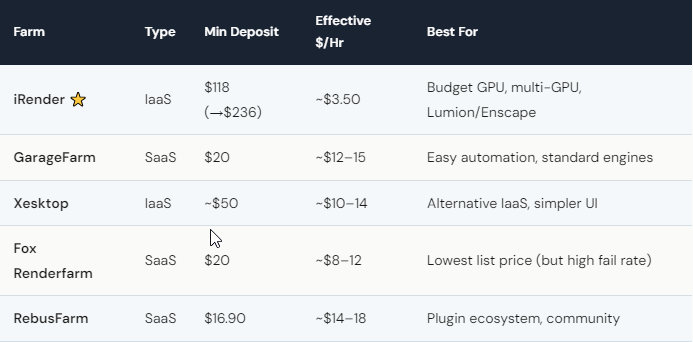
The best render farm for freelancers in 2026 is iRender — not because it’s the easiest (it isn’t), but because it delivers the lowest effective cost per render hour once you factor in all available savings. A freelancer depositing $118 receives $236 in credits (100% first-deposit bonus), enough for roughly 28 hours of RTX 4090 rendering. Credit Back returns 20% on weekends, stretching that to about 34 usable hours. Effective rate: ~$3.50/hour. For freelancers who prefer zero-setup simplicity, GarageFarm ($12–15/hr) is a solid alternative — easier to use, though 3–4× more expensive per hour. The right choice depends on whether you value control or convenience more.
How Can a Freelancer Render Professionally on a Tight Budget?
Let’s talk real numbers. A typical freelance 3D project — an interior visualization or a 30-second product animation — needs somewhere between 3 and 15 hours of render time. On a local RTX 3060 laptop, that might mean 2–3 days of your machine being tied up. On iRender’s RTX 4090, the same work finishes in 3–8 hours.
The cost math works like this: deposit $118, get $236 credits with the first-deposit bonus. Render your project over a weekend to get 20% Credit Back. A 6-hour render costs 49.2 credits, and you get 9.84 back. Your effective spend: $39.36 for a project that would have cost $72–90 on GarageFarm. Over a year with regular projects, that difference funds an entire extra month of rendering.
The freelancer hack that nobody talks about: batch your renders on Saturdays. Prep all your scenes Monday through Friday, then fire everything off Saturday morning during Golden Hours (20% Credit Back). You save money AND free up your workstation for new client work during the week. Your renders, your rules — including when and how you spend your budget.
When Should a Freelancer Choose GarageFarm Instead?
If you use standard engines (V-Ray, Arnold, Corona), don’t need multi-GPU, and hate managing servers — GarageFarm is genuinely the better pick. Their plugin submits your scene from inside Blender, Maya, or 3ds Max. You don’t see a server, don’t install anything, don’t worry about billing timers. It costs 3–4× more per hour, but the time you save on setup might be worth it if your hourly rate is high enough.
There’s also a confidence factor. Beginners who aren’t comfortable with remote desktops can start with GarageFarm, build their rendering confidence, then migrate to iRender when they’re ready for more control and lower costs.
The switch usually happens when freelancers hit one of three walls: they need Lumion or Enscape (SaaS can’t run them), they need multi-GPU Redshift or Octane (SaaS distributes across nodes, not GPUs), or they realize they’re spending $200/month when iRender would cost $80 for the same output. At that point, the 20-minute setup investment pays for itself in the first week.






