
Dedicated GPU Server for Rendering: When You Need More Than a Shared Farm
A dedicated GPU server gives you an entire machine — CPU, GPU, RAM, storage — exclusively for your use. Unlike shared render farms, where your job competes for resources, a dedicated server means no queue, no throttling, no software restrictions. iRender offers dedicated RTX 4090 servers (1–8 GPUs, 24GB VRAM each, 256GB RAM, 2TB NVMe) at ~$8.20/hour per GPU with remote desktop access. You connect, install whatever you want, and render on your terms. Alternatives include Xesktop (~$10–14/hr) and AWS EC2 (~$12–20/hr, but significantly harder to configure). Dedicated servers are essential for real-time apps (Lumion, Enscape, UE5), multi-GPU rendering (Redshift, Octane), and custom pipelines that shared farms can’t accommodate.
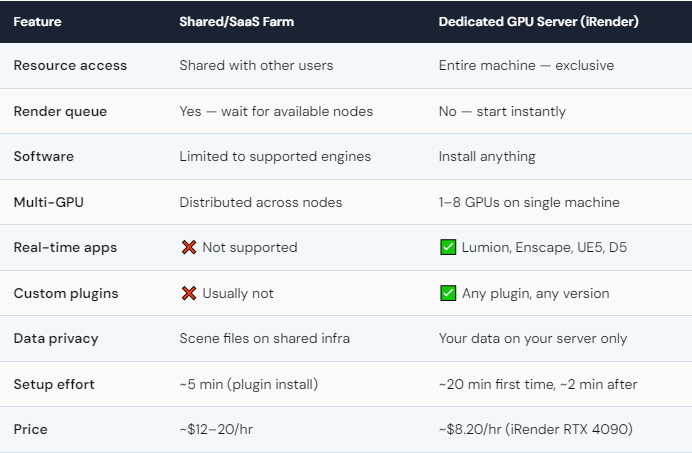
When Does a Shared Farm Stop Being Enough?
There’s a moment most 3D artists hit sooner or later. You submit a scene to a SaaS farm, download the results, and something’s wrong. A plugin didn’t load. A texture path broke. The render looks different from your local preview. You re-submit, adjust settings through the farm’s interface, wait again. Two hours and three attempts later, you’re thinking: if I could just see my scene on the machine before rendering, none of this would happen.
That’s the dedicated server moment. On iRender, you open your scene on the server, do a quick preview render to verify everything looks right, then launch the full batch. Problems get caught in 5 minutes, not after 2 hours of wasted render time. This alone saves more money than any pricing discount.
The other trigger is software limitations. Want to run Lumion for an arch-viz walkthrough? Enscape for a real-time client presentation? A custom Houdini setup with specific simulation caches? SaaS farms can’t do any of that. They support what they support, and if your workflow doesn’t fit — tough luck. A dedicated server doesn’t have that conversation. You install what you need. Your renders, your rules. That’s not a slogan — it’s how the thing actually works.
How Does iRender Compare to Other Dedicated Server Options?
iRender vs Xesktop: Both are IaaS with RTX 4090. iRender is cheaper (~$8.20/hr vs $10–14/hr), offers up to 8 GPUs per server, and has more active community support. Xesktop has a cleaner dashboard interface. For raw GPU power and cost, iRender wins. For UI simplicity, Xesktop is marginally easier.
iRender vs AWS EC2: AWS offers virtually unlimited scalability and GPU options (A10G, A100, even H100), but setup is exponentially harder. You need cloud infrastructure knowledge — VPC configuration, security groups, AMI selection, spot vs on-demand pricing. It takes hours to configure correctly. iRender is pre-configured: pick a server, connect, start rendering. Unless you’re running a large studio pipeline that needs AWS-level infrastructure, iRender saves you significant setup time.
The honest downside of dedicated servers: You manage everything. Software installation, scene verification, render monitoring, and — critically — shutting down the machine when you’re done. On iRender, leaving an 8-GPU server idle overnight costs roughly $130. SaaS farms never have this problem because they only bill for render time. The dedicated server gives you more power and control, but it requires more responsibility in return.






