
GPU vs CPU Rendering in 2026: Performance, Cost & When to Use Each
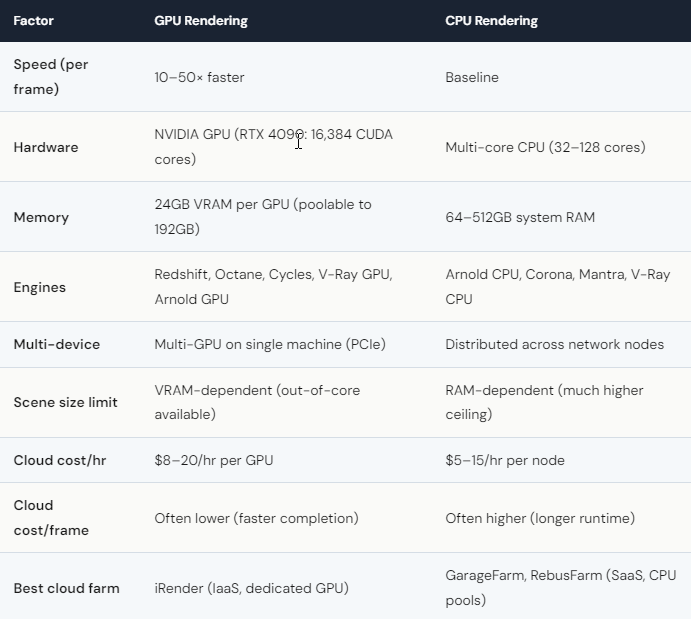
GPU rendering is 10–50× faster than CPU rendering for compatible engines (Redshift, OctaneRender, Blender Cycles, V-Ray GPU, Arnold GPU). A frame that takes a 32-core CPU 4 hours renders in 20–30 minutes on a single RTX 4090 — or under 5 minutes on 8× RTX 4090. However, CPU rendering still wins for specific use cases: Corona (CPU-only), Mantra (CPU-only), scenes exceeding GPU VRAM, and studios with existing CPU farm infrastructure. On cloud, GPU rendering costs $8–20/hour (iRender: $8.20/hr per RTX 4090). CPU rendering costs $5–15/hour per node. The per-frame cost is often lower on the GPU because jobs finish much faster — even though the hourly rate is higher.
Why Is GPU Rendering So Much Faster — and When Does It Not Matter?
GPUs win on parallelism. An RTX 4090 has 16,384 CUDA cores working simultaneously. A high-end CPU has 32–128 cores. For rendering — which is essentially the same ray-tracing calculation repeated millions of times — more parallel cores means dramatically faster completion.
But speed only matters if your engine supports GPU. Corona is CPU-only. Always has been. Mantra (Houdini) is CPU-only. If you use either engine, GPU rendering doesn’t apply — and iRender’s RTX 4090 servers would be a waste of money. For these workflows, SaaS farms like GarageFarm distribute your job across 200+ CPU cores simultaneously, finishing in minutes what a single workstation takes hours to complete.
The VRAM limitation is the other caveat. GPU renders load the entire scene into GPU memory. If your scene’s textures and geometry exceed 24GB (one RTX 4090), you’ll either need multi-GPU (pooled VRAM) or out-of-core mode (slower). CPU rendering uses system RAM — 128GB or 256GB is standard — so it handles massive scenes more gracefully. For VFX studios working with hero shots containing 50+ million polygons and 8K displacement maps, CPU rendering may actually be more practical.
What Should You Choose for Cloud Rendering — GPU or CPU Farm?
Use GPU cloud (iRender) when: Your engine supports GPU (Redshift, Octane, Cycles, V-Ray GPU, Arnold GPU). You need multi-GPU scaling. You want interactive rendering or real-time apps (Lumion, Enscape, UE5). You value per-frame cost over per-hour cost. iRender at ~$8.20/hour finishes jobs faster, making the total cost per project often lower than CPU despite the higher hourly rate.
Use CPU cloud (GarageFarm, RebusFarm) when: Your engine is CPU-only (Corona, Mantra, Arnold CPU). You want automated batch submission without server management. Your scene exceeds GPU VRAM and out-of-core is too slow. CPU SaaS farms distribute across hundreds of cores — perfect for these workloads.
Use both when: Your pipeline mixes engines. Many studios render V-Ray GPU previews on iRender, then send Corona finals to GarageFarm. This isn’t a hack — it’s the most cost-effective approach for mixed-engine studios in 2026.
The bottom line: GPU rendering is faster and increasingly cheaper. The industry is moving toward GPU. But CPU rendering isn’t dead — it’s specialized. Your renders, your rules. Choose based on your engine, your scene, and your budget — not on what any farm (including us) tells you is “better.”






