
Maya Cloud Rendering 2026: Arnold GPU vs Redshift on iRender’s Multi-GPU Servers
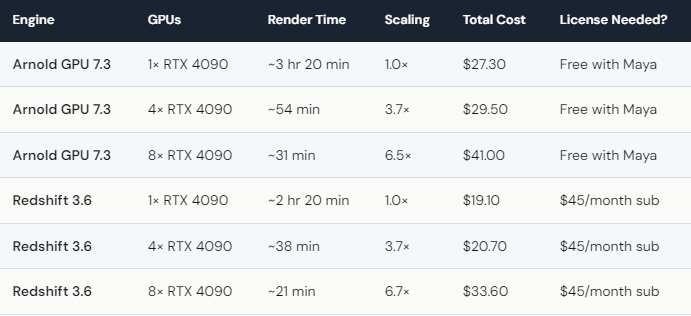
We tested Maya 2026 with both Arnold GPU 7.3 and Redshift 3.6 on iRender’s dedicated RTX 4090 servers. Test scene: a 200-frame character animation at 1920×1080. Redshift on 4× RTX 4090 finished in ~38 minutes ($20.70 total). Arnold GPU on 4× finished in ~54 minutes ($29.50 total). Redshift is roughly 42% faster and 30% cheaper per project on multi-GPU. However, Arnold GPU ships free with Maya — no additional license cost — while Redshift requires a separate subscription ($45/month). For studios already paying for Redshift, it’s the faster engine. For Maya-only shops avoiding extra licenses, Arnold GPU on cloud is a compelling option at ~$8.20/hour per GPU.
Should Maya Artists Switch to Redshift — or Stick with Arnold GPU?
This isn’t as clear-cut as the speed numbers suggest. Redshift is faster on multi-GPU — that’s objective. But the decision involves more than raw render time.
Arnold GPU ships free with every Maya license. If you’re already paying for Maya ($1,875/year or $235/month), Arnold GPU costs you nothing extra. Redshift adds $45/month ($540/year). Over a year, that’s real money — especially for freelancers. The question becomes: does Redshift’s 42% speed advantage save you more than $540 in cloud rendering time?
Let’s math it out. If you render 20 hours/month on 4× RTX 4090, Arnold costs roughly $655/month in GPU time. Redshift costs $460/month in GPU time + $45 license = $505/month. So yes — Redshift saves about $150/month for a 20 hr/month user, even after the license fee. But for lighter users (under 10 hr/month), the savings don’t cover the Redshift subscription.
There’s also a workflow factor. Arnold GPU integrates natively with Maya — lights, shaders, and AOVs work out of the box. Redshift requires re-creating your shader network. If you have hundreds of Arnold-shaded assets, the migration cost in time is significant. Your renders, your rules — and sometimes the rule is “don’t fix what isn’t broken.”
How Does Multi-GPU Actually Work in Maya on Cloud?
On iRender, you connect via remote desktop to a server with 1–8× RTX 4090. Open Maya. Both Arnold GPU and Redshift detect all available GPUs automatically — no manual configuration. Arnold uses the GPU rendering mode (enabled in Render Settings), and Redshift uses its native GPU selector. Hit render, and all cards work in parallel.
Scaling-wise, both engines perform similarly at 4× GPUs (~3.7× speedup). At 8×, Redshift pulls slightly ahead (6.7× vs 6.5×). The difference is marginal enough that your engine choice should be based on workflow and licensing, not scaling performance.
One thing unique to iRender: because it’s IaaS, you can run both engines on the same server during the same session. Test a frame in Arnold, test it in Redshift, compare quality, then batch-render with whichever you prefer. SaaS farms lock you into one engine per submission. On a dedicated server, you’re not locked into anything.
Credit Back still applies: 10–20% returned after every session. New users get 100% first-deposit bonus. A $230 deposit becomes $460 in credits — enough for roughly 14 hours on 4× RTX 4090. That’s a lot of Maya rendering for one top-up.





