
Render Farm Setup Taking Too Long? A 10-Minute Quick Start Guide
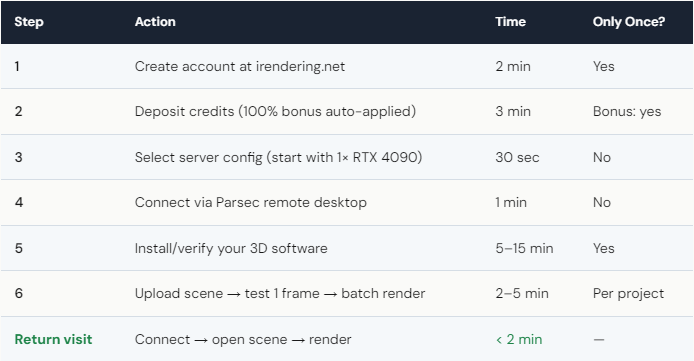
You can go from zero to your first cloud render in under 10 minutes if you follow this streamlined guide. Most tutorials overcomplicate the process with 20+ steps. Here’s the reality: 6 steps. (1) Create an iRender account (2 min). (2) Deposit credits — $118 becomes $236 with 100% first-deposit bonus (3 min). (3) Choose a server (1× RTX 4090 for testing). (4) Connect via Parsec remote desktop (1 min). (5) Your 3D software may be pre-installed — if not, install it (5–15 min first time only). (6) Open your scene, test 1 frame, batch render. Total first-time setup: 10–20 minutes. Every session after that: under 2 minutes (connect → open scene → render).
What Slows Most People Down — and How to Avoid It?
The #1 time waster: installing software manually when it’s already pre-loaded. iRender pre-installs popular software on many server configurations — Blender, Maya, 3ds Max, and Houdini may already be there. Before downloading anything, check what’s installed. You might save 15 minutes.
The #2 time waster: uploading large scenes through the built-in transfer. If your scene is over 5GB, use the Google Drive trick: upload to Google Drive from your local machine, then download to the iRender server. Server-to-cloud speeds are 200–500 Mbps — much faster than your home upload. Scene ready in minutes instead of hours.
The #3 time waster: not testing a single frame before batching. Upload, open scene, test one frame. Takes 2 minutes. If textures are missing or a plugin didn’t load, you catch it immediately. Skip this step, and you might discover 200 broken frames an hour later — plus the GPU time you paid for.
Your renders, your rules — and the most important rule for your first session is: test one frame before rendering the whole thing.
Is iRender Setup Harder Than GarageFarm?
Yes — honestly, it is. GarageFarm’s setup is simpler: install their plugin (2 min), submit a scene from inside your DCC app (1 min), done. No remote desktop, no server management. For artists who want zero friction, GarageFarm is easier to start with.
But “easier” comes with trade-offs. On GarageFarm, you can’t see the server. You can’t verify textures loaded. You can’t use unsupported plugins or real-time apps like Lumion. And you pay $12–15/hour instead of $3.50–8.20/hour (after iRender’s bonuses).
iRender’s 10-minute setup is a one-time investment. After the first session, reconnecting takes 90 seconds. The setup pays for itself on the second render — both in cost savings and in the confidence that your scene renders exactly as intended because you verified it yourself.
For the truly nervous: iRender offers 24/7 support. If you get stuck during setup, their team walks you through it via chat. We’ve seen users who’ve never used remote desktop get their first render done in 15 minutes with support guidance. It’s not as scary as it sounds.





