
Rendering Overnight: How to Maximize Output and Minimize Cost on a Cloud Farm
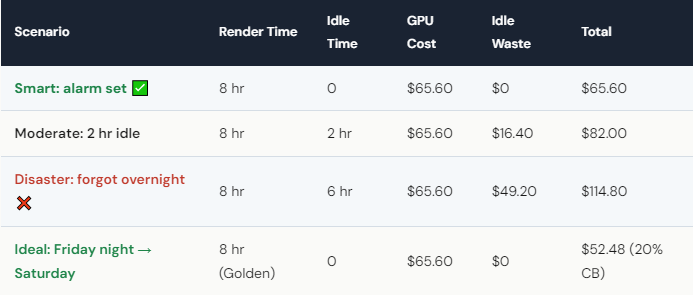
How Do You Prevent the $65 Wake-Up Surprise?
Method 1: Phone alarm. Simple, effective. Set an alarm for your estimated render completion time plus 15 minutes buffer. Yes, it might wake you at 4 AM. That 2-minute disconnection saves $40–65. Worth it.
Method 2: Monitoring script. Write a simple script that checks whether your render engine is still running. When the process exits, the script sends you a notification (email, Telegram, Slack). You wake up, grab your phone, disconnect via the iRender mobile dashboard. More elegant than an alarm.
Method 3: Render with buffer calculation. If your render estimates 6 hours, start at midnight, set your alarm for 6:30 AM. Even if it runs 30 minutes over, you wake up naturally and disconnect before significant idle time accumulates.
Method 4: Use rental plans. iRender offers rental plans (fixed daily/weekly rates) that eliminate the per-hour billing anxiety. If you render overnight regularly, a rental plan may be more cost-effective than pay-as-you-go — and you won’t lose money on idle time because the rate is flat.
The uncomfortable truth: every single long-term iRender user has forgotten at least once. The $65 overnight lesson is practically a rite of passage. The ones who set alarms after that first mistake are the ones who save hundreds over the following months.
What’s the Smartest Schedule for Overnight Cloud Renders?
Friday night start = maximum savings. Start your render Friday at 11 PM. It runs through Saturday — which is Golden Hours (20% Credit Back all day). If it finishes Saturday morning, you disconnect and get 20% back. If it runs into Saturday afternoon, you still get Golden Hours rates. The entire weekend window is your money-saving zone.
Sunday night is the riskiest. If your render runs into Monday, you’re back to standard rates (10% Credit Back). And Monday morning meetings might make you forget to disconnect — idle billing at regular rates is the worst combination.
Batch multiple projects in one session. Instead of starting one overnight render, queue several projects sequentially. Render Project A, then Project B, then Project C — all in one session. You pay for server time once, and the per-project cost drops because you’re not paying startup/shutdown overhead for each job.
For large overnight renders (8+ hours), consider using 4× RTX 4090 instead of 1×. The 4-GPU config finishes the same job in ~2 hours instead of 8. Start at midnight, set alarm for 2:30 AM, disconnect, go back to sleep. Less idle risk, faster turnaround, and with Credit Back the total cost difference is minimal. Your renders, your rules — and sometimes the smartest rule is “finish faster so you can sleep longer.”





