
Unreal Engine Cloud Rendering: Real-Time GPU Power Without the Hardware Cost
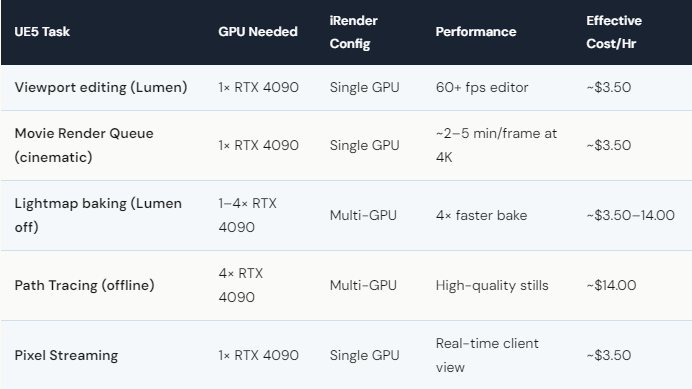
Unreal Engine 5 with Nanite and Lumen requires a powerful GPU with a live desktop session — which means no SaaS render farm can run it. GarageFarm, RebusFarm, and Fox Renderfarm all use automated pipelines without interactive desktop access. UE5 needs to run on a dedicated GPU server where you can interact with the viewport, adjust settings in real-time, and trigger Movie Render Queue manually. On iRender, a single RTX 4090 (24GB VRAM, ~$8.20/hr) runs UE5 smoothly at 60+ fps in editor with Lumen enabled. For heavy cinematic renders via MRQ, the 4× RTX 4090 config accelerates rendering significantly. After Credit Back (20% weekends) and 100% first-deposit bonus, effective cost drops to ~$3.50–4.00/hour — less than the electricity cost of running a local RTX 4090 for the same duration.
Why Can’t Any SaaS Render Farm Run Unreal Engine?
It comes down to how UE5 works. Unreal Engine isn’t a batch renderer — it’s an interactive application. You need to see the viewport, navigate the scene, adjust lighting in real-time, set up cameras, configure sequencer, and manually trigger Movie Render Queue. None of that can happen through a “upload file → render → download” pipeline.
SaaS farms like GarageFarm and RebusFarm are built for offline renderers: V-Ray, Arnold, Corona. You submit a scene file and they distribute it across nodes. Unreal Engine doesn’t work that way. It needs a live GPU desktop session — which is exactly what IaaS provides.
On iRender, you connect via remote desktop (Parsec or RDP), open Unreal Engine, and work as if you’re sitting in front of a powerful workstation. The RTX 4090 handles Nanite’s virtual geometry and Lumen’s real-time global illumination at 60+ fps in editor. When you’re ready, trigger Movie Render Queue for cinematic-quality output. The whole workflow happens live, on your schedule, with your settings. Your renders, your rules — and with UE5, there’s literally no alternative to IaaS.

What Can You Actually Do with UE5 on a Cloud GPU Server?
Architectural visualization: Load massive building models with Nanite, light with Lumen, render walkthrough animations via MRQ. On a local RTX 3060, this stutters at 15 fps. On iRender’s RTX 4090, smooth 60+ fps editing and clean cinematic output.
Game cinematic rendering: Use Sequencer to create in-game cinematics at movie quality. Path Tracing mode on 4× RTX 4090 produces ray-traced stills and short sequences that rival offline renderers — in a fraction of the time.
Pixel Streaming for client reviews: iRender’s server can run Pixel Streaming, allowing your client to view and interact with the UE5 scene in a web browser — no download, no app install. You present, they navigate, decisions happen in real-time.
Lightmap baking: For projects that don’t use Lumen (mobile/VR targets), lightmap baking on multi-GPU significantly cuts build times. The 256GB RAM on iRender’s servers handles large worlds without memory issues.
All of this happens on hardware that would cost $7,000–15,000 to buy locally. On iRender, you pay only for the hours you use. A 4-hour UE5 session on a single RTX 4090 costs $32.80 — or $13.12 after first-deposit bonus and weekend Credit Back. Build the habit of working in cloud sessions, and you’ll wonder why you ever waited for a local render to finish.






