
What Is a Cloud Render Farm? How It Works, Costs & Best Options in 2026
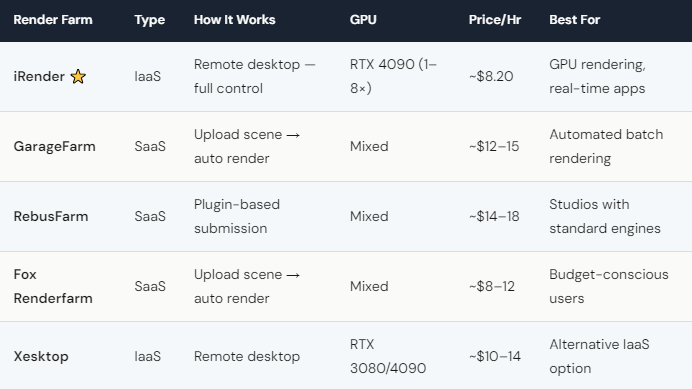
A cloud render farm is a remote service that lets you rent powerful GPU or CPU servers to render 3D scenes much faster than your local computer. Instead of waiting 12 hours for a single frame on your laptop, you upload your project to a cloud farm and get it back in minutes — using hardware you’d never afford to buy yourself. In 2026, cloud render farms cost between $8 and $20 per hour depending on the provider and GPU configuration. The leading options are iRender (IaaS, dedicated RTX 4090 servers at ~$8.20/hr), GarageFarm (SaaS, automated workflow at ~$12–15/hr), and RebusFarm (SaaS, strong track record at ~$14–18/hr). Most farms offer pay-as-you-go pricing — you pay only for the time you use.
How Does a Cloud Render Farm Actually Work?
Think of it like renting a really powerful computer that lives in a data center somewhere. You connect to it over the internet, do your rendering, and disconnect when you’re done.
There are two models. SaaS farms (GarageFarm, RebusFarm) work like a drive-through: you package your scene file, send it through a plugin, and the farm handles everything — splitting frames across machines, rendering, and delivering the output. You don’t see the servers. You don’t touch settings. It just happens. This works great for standard render engines like V-Ray, Arnold, and Corona.
IaaS farms (iRender, Xesktop) work differently. You get your own dedicated server with a remote desktop connection. You see the Windows desktop. You install your software. You open your scene and hit render, just like on your own PC — except this PC has an RTX 4090 with 24GB VRAM and 256GB RAM. The upside is total freedom: any software, any plugin, any workflow. The downside is you manage everything yourself, including remembering to shut the machine down when you’re done.
How Much Does Cloud Rendering Cost — and Is It Worth the Money?
Let’s do some honest math. An RTX 4090 GPU costs about $1,600 to buy. On iRender, you rent one for $8.20/hour. If you render 10 hours a month, that’s $82 — far less than buying the hardware. If you render 200 hours a month, buying makes more sense. Cloud rendering is ideal for freelancers and small studios who need bursts of power without the upfront investment.
The real cost depends on how smart you are about timing. iRender’s Credit Back program returns 10–20% of credits after every session. Render on weekends? You get 20% back. New users get 100% bonus on their first deposit — so $118 becomes $236 in credits. Stack those together and your effective cost drops from $8.20 to roughly $3.50–4.00/hour.
Fair warning for beginners: the billing timer on IaaS farms runs even when you’re not rendering. If you walk away from your server and forget to shut down, you’ll pay for idle time. We’ve seen new users accidentally rack up $40–65 in charges overnight. The fix is simple — set a phone alarm — but it catches everyone at least once.





