
Your Scene Is Too Big for One GPU: When to Stop Optimizing and Scale Out
That afternoon is the reason I wrote this. There is a quiet trap in 3D where optimizing feels productive, so you keep doing it long after it has stopped earning its keep. At some point the scene is as lean as it is going to get without hurting the shot, and every further hour you spend tuning is an hour you are not rendering. Knowing where that line sits is a skill, and most of us learn it the slow way.
Stop optimizing and scale out when the scene is already clean, when further cuts would visibly hurt the shot, and when the remaining render time still misses your deadline. A single GPU has a fixed ceiling of memory and speed, so once you have hit it, the time problem is solved by adding GPUs or machines, not by tuning further. Optimizing is for removing waste. Scaling is for buying horsepower you do not have.
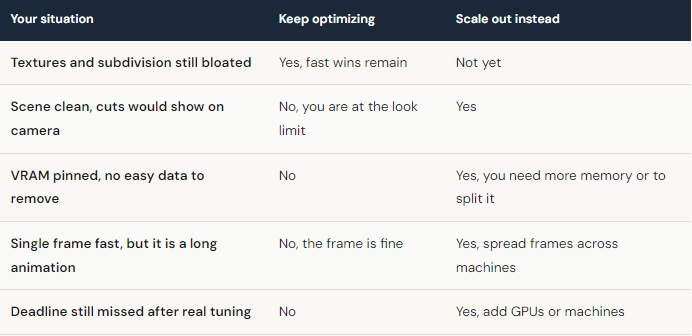
How do I know I have actually hit the ceiling?
Two signals tell me the optimizing is done. The first is when the cuts start showing up on camera. If lowering subdivision any further softens a silhouette the audience will see, or dropping a texture makes the hero material look cheap, you have crossed from removing waste to removing quality. The second is when VRAM stays pinned no matter what you trim. When nvidia-smi sits near 24GB and the only data left to cut is data the shot needs, more tuning will not save you, because the problem is the size of the card, not the cleanliness of the scene.
Time is the third signal, and the most stubborn one. Do the arithmetic before you commit. If a clean frame takes 11 minutes and you have 600 frames and three days, one machine cannot finish it, and no clever setting closes that gap. That is a capacity problem with a capacity answer.
Scaling out without buying hardware you will not use
Buying a second or third GPU to clear one busy month is a hard sell, because the cards sit idle the rest of the year. Renting solves the timing, and iRender is built around you keeping control rather than handing your scene to a black box. You get a full RTX 4090 workstation, with 256GB of system RAM behind the card, and you install your software and your exact setup, so the render matches your local result because you built the environment. Run an 8 GPU machine on a single brutal frame, or several machines in parallel to clear a sequence in a night. The whole pitch of “your renders, your rules” is that nothing about your pipeline has to change to fit the farm.
A couple of practical warnings so the cost stays predictable. Billing tracks the time the server is powered on, so a machine sitting idle costs the same as one rendering, which makes shutting down the moment you finish a real habit worth keeping. The first setup is the slow part, around fifteen to thirty minutes to get everything installed, and after that your saved image launches in a couple of minutes. If your situation is simply a pile of overnight frames and you do not need a live desktop, a SaaS render farm can be the easier tool. iRender earns its place when the scene needs more memory headroom or more control than your own machine can give.





