
Is 24GB VRAM Enough for 3D Rendering in 2026?
For the work most 3D artists actually do, yes, 24GB is plenty in 2026, even now that 32GB consumer cards exist. Product visualization, architectural interiors, character work, motion graphics, and the majority of Blender, Cinema 4D, and Maya scenes fit comfortably with sensible texture sizes. Where 24GB starts to strain is film-scale sets, huge 8K texture libraries, dense volume simulations, and 4K renders carrying a deep stack of passes.
This question comes up every time someone is about to spend money, either on a card or on a render service, and the practical framing is that 24GB is not a hard wall so much as a comfortable ceiling for typical production. I have rendered years of client work on 24GB cards without trouble, and the times I hit the limit were always the same kinds of scenes: ones with texture libraries I had not pruned, or effects-heavy shots that were always going to be hungry.
It is worth naming the elephant in the room. Since early 2025 there has been a 32GB consumer card on the market, so 24GB is no longer the most VRAM you can buy. That changes the upgrade question a little, but it does not change the answer for most people, because the scenes that overflow 24GB usually overflow 32GB too once they are big enough to matter. The deciding factor is what you render, not the headline number on the box.
| Type of work | Typical VRAM use | Fits in 24GB? |
|---|---|---|
| Product viz, single hero object | ~4 to 10 GB | Comfortably |
| Archviz interior, sensible textures | ~10 to 18 GB | Yes, with care |
| Character with hair and grooming | ~8 to 16 GB | Usually |
| 4K render with many AOVs | ~18 to 26 GB | Tight, can go over |
| Film-scale set, 8K texture library | ~30 GB and up | No, needs out of core or more memory |
| Dense volume sim render | ~20 to 40 GB and up | Often over, even on 32GB |
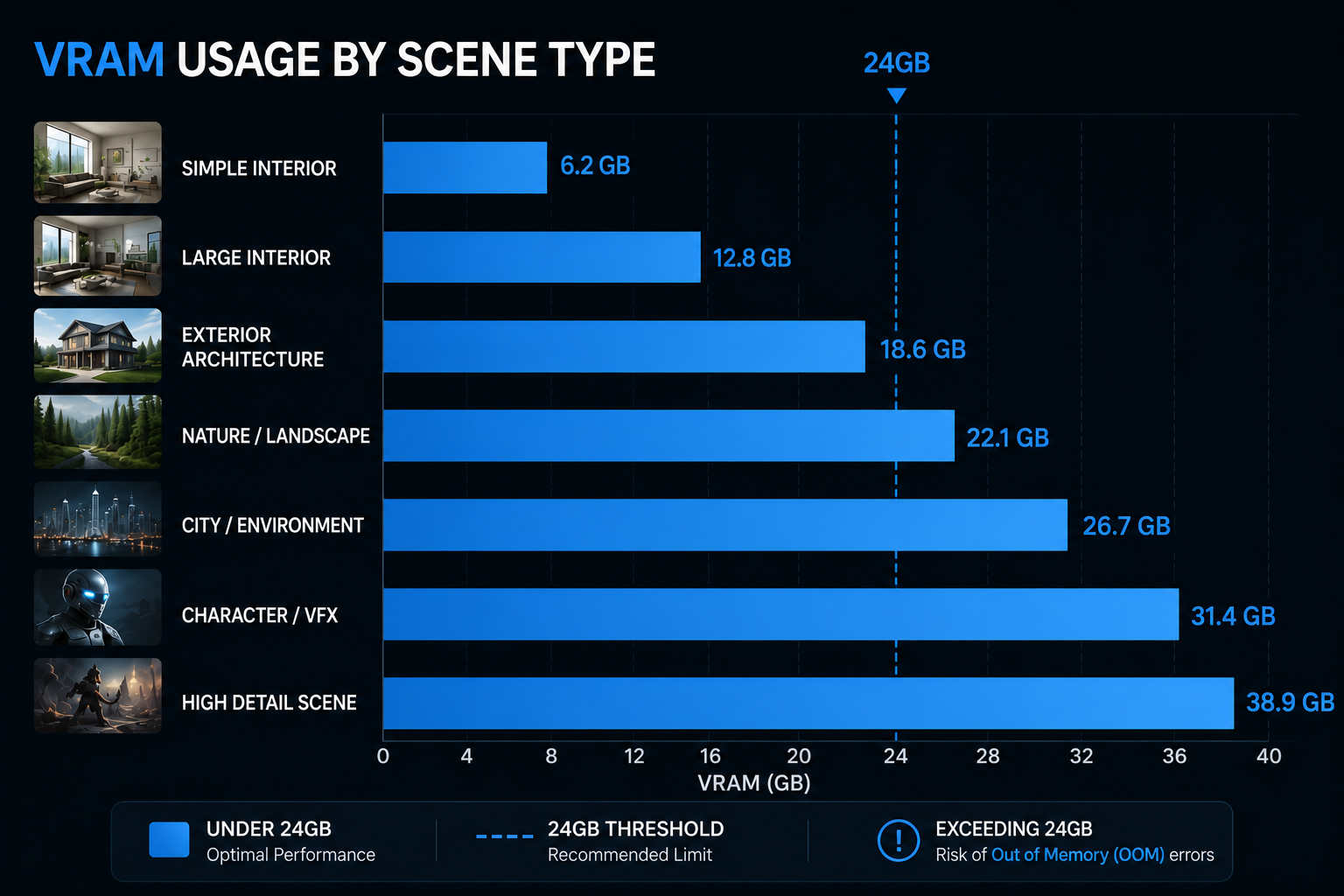
What fits comfortably in 24GB
Most commercial work sits well under the limit. A product render with one detailed object and a clean studio setup rarely troubles a 24GB card. Archviz interiors are heavier because of all the furniture, materials, and textures, but with texture sizes matched to how close each object is to camera, a typical interior lands in the teens of gigabytes with room to spare. Character work, even with hair and grooming, usually fits, and motion graphics are almost never VRAM bound. For the daily reality of freelancers and small studios, 24GB covers it.
The cases that fit but get close are worth knowing. A 4K render with a full set of render passes, known as AOVs, plus a denoiser can creep toward the ceiling, because the output buffers grow with resolution. That is a separate issue from how heavy the scene geometry is. Trimming passes or rendering at a lower resolution for tests keeps those in line.
What pushes past 24GB
The scenes that genuinely exceed 24GB tend to be predictable. Film-scale environments with enormous, unoptimized texture sets are the classic one, since textures are usually the largest single consumer of VRAM. Dense volume simulations, smoke and fluids rendered at high voxel detail, can run well past a single card on their own. And heavy 4K work with many passes stacks the scene cost and the buffer cost together until something has to give. A 32GB card buys headroom on the borderline cases, but the genuinely large ones overflow it too.
For these, out of core rendering, which means spilling data the card cannot hold into system RAM, extends a 24GB card a long way at the price of slower reads. So even a scene that overflows the card can often still render on 24GB, just not as fast as one that fits. The more system RAM the machine has, the more comfortably that overflow sits.
The 2026 picture, and where iRender fits
Heading through 2026, the practical situation is that the software has caught up faster than most scenes have grown. Out of core support and smarter memory handling in Blender, Redshift, Octane, and others mean a 24GB card stretches further than the raw number suggests, and the rendering engines lean on system RAM to do it. So while 32GB cards now exist, the real-world gap for everyday production is smaller than the spec sheet implies, and for most artists 24GB is still enough.
When a job does need more headroom than your own card, iRender gives you full RTX 4090 machines, each with 24GB of VRAM and 256GB of system RAM. To be clear, the VRAM per card is the same 24GB, so renting one does not hand you a bigger card. What it adds is a large system memory pool that makes out of core genuinely comfortable, fast storage, and up to 8 cards to clear heavy work quickly, with your own software and versions installed so the result matches your local setup, which is the meaning of “your renders, your rules.” On any rented box, the clock starts at boot and the first configuration takes fifteen to thirty minutes before your saved image launches fast, so set auto-shutdown and you will not leave one running. If you only want hands-off batch frames, a SaaS render farm is an option too.
Got a scene that pushes past 24GB and need room to render it?: See RTX 4090 servers with 256GB system RAM
Want to test whether your scene fits before buying a card?: Try iRender now and get a 100% bonus on your first deposit






