
Cheapest Render Farms in 2026: But Which One Actually Delivers Quality?
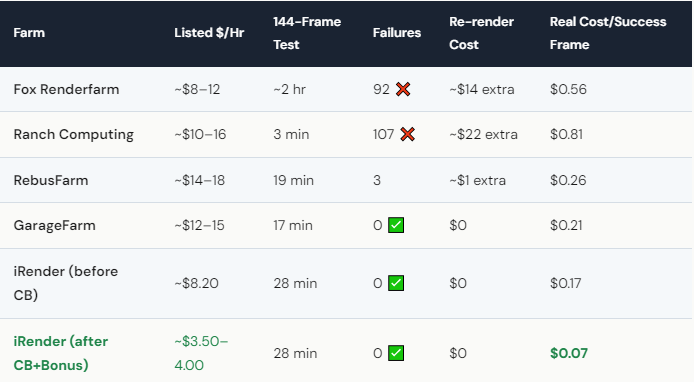
The cheapest render farm by list price in 2026 is Fox Renderfarm at ~$8–12/hour — but in our 144-frame test, 92 frames failed, meaning the real cost per successful frame was 2.8× higher than advertised. iRender lists at $8.20/hour with zero failed frames, and its Credit Back program (10–20% returned per session) plus 100% first-deposit bonus bring the effective rate down to ~$3.50–4.00/hour. GarageFarm costs $12–15/hour but offers zero failures and automated workflow. The cheapest farm on paper often isn’t the cheapest per successful frame — factor in re-renders, failed frames, and hidden costs before choosing.
Why Does the “Cheapest” Farm Often End Up Costing More?
Because failed frames don’t show up on the price page. Fox Renderfarm looks incredible at $8–12/hour. But when 92 out of 144 frames come back broken — black frames, missing textures, crashed renders — you have to re-submit. That’s another render cycle. More time, more money. In our test, the re-renders added roughly $14 in extra costs. The “cheap” option ended up costing $0.56 per successful frame, while iRender (at a similar list price) delivered every frame clean for $0.17 each.
Then there’s the quality control problem. On SaaS farms, you don’t see the render until it’s done. If a texture path was wrong, or a plugin didn’t load, or the farm applied different settings — you only find out after paying. On iRender, you see your scene on the server before you hit render. You catch problems early. That’s the your renders, your rules difference: you control the outcome, not the farm.
This doesn’t mean SaaS farms are bad. GarageFarm delivered 144/144 frames successfully at $12–15/hour. Their system is mature, their plugin integration is solid, and they’ve earned their reputation. But “cheapest” and “best value” are two completely different questions.
How Can You Get the Lowest Actual Cost Without Sacrificing Quality?
Step 1: Choose a farm with zero or near-zero fail rates. In our testing, iRender, GarageFarm, and Xesktop all delivered clean frames. Start there — not with whoever advertises the lowest number.
Step 2: Use pricing programs that actually reduce your cost. iRender’s Credit Back returns 10–20% of credits after every session. Render on weekends and get 20% back. New users get 100% bonus on their first deposit — $118 becomes $236 in credits. When you stack these, the effective cost drops from $8.20 to roughly $3.50–4.00/hour. That’s genuinely hard to beat.
Step 3: Optimize your scene before uploading. Enable AI denoising (OptiX in Redshift, OIDN in Blender), reduce unnecessary texture resolution, and bake simulations locally. A 20-minute optimization pass can cut render time — and cost — by 30–40%.
Step 4: Watch the billing timer. Here’s iRender’s honest downside: the server charges whether you’re rendering or not. Forget to disconnect overnight and you’ll waste ~$65. Set a phone alarm. This one mistake can destroy all the savings you’ve accumulated. We say it in every article because it catches at least one new user every week.





