
Maxon’s Cinebench 2026 and its CPU & GPU Scores
Maxon’s Cinebench 2026 marks a major evolution of one of the industry’s most widely trusted benchmarking tools for evaluating modern CPU and GPU performance. Cinebench 2026 is now fully aligned with Maxon’s Redshift rendering engine, delivering more demanding scenes, higher memory requirements, and more realistic rendering scenarios than previous versions.
In addition to refined CPU benchmarks, Cinebench 2026 places greater emphasis on GPU rendering performance, offering deeper insight into how contemporary graphics hardware handles production-grade Redshift workloads. In this article, we will explore the key changes introduced in Cinebench 2026 and analyze the CPU and GPU scores it produces, helping users better understand how different hardware configurations compare under modern rendering demands.
Maxon’s Cinebench 2026
What is Cinebench 2026?
Cinebench is a widely used hardware benchmarking tool developed by Maxon to measure the performance of CPUs and GPUs using real-world 3D rendering workloads. At its core, Cinebench renders complex 3D scenes using Maxon’s professional rendering technology (now based on Redshift). Instead of synthetic tests, it evaluates how efficiently a system handles tasks that closely resemble actual content creation, such as lighting, shading, geometry processing, and ray tracing.
Cinebench 2026 utilizes the power of Redshift, Cinema 4D’s default rendering engine, and sets a new standard for performance evaluation. Cinebench 2026 is designed to accommodate a broad range of hardware configurations. Embracing cutting-edge technology, it provides a more accurate and relevant representation of the hardware capabilities to artists, designers, and creators.

Source: Maxon
What is new in Cinebench 2026?
Deeper Integration of Redshift Rendering
Cinebench 2026 further solidifies Redshift as the foundation of Maxon’s benchmarking pipeline. Unlike earlier versions that transitioned from Cinema 4D’s legacy renderer, Cinebench 2026 is fully optimized around modern Redshift rendering workflows, featuring more complex geometry, advanced lighting, and heavier shading calculations. Both CPU and GPU tests now rely on production-grade Redshift scenes that better reflect real-world rendering tasks faced by today’s 3D artists and studios.
Expanded CPU Benchmarking
While CPU performance remains a core focus, Cinebench 2026 introduces more granular CPU evaluation, including improved multi-core scaling and dedicated SMT (Simultaneous Multithreading) testing. This allows users to better understand how efficiently modern processors utilize physical and logical cores under heavy rendering workloads.
Enhanced GPU Rendering Benchmarks
Building on the return of GPU benchmarking in Cinebench 2024, Cinebench 2026 delivers more demanding GPU rendering tests. These benchmarks are designed to push modern graphics cards harder, especially high-end and multi-GPU configurations. With larger scenes and increased memory requirements, Cinebench 2026 provides clearer insight into how GPUs perform in Redshift-based rendering pipelines used in production environments.
Broader Hardware and Platform Support
Cinebench 2026 expands compatibility across modern hardware platforms. It supports x86-64 Intel and AMD processors on Windows and macOS, as well as ARM64 architectures, including Apple Silicon and Snapdragon-based systems. On the GPU side, the benchmark supports NVIDIA, AMD, and Apple GPUs, aligning with the growing diversity of graphics hardware in creative workflows. This ensures Cinebench 2026 remains relevant across desktops, workstations, and next-generation systems.
More Demanding Unified Benchmark Scenes
Cinebench 2026 continues the unified scene approach for both CPU and GPU testing, but with significantly increased complexity. Using the same Redshift scene for both tests allows for more meaningful comparisons between CPU and GPU rendering performance. The updated scenes feature higher polygon counts, more detailed textures, and advanced ray tracing effects, closely mimicking real production scenarios rather than simplified benchmark tasks.
Cinebench 2026’s System Requirements
Based on the Redshift renderer, Cinebench 2026’s system requirements are heavily tied to it. Here are the key requirements for this tool:
- Memory: At least 16GB RAM for optimal performance.
- Operating Systems: Windows 10 Version 20H2 or higher or Windows 11 for x86/64 hardware, macOS 14.7+ (Sonoma)
- CPUs: Apple M-series chips (M1, M2, Pro, Max, Ultra) are supported.
- GPUs: For GPU rendering on Windows, a CUDA Nvidia GPU or recent HIP-compatible AMD GPU is necessary.
- macOS GPU Support: Apple’s integrated GPUs can be evaluated on Mac systems.
Who should use Cinebench 2026?
Cinebench 2026 is best suited for 3D artists, content creators, hardware reviewers, and system builders who need a realistic evaluation of modern CPU and GPU performance. Using production-grade Redshift rendering workloads, it provides meaningful insight into how different hardware configurations perform in real-world creative scenarios. It is particularly valuable for users working with GPU-accelerated rendering, planning workstation upgrades, or validating systems for demanding rendering and content creation pipelines.
CPU & GPU Scores of Cinebench 2026
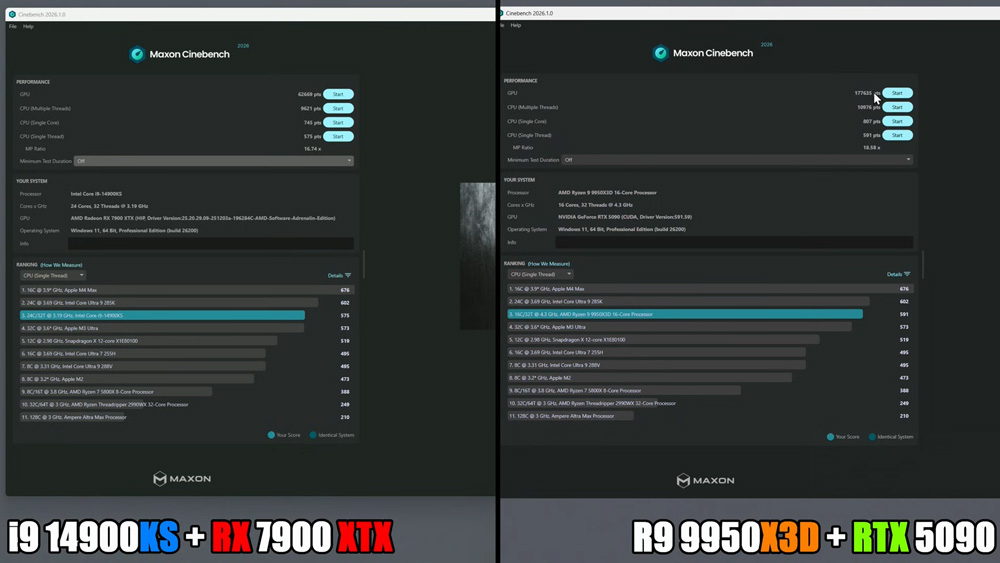
Source: Bang4BuckPC Gamer
Based on the Cinebench 2026 results shown in the image, the performance gap between the two hardware configurations is immediately noticeable.
The Intel Core i9-14900KS paired with the AMD Radeon RX 7900 XTX delivers strong CPU performance in both single-core and multi-core tests, but its GPU score is relatively low. This is largely due to the fact that Redshift in Cinebench 2026 does not yet fully utilize AMD’s hardware ray tracing acceleration, meaning the RX 7900 XTX’s GPU result does not reflect its full potential.
In contrast, the AMD Ryzen 9 9950X3D combined with the NVIDIA RTX 5090 achieves a dramatically higher GPU score, highlighting how well Redshift is currently optimized for NVIDIA’s CUDA and OptiX technologies. These results reinforce that, in Cinebench 2026, NVIDIA GPUs hold a clear advantage in GPU rendering benchmarks, while high-end CPUs from both Intel and AMD remain highly competitive in CPU performance tests.
It is important to note that Cinebench 2026 scores should not be directly compared with results from earlier versions, including Cinebench 2024 or R23. Cinebench 2026 represents a fundamental shift in benchmarking methodology rather than an incremental update. With its deeper integration of Maxon’s Redshift renderer, the benchmark now uses significantly more complex scenes, heavier geometry, and more advanced lighting and shading calculations. These changes result in a substantially higher computational and memory demand, making Cinebench 2026 a far more accurate reflection of modern content creation workloads. As a result, score continuity with previous Cinebench generations has been intentionally broken in favor of realism and relevance.
While Cinebench 2026 relies on Redshift’s GPU rendering pipeline, Redshift does not yet fully leverage AMD’s hardware ray tracing acceleration (HIP-RT). This limitation means AMD GPUs are currently unable to utilize their ray tracing hardware to the same extent as NVIDIA GPUs using OptiX and CUDA-based optimizations.
Because of this disparity, current AMD GPU scores in Cinebench 2026 may not accurately represent their true potential in future Redshift workloads. Once HIP-RT support is fully implemented and Redshift achieves feature parity and optimization maturity across both hardware platforms, AMD GPUs are expected to demonstrate notable performance improvements, potentially reshaping competitive standings.
iRender - The Best Render Farm for Cinema 4D and Redshift
iRender provides a remote machine rental service by offering flexible configurations of 1, 2, 4, 6, and 8 GPU machines using the top-tier RTX 4090. Built with powerful CPUs (AMD Ryzen™ Threadripper™ PRO 3955WX @ 3.9 – 4.2GHz and AMD Ryzen™ Threadripper™ PRO 5975WX @ 3.6 – 4.5GHz), 256GB RAM, and 2TB NVMe SSD storage, our machines can handle even the most demanding scenes in your 3D projects.
Our server has pre-installed Cinema 4D and Redshift. We grant you complete access to your rented machines. You can use your C4D, renderers, plugins, and/or any other software of any version on our machine. We treat your rented machines like your personal workstations – no restrictions apply. This freedom enables you, 3D artists, to realize creative visions without limitations. Moreover, iRender offers an iRender GPU app. In this all-in-one application, you can free your workflow from accessing iRender website, and just have to work on the iRender GPU app. This app is only for Window users.

Let’s check out some of our test videos on Cinema Redshift!


Enjoy our FREE TRIAL to try our RTX 4090 machines and boost your rendering now!
For more detailed information, please contact us via Live chat 24/7 or WhatsApp: +(84) 912-785-500 or Email: [email protected].
iRender – Happy Rendering!
Related Posts
The latest creative news from Cinema 4D Cloud Rendering , Redshift Cloud Rendering, Octane Cloud Rendering, 3D VFX Plugins & Cloud Rendering.






