
V-Ray GPU Render Farm: Real-World Speed & Cost on iRender (2026 Benchmark)
When rendering V-Ray GPU animations in Maya, relying solely on a local workstation can quickly become a bottleneck. A single RTX 4090 may handle short sequences efficiently, but as projects scale to full animations, render times stretch into overnight queues, tying up your machine and putting deadlines at risk.
At that point, the question is no longer whether to use a render farm, but which setup delivers the best balance between speed and cost.
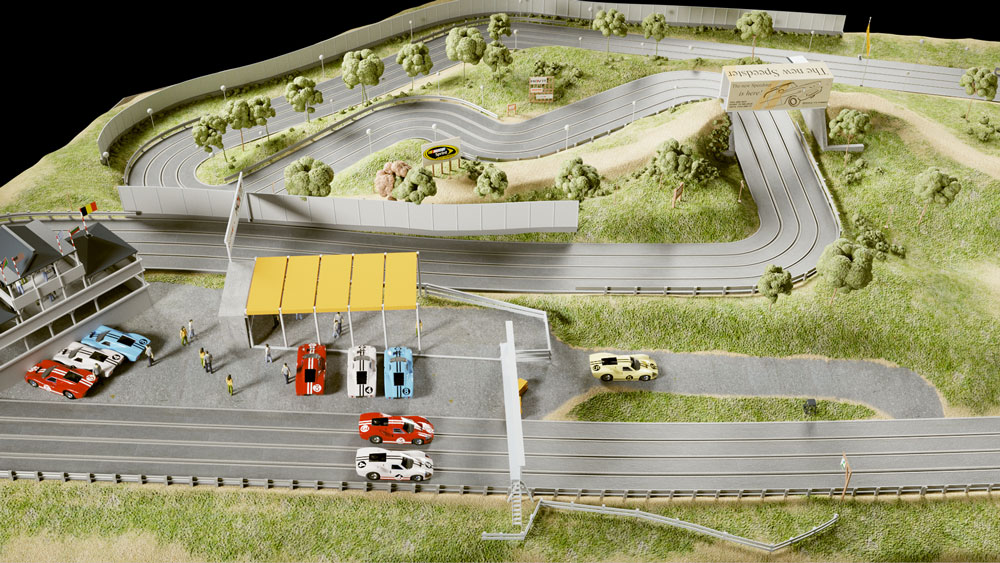
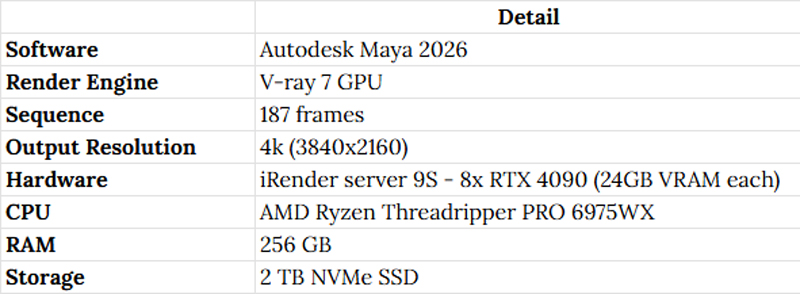
In this article, we move beyond theory and dive into real-world performance data. Using V-Ray 7 GPU in Maya 2026, we tested a 4K animation sequence of 187 frames on iRender’s Server 9S (8× RTX 4090). Here’s what the results reveal.
Test Setup
Benchmark Results
Total render time: 2 hours for 187 frames at 4K.

38.5 seconds per frame at 4K is a strong result for V-Ray GPU. At this resolution, V-Ray needs to load full geometry, GI, and lighting data into VRAM on each frame and 8 cards with 24GB each (192GB total VRAM pooled across the server) means even complex scenes won’t hit memory ceilings.
For example:
- A 100-frame sequence would complete in approximately 64 minutes
- A 500-frame animation (roughly 20 seconds at 25fps) would take approximately 5.4 hours
- A 1,000-frame project would take approximately 10.7 hours
These are estimates based on the measured per-frame average. Real-world times vary slightly depending on scene complexity per frame (e.g., camera cuts, particle counts, motion blur samples).
Why 8x RTX 4090 Works Well for V-Ray GPU
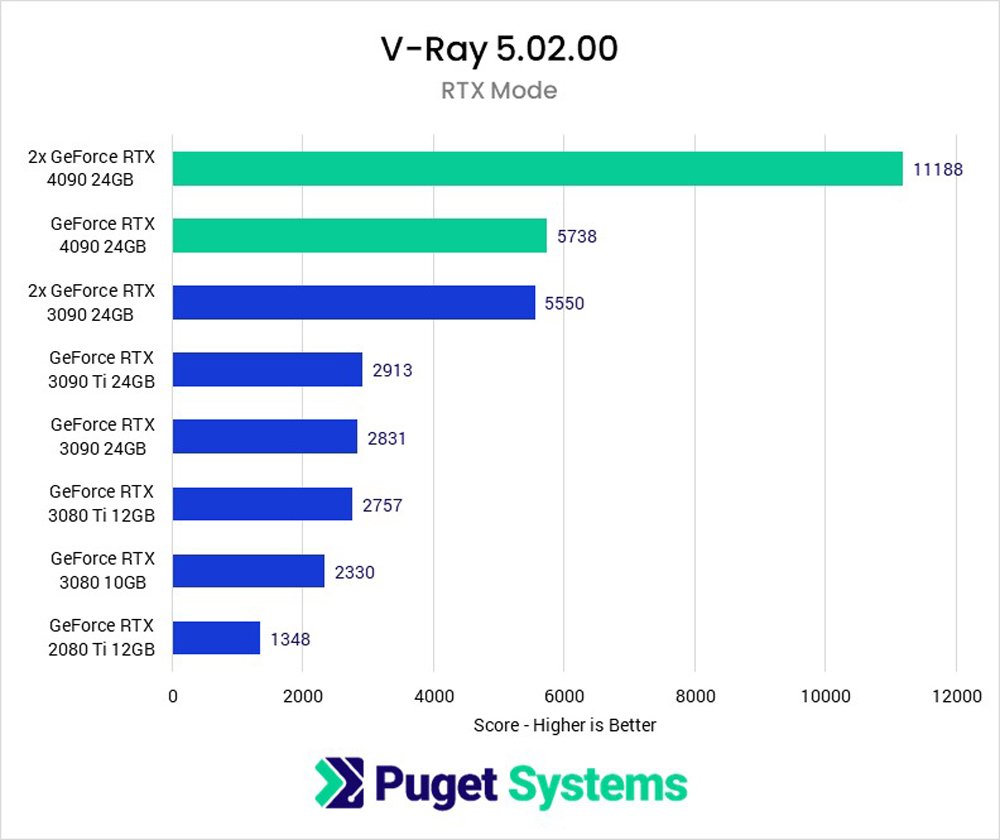
V-Ray GPU distributes rendering across multiple GPUs at the bucket level, each GPU renders independent buckets, in parallel. This means scaling efficiency is high compared to some other render engines.
In practice, going from 1 GPU to 8 GPUs doesn’t give you exactly 8× speedup due to overhead (data transfer, synchronization, non-GPU pipeline steps), but V-Ray GPU typically achieves 75–85% scaling efficiency at 8 cards. That means 8 GPUs performs roughly 6–7× faster than a single card of the same generation, not 8×.
Each RTX 4090 has 24GB of VRAM. In a multi-GPU setup, V-Ray doesn’t share VRAM across cards for a single frame, each GPU holds a full copy of the scene data it needs. So the practical VRAM limit is still 24GB per GPU, not 192GB combined. If your scene exceeds 24GB, you’ll need to use out-of-core rendering or optimize the scene before uploading.
Real Cost Calculation
Server 9S is priced at $52/hour. The benchmark completed in exactly 2 hours:
Actual cost for this 187-frame 4K project: 2h × $52 = $104
That works out to approximately $0.56 per frame at 4K.
The cost will depend on the server you choose.
Estimated prices may vary; you can refer to the table below:

Besides, iRender’s pricing rewards longer booking blocks. If you rent for 3 hours, you will save 6% and 6 hours, you will save 8%. Moreover, if you rent a full day, you will save 10% and 20% for weekly rental.
For a 2-hour job like this benchmark, the standard rate is optimal. For larger projects, 500+ frames, overnight batches, booking a day block at $46.80/hr cuts Server 9S to $93.60 for 2 hours, bringing cost per frame down to $0.50.
New accounts get a 100% bonus on the first deposit. Depositing $100 gives you $200 in credit. That means the $104 benchmark job effectively costs $52 out of pocket if you’re a first-time user, $0.28/frame.
How to Run V-Ray GPU on iRender
The workflow is straightforward once you understand iRender’s IaaS model. You will get full remote desktop access to the server, not a managed submission queue. This means:
- Create an account and top up your balance
- Create a server 9S from the dashboard
- Transfer your scene files via the iRender GPU desktop app (free, fast transfer tool)
- Connect to the server via remote desktop, it’s a full Windows environment
- Install your V-Ray license, you will need to use your own Chaos license. V-Ray’s floating license system works with cloud machines.
- Open Maya, load your scene, start the render and process same as your local machine
- Download outputs directly or keep them in iRender storage between sessions
Who Should Use V-Ray GPU Cloud Rendering

Image Source: Chaos
Freelance archviz artists: If you’re delivering 4K animation walkthroughs to clients, a 2-hour render window on Server 9S means you can finish a project the morning it’s due rather than setting up a render queue the night before. At $0.56/frame, a 100-frame walkthrough costs $56, less than an hour of your billable rate.
Small studios (3–15 people): Maintaining an in-house render farm at 8x RTX 4090 level requires significant capital plus maintenance, power, and cooling overhead. Paying $52/hour for server 9S only when you need it almost always wins economically unless your utilization is near-continuous.
VFX and animation teams with variable workloads: Cloud rendering lets you scale instantly. One job needing 8 GPUs doesn’t block your team from running other jobs on separate instances simultaneously.
Conclusion
The benchmark result is clearly: 187 frames at 4K in 2 hours with V-Ray 7 GPU on Maya 2026, running on iRender’s Server 9S (8x RTX 4090), at a total cost of $104, approximately $0.56 per frame.
You don’t pay significantly more per frame by choosing more GPUs. You pay for speed.
Ready to test on your own scene? New users get a 100% credit bonus on their first deposit, meaning you can run a test render at half the listed cost.
iRender – Happy Rendering!
Related Posts
The latest creative news from Enscape Cloud rendering, Lumion Cloud rendering, V-Ray Cloud Rendering , Twinmotion Cloud Rendering , 3D VFX Plugins & Cloud Rendering.


[/vc_section]
Related Posts
The latest creative news from Blender Cloud rendering.


[/vc_section]





