
Choose Blender or Maya for Rendering and Animation in 2026?
With the rapid advancement of 3D animation tools, choosing the right software has become a crucial decision for artists, studios, and animation professionals. Among the many options available today, Blender and Autodesk Maya stand out as two of the most widely used and powerful animation software packages. While both are capable of producing high-quality animated content, they are designed with different workflows, target users, and production environments in mind.
In this article, we will explore and compare the animation capabilities of Blender and Maya to help you determine which software best suits your animation needs.
Blender and Maya Overview
Blender
Blender is an open-source 3D creation suite that supports the entire 3D production pipeline, including modeling, rigging, animation, simulation, rendering, compositing, and video editing. One of Blender’s most defining characteristics is that it is completely free and open-source, making it accessible to artists at any level.

Big Buck Bunny - Blender Open Movie (Image Credit: Blender Studio)
Blender runs on all major operating systems, including Windows, macOS, and Linux. Its animation tools have evolved significantly over recent versions, offering keyframe animation, non-linear animation (NLA), graph editor controls, shape keys, and a growing set of simulation features. Thanks to its active community and frequent updates, Blender has become a popular choice for independent animators, freelancers, and small studios.
Maya
Autodesk Maya is a professional 3D animation software widely recognized as an industry standard in film, television, and game development. It is especially known for its advanced character animation, rigging, and technical animation tools. Maya is commonly used in large-scale production pipelines and is deeply integrated into professional studio workflows.

Source: Autodesk.com
Maya supports complex character rigs, facial animation systems, motion capture data, and advanced animation layers. Its robustness and precision make it the preferred choice for studios working on feature films, episodic content, and AAA games. However, Maya is a paid subscription software, which may be a barrier for individual artists or small teams.
Should we choose Blender or Maya for Rendering and Animation?
Blender vs Maya: Animation Capabilities
Blender Animation Capabilities
Blender provides a comprehensive set of animation tools suitable for a wide range of projects. Animators can work with keyframes, animation curves, constraints, and drivers to control motion precisely. Blender’s Graph Editor and Dope Sheet allow for detailed timing and spacing adjustments, while the Non-Linear Animation (NLA) editor enables the combination and layering of multiple animation actions.
Blender also includes powerful tools for character animation, such as armatures, weight painting, and shape keys for facial animation. While its rigging system may require additional setup or add-ons for complex characters, it is flexible enough to handle short films, indie games, and stylized animation projects. Additionally, Blender’s Grease Pencil tool expands animation possibilities by allowing artists to mix 2D and 3D animation within the same environment.
Maya Animation Capabilities
Maya is widely regarded as one of the strongest animation tools available, particularly for character animation. Its animation system is designed to handle complex rigs with high stability and precision. Maya offers advanced features such as animation layers, time editor, motion trails, and sophisticated constraint systems that allow animators to fine-tune every aspect of movement.
For character animation, Maya excels in facial rigging, muscle systems, and motion capture integration. These tools make it easier to animate realistic characters and manage large animation datasets efficiently. Maya’s reliability and scalability are key reasons why it remains the preferred choice in professional studios, where consistency and pipeline compatibility are critical.
Blender vs Maya: GPU Rendering Performance
Blender’s GPU Rendering Performance
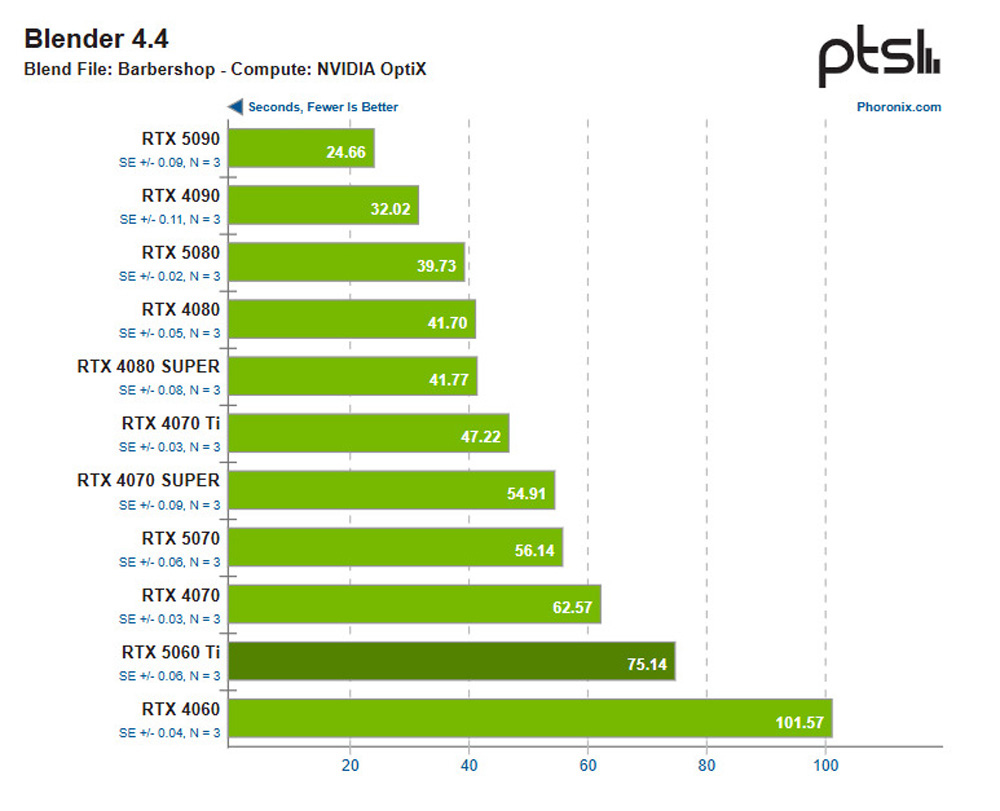
Source: Phoronix
Based on the chart, Blender 4.4 OptiX rendering performance scales very clearly with GPU class and generation. Entry-level and older GPUs like the RTX 3050 and RTX 4050 show noticeably longer render times, while mid-range cards such as the RTX 4070 / 4070 SUPER already deliver a strong performance jump. Blender has become increasingly optimized for GPU rendering, particularly through its Cycles render engine, which is designed to take full advantage of modern graphics hardware. Both Cycles and EEVEE support GPU acceleration, allowing users to significantly reduce render times compared to CPU-only workflows.
Cycles supports multiple GPU backends depending on the hardware vendor and operating system, making Blender one of the most flexible renderers in terms of GPU compatibility. These include:
- CUDA (NVIDIA) – Supports NVIDIA GPUs with Compute Capability 3.0 and above
- OptiX (NVIDIA) – Utilizes dedicated RT cores in RTX GPUs for accelerated ray tracing, available on GPUs with Compute Capability 5.0 or higher
- HIP (AMD) – Requires AMD GPUs based on the Vega architecture or newer
- oneAPI (Intel) – Designed for Intel Arc GPUs using the Xe HPG architecture
- Metal (Apple) – Optimized for Apple Silicon, as well as AMD and Intel GPUs on macOS
A major strength of Cycles lies in its ray tracing acceleration, which allows the renderer to offload specific ray traversal and intersection tasks to specialized hardware. NVIDIA OptiX was the first technology to demonstrate the power of dedicated RT cores for Cycles rendering, resulting in significant speed improvements. In more recent Blender versions, similar acceleration techniques have been introduced for AMD (HIP-RT) and Intel (Embree), significantly improving their competitiveness.
While AMD Radeon and Intel Arc GPUs have shown impressive performance gains in recent benchmarks, NVIDIA OptiX remains the fastest and most mature solution for Cycles. High-end GPUs, such as the RTX 4090 and RTX 4080, currently dominate Blender’s GPU rendering performance, especially in complex, ray-tracing-heavy scenes. AMD’s RX 7900 XTX leads the AMD lineup but still trails behind NVIDIA’s mid-to-high range RTX cards when OptiX is enabled.
Blender also supports multi-GPU rendering, allowing multiple GPUs to process tiles or frames in parallel. This can dramatically reduce render times for large projects. However, it is important to note that VRAM is not shared between GPUs—each GPU must load the entire scene into its own memory, which can become a limiting factor for extremely complex scenes.
Overall, Blender offers a highly scalable and cost-effective GPU rendering solution, especially for users who rely on NVIDIA RTX GPUs or GPU render farms.

Maya’s GPU Rendering Performance
Maya’s GPU rendering performance is primarily driven by Arnold Renderer, which has evolved from a CPU-focused renderer into a hybrid CPU/GPU solution. Arnold GPU is designed to leverage modern GPU hardware while maintaining the same physically accurate rendering principles that Arnold is known for in production environments.
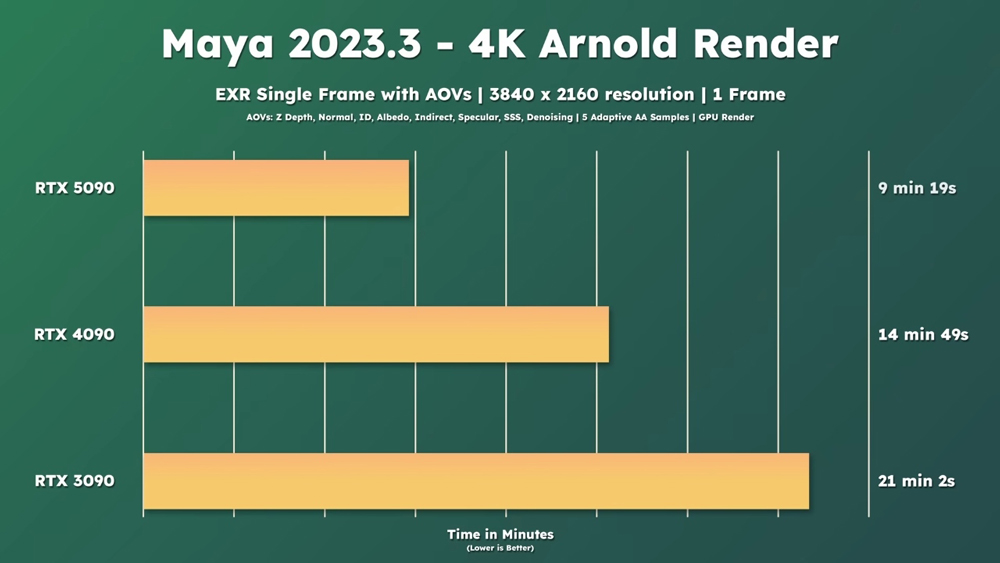
Maya Arnold benchmark score from Sir Wade Neistadt
Arnold GPU supports NVIDIA RTX GPUs using OptiX, enabling hardware-accelerated ray tracing for faster render times. Unlike Blender, Maya’s GPU rendering ecosystem is more restrictive, focusing mainly on NVIDIA hardware to ensure stability and predictability in professional pipelines. This narrower hardware support reflects Maya’s emphasis on consistency rather than broad accessibility.
On supported GPUs, Arnold GPU delivers substantial speed improvements over CPU rendering, particularly in scenes with heavy lighting, complex shading networks, and high-resolution textures. High-end GPUs such as the NVIDIA GeForce RTX 4090 currently provide the best performance in Maya, offering significant gains compared to previous generations like the RTX 3090. However, the performance scaling depends heavily on scene structure, shader complexity, and memory usage.
Maya also supports multi-GPU rendering with Arnold GPU, allowing users to distribute rendering workloads across multiple GPUs. Similar to Blender, VRAM is not pooled across GPUs, meaning each GPU must independently store scene data. This makes GPU memory capacity a critical factor when rendering large production assets.
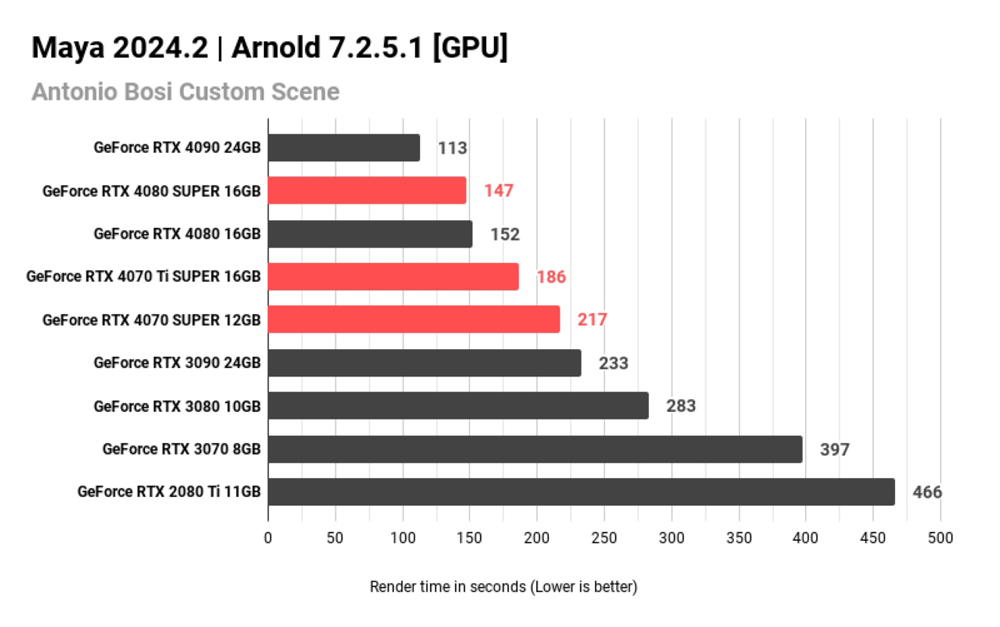
While Arnold GPU continues to improve, it does not yet support every Arnold feature available in CPU mode. Certain advanced shaders, volumes, and production-specific tools may still require CPU rendering. As a result, many studios adopt a hybrid workflow, using GPU rendering for look development and previews, while relying on CPU rendering for final production frames when maximum compatibility is required.

Final Thought
Both Blender and Maya are powerful 3D animation and production tools, each designed with different strengths and professional goals in mind. The choice between Blender and Maya ultimately depends on the scale of the project and the specific needs. For independent artists, freelancers, and small teams, Blender offers a highly capable and cost-effective solution. Blender’s open-source nature also allows for extensive customization and rapid innovation driven by its global community. Maya, on the other hand, is built for high-end production pipelines where stability, precision, and industry-standard workflows are essential. It excels in character animation, rigging, and large-scale collaboration, making it the preferred choice for film, television, and AAA game studios.
Boost Blender and Maya Animation and Rendering Performance with iRender
iRender powers up your creativity with unlimited GPU rendering resources. Our GPU render farm houses the most powerful 3D rendering machines. Configure from 1 to 8 GPUs with top-tier RTX 4090, Threadripper Pro CPUs, 256GB RAM, and 2TB SSD storage – iRender’s machines can handle any 3D project demands. We support all 3D software including Blender and Maya.
Once renting our machines, you will own them as your personal workstations. All our servers are equipped:
- AMD Ryzen™ Threadripper™ PRO 3955WX (3.9-4.2GHz) or
- AMD Ryzen™ Threadripper™ PRO 5975WX (3.6-4.5GHz)
- 1/2/4/6/8x – 4090
- 256GB RAM
- 2TB NVMe SSDs
Our server has pre-installed Blender 4.5 so you just upload your Blender files and start rendering there. Moreover, iRender offers an iRender GPU app. In this all-in-one application, you can free your workflow from accessing iRender website, and just have to work on the iRender GPU app. This app is only for Window users.

Enjoy our FREE TRIAL to try our RTX 4090 machines and boost your rendering now!
For more detailed information, please contact us via Live chat 24/7 or WhatsApp: +(84) 912-785-500 or Email: [email protected].
iRender – Happy Rendering!
Related Posts
The latest creative news from Blender Cloud rendering.






