
Should we choose CPU or GPU Rendering?
When it comes to rendering in architecture and design, one of the most common questions is: Should you rely on CPU rendering or GPU rendering? The choice isn’t just about hardware, it’s a decision that affects how fast you can deliver, how realistic your visuals look, and even how much budget you’ll spend. On one hand, CPUs have long been the backbone of photorealistic rendering, trusted for their precision and reliability. On the other, GPUs are redefining workflows with unmatched speed and real-time interactivity. Both approaches have their strengths and limitations.
This blog breaks down the key differences between CPU and GPU rendering, highlights their pros and cons, and explains when each option is the smarter choice for architects and designers.

CPU vs GPU Rendering
- CPU Rendering relies on the central processing unit, where a limited number of powerful cores handle rendering tasks sequentially. This approach is known for its reliability and precision, which makes it a trusted choice in engines like Corona or Arnold. However, because CPUs are not designed for massive parallelism, render times can become quite long when working with large or complex scenes.
- GPU Rendering, on the other hand, takes advantage of thousands of smaller cores that process tasks in parallel. This allows it to deliver much faster results, especially in interactive or real-time workflows. Engines like Redshift, Octane, and V-Ray GPU are built to fully leverage this capability. The trade-off is that GPUs are limited by their video memory (VRAM), which can be a bottleneck in highly detailed scenes.
Key Differences Between CPU vs GPU Rendering
1. Rendering Speed
CPU Rendering
- Relies on fewer but more powerful cores, which process tasks sequentially
- Strong at handling complex light calculations and large datasets, but render times can become hours or even days for high-resolution images
- Performance scales with the number of CPU cores, but adding more cores quickly increases cost
GPU Rendering
- Runs on thousands of parallel cores, delivering massive speed advantages over CPUs in most workloads
- Especially effective in real-time rendering and animations, where instant feedback saves time in iteration
- Performance scales well with multi-GPU setups, making it possible to finish jobs in minutes that would take CPUs much longer
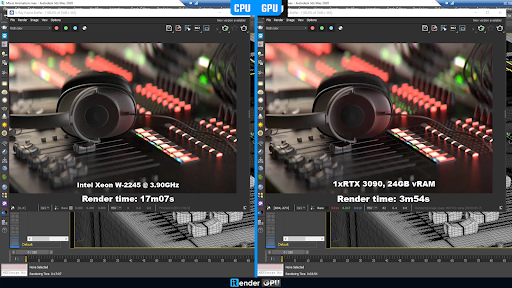
A real-world test with V-Ray shows the difference clearly: rendering on an Intel Xeon W-2245 @ 3.90GHz took 17 minutes 07 seconds, while the same scene rendered on a single NVIDIA RTX 3090 (24GB VRAM) finished in just 3 minutes 54 seconds. This highlights how GPUs can deliver massive speed advantages over CPUs in many workflows.
2. Output Quality & Reliability
CPU Rendering
- Known for producing highly accurate and photorealistic results, especially in light transport, caustics, and global illumination
- Handles complex geometry and large datasets with consistency
- Reliable for long render sessions, less prone to crashes caused by memory limitations
- Preferred in engines like Corona Renderer or Arnold CPU, where realism is the top priority
GPU Rendering
- Modern GPU renderers (Redshift, Octane, V-Ray GPU) can now match CPU quality in most scenarios
- However, results may vary if a scene exceeds VRAM limits, sometimes requiring optimizations that can affect stability
- While generally reliable, GPUs may encounter errors in extremely large or unoptimized projects
- Strong at producing realistic images quickly, but long-term reliability still leans toward CPU solutions
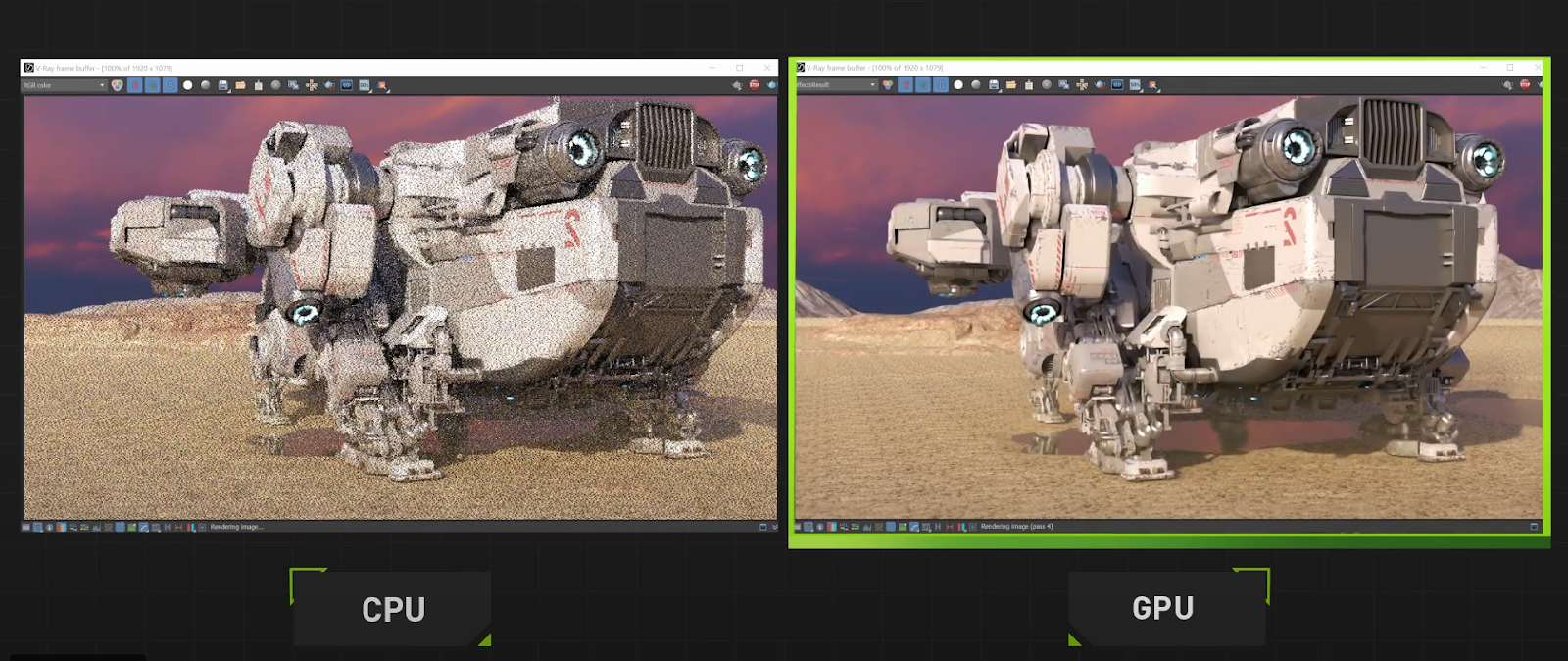
As shown in this V-Ray test, the CPU render still appears noisy at the same stage, while the GPU render is already much cleaner and closer to the final image, which highlights how GPUs provide faster, more usable feedback during the rendering process.
3. Cost & Accessibility
CPU Rendering
- Every workstation already includes a CPU, so most designers can start rendering without extra investment
- High-performance CPUs (e.g., AMD Threadripper, Intel Xeon) can be expensive, but they still offer good longevity for rendering tasks
- Scaling with CPUs often means purchasing new machines or render nodes, which increases costs significantly
GPU Rendering
- Requires powerful dedicated GPUs (e.g., RTX 4090,…), which can be costly upfront
- Adding multiple GPUs quickly raises hardware costs, but also boosts performance dramatically
- Accessibility can be limited by VRAM size: entry-level or older GPUs may not handle large scenes effectively
4. Scalability
CPU Rendering
- Scaling performance usually requires adding more machines or investing in high-core-count CPUs
- Building or maintaining a CPU render farm can be expensive and space-consuming
- Less flexible for quick upgrades compared to GPUs
GPU Rendering
- Easy to scale by adding multiple GPUs to a single workstation or using cloud GPU services
- Multi-GPU setups deliver near-linear performance gains in many render engines
- Offers greater flexibility: users can start small and expand as project demands grow
Summary
| Aspect | CPU Rendering | GPU Rendering |
| Rendering Speed | Slower, cores process tasks sequentially. Best for long, offline renders. | Much faster thanks to thousands of parallel cores. Ideal for real-time workflows. |
| Output Quality & Reliability | Highly accurate, stable, handles complex calculations well. Long sessions are more reliable. | Modern GPU engines can match CPU quality. VRAM limits can affect stability on heavy scenes. |
| Cost & Accessibility | Accessible since all workstations have CPUs. Scaling requires costly multi-CPU setups. | High upfront cost for powerful GPUs. Multi-GPU setups boost performance but raise investment. |
| Scalability | Requires adding more machines or high-core CPUs. Expensive and less flexible. | Easy to scale with multi-GPU setups or cloud services. More flexible and efficient. |
Conclusion
The choice between CPU and GPU Rendering isn’t about which one is universally better, it’s about which one fits your workflow, budget, and project needs.
- CPU rendering remains the go-to for stability, accuracy, and complex calculations, making it a reliable solution for architects and designers who prioritize photorealistic quality and long-term consistency.
- GPU rendering, by contrast, dominates when speed and interactivity are crucial. Its ability to handle real-time previews and scale efficiently makes it a powerful option for modern design workflows and client presentations.
In the end, both approaches have their place in the visualization pipeline. Understanding their strengths and limitations allows you to make smarter decisions, ensuring your designs not only look stunning but also meet deadlines with confidence.
iRender – Flexible Render Farm for CPU & GPU Workflows
At iRender, you can install and run any 3D software or render engine you need on our high-performance remote servers. Whether your workflow depends on CPU rendering or GPU rendering, iRender gives you the flexibility to choose the right hardware for your projects.
With access to powerful configurations such as:
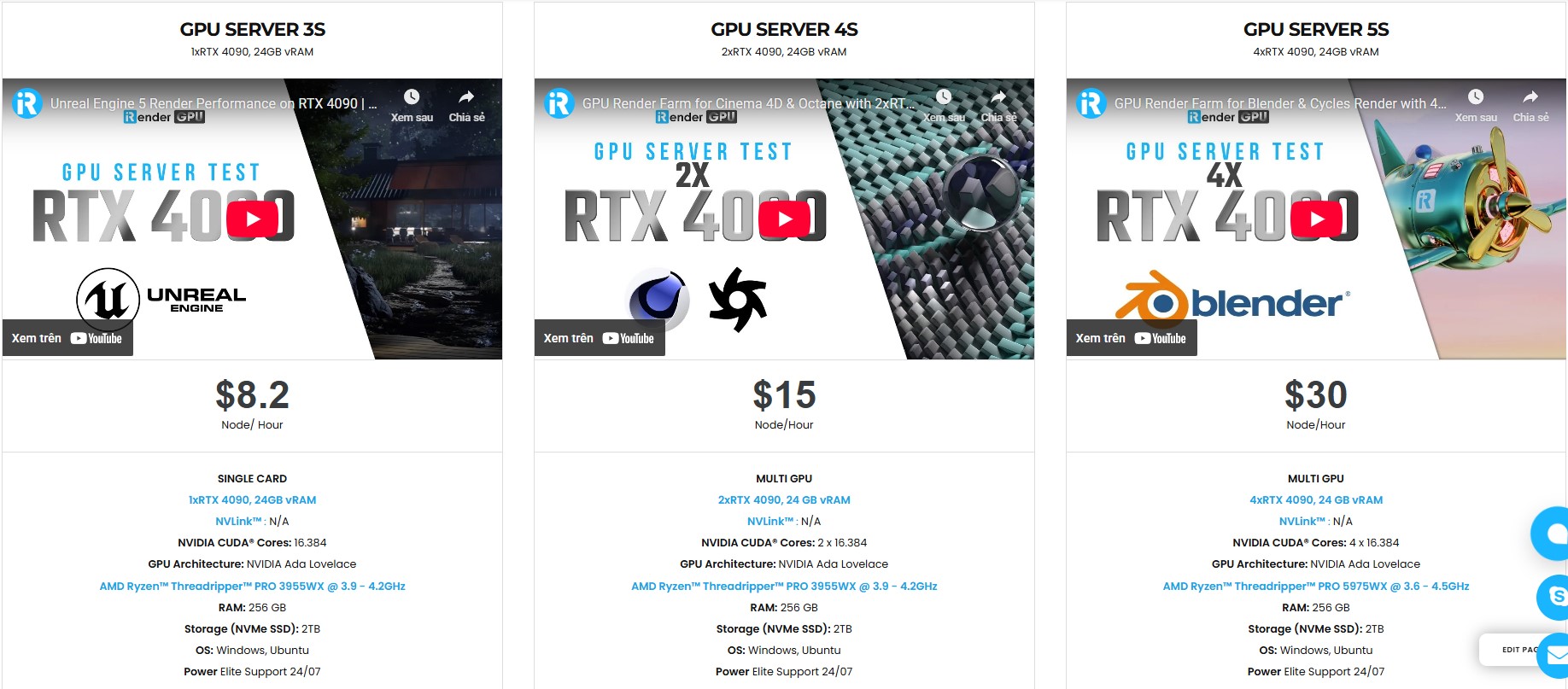
- CPU: AMD Ryzen™ Threadripper™ PRO 3955WX @ 3.9 – 4.2GHz and AMD Ryzen™ Threadripper™ PRO 5975WX @ 3.6 – 4.5GHz
- GPU: single to multi NVIDIA RTX 4090
You can:
- Render faster without being limited by your local workstation
- Scale your projects seamlessly, whether you’re working on small interiors or large architectural scenes
- Enjoy the freedom to set up your preferred tools, add your licenses, and work as if it were your own computer, only faster and more reliable
Let’s watch some videos that use GPU Rendering on our remote machines:


Here is all our CPU vs GPU with detailed information:
Why choose iRender?
When projects become bigger and deadlines become tighter, finding a suitable and optimized renderer is no longer optional, it’s crucial. iRender’s mission is to help you make all your ideas become final products in a faster, stronger and more efficient way.
Powerful performance: GPU RTX 4090 workstations, compatible with almost 3D/AI software. Moreover, iRender’s remote servers also provide CPU AMD Ryzen Threadripper Pro 3955WX @ 3.90GHz – 4.2GHz and AMD Ryzen™ Threadripper™ PRO 5975WX @ 3.6 – 4.5GHz, RAM 256GB and 2TB SSD NVMe Storage
Flexible usage: Use the remote server anytime you want
Secure & Privacy: Guarantee for your data safety and privacy
Fast support: A customer support team ready to assist from 6:00 to 24:00 (GMT +7) every day.
Cost-effective: Pay-as-you-go, pay for the time used
If you are still wondering, register now to get a free trial and receive a 100% iRender bonus points for your first transaction within 24 hours of registration.

🎁 Special Offer from iRender
From September 16 to September 30, 2025, iRender is running a special promotion:
- Earn 345+ Render Points with purchases from $230+
- Earn 1150+ Render Points with purchases from $575+
It’s the perfect time to try iRender’s high-performance servers for your rendering projects with V-Ray, Corona, or any other 3D software you prefer. Purchase less, harvest more value!

For more detailed information, please contact us via Live chat or WhatsApp: +(84) 962 868 890 or Email: [email protected].
iRender – Your Renders, Your Rules!
Related Posts
The latest creative news from Maya Cloud Rendering, Redshift Cloud Rendering, Cinema 4D Cloud Rendering , 3D VFX Plugins & Cloud Rendering.






