
Understanding Color Spaces: Why ACES Is the Industry Standard?
Color plays a critical role in how we perceive images, whether in films, games, or 3D renders. Color space defines how colors are created, displayed, and interpreted across different devices and applications. Without proper color management, your work can easily lose accuracy and consistency throughout the production pipeline. ACES (Academy Color Encoding System) was developed to solve this problem. It provides a unified, scene-referred color workflow that ensures your colors remain consistent from creation to final output. That’s why ACES has become the industry standard in VFX, animation, and high-end rendering.
In this article, we’ll break down what color spaces are, how ACES works, and why adopting an ACES workflow can significantly improve the quality and reliability of your visuals.
What is Color Space?
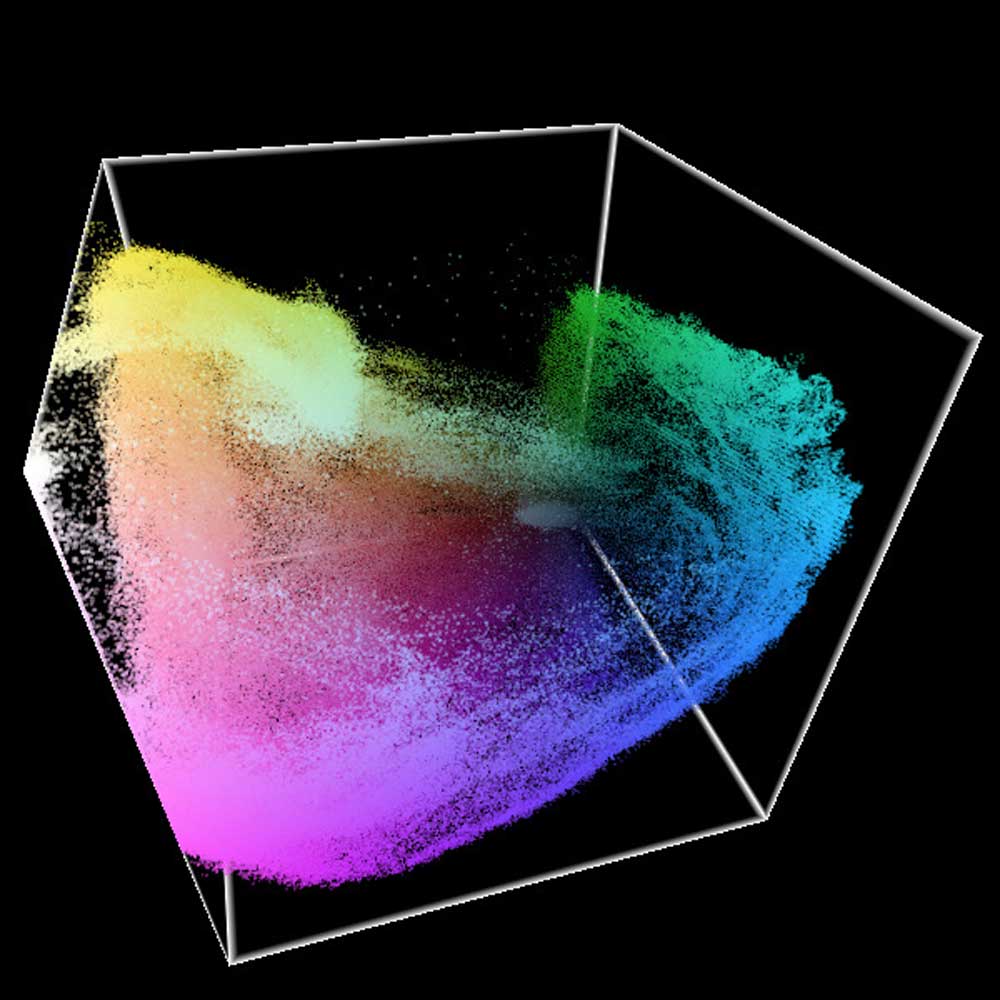
Image Source: Adrian Margel
ACES (Academy Color Encoding System) is a professional color management framework widely adopted in the film and visual effects industry. It offers a unified and reliable way to handle color, ensuring that visuals remain accurate and consistent across different software, displays, and production stages. With ACES, artists gain greater creative control over color grading while maintaining color fidelity from on-set capture to final delivery.
In simple terms, a color space is a method of converting colors into numerical values that computers and devices can understand. Every color you see in movies, games, or printed images is defined within a specific color space.
However, color spaces differ depending on where and how the image is viewed. This difference comes from the color gamut, which describes the complete range of colors a device is capable of displaying. Since each device has its own color gamut, the same image can appear slightly different from one screen or medium to another.
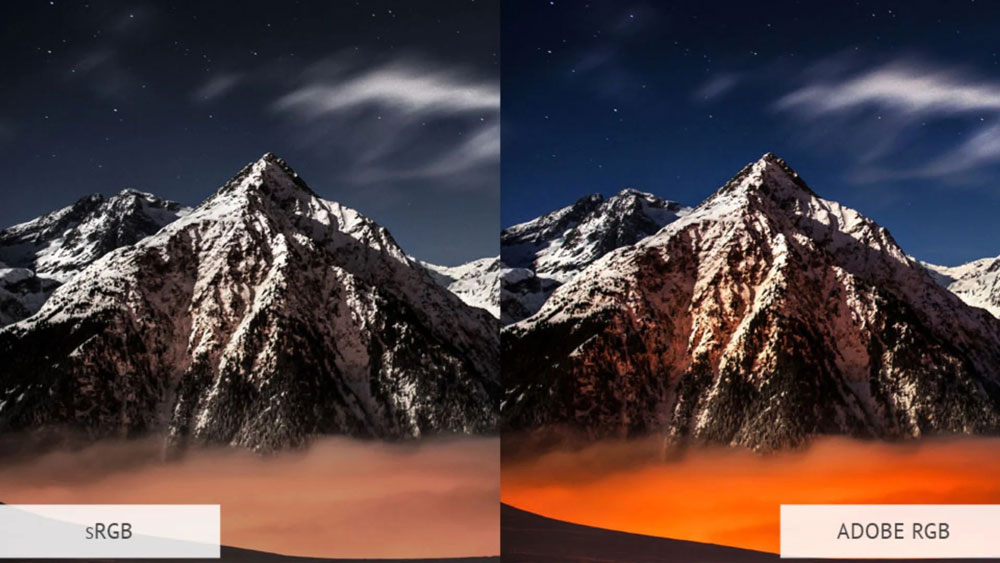
Image Source: Diyphotography
This example clearly illustrates the difference between sRGB and Adobe RGB color spaces. On the left, the sRGB version appears more muted and slightly washed out, especially in the sky and the warm tones near the horizon. This happens because sRGB has a relatively narrow color gamut and cannot accurately represent highly saturated colors.
On the right, the Adobe RGB version displays deeper blues and more vibrant oranges. Because Adobe RGB supports a wider color gamut, it can preserve richer color information that is lost in sRGB. When an image created or graded in one color space is viewed in another, noticeable shifts in color intensity and balance can occur.
As you can imagine, this mismatch can cause serious issues in production, especially when consistency across different displays, outputs, and delivery formats is required.
Why Color Spaces Cause Problems in Production
Not all color spaces are created equal. For example:
- sRGB is designed for web and standard monitors
- Adobe RGB supports a wider range of colors, mainly for photography and print
- Rec.709 is common in broadcast video
- DCI-P3 is used in digital cinema
If you create content in one color space and view it in another, color shifts are almost guaranteed. Saturated colors may clip, highlights may lose detail, and overall contrast can change.
In complex production pipelines, assets move between multiple applications, artists, and output formats; these inconsistencies quickly become a serious problem.
What Is ACES?

Image Source: Premium Beat
ACES (Academy Color Encoding System) is a free, open, device-independent color management system that standardizes color space between different input sources. Using ACES results in more photorealistic renders due to its wider dynamic range and ultra-wide color gamut. Additionally, it provides a wider array of colors to choose from, making it a more future-proof option within production pipelines.
Unlike traditional display-referred color spaces, ACES is designed to preserve real-world color information across the entire production pipeline. It acts as a neutral, high-dynamic-range container for color data, independent of any specific display or device.
In short, ACES ensures that:
- Colors remain consistent across software and hardware
- No color data is unintentionally lost
- Creative decisions stay intact from start to finish
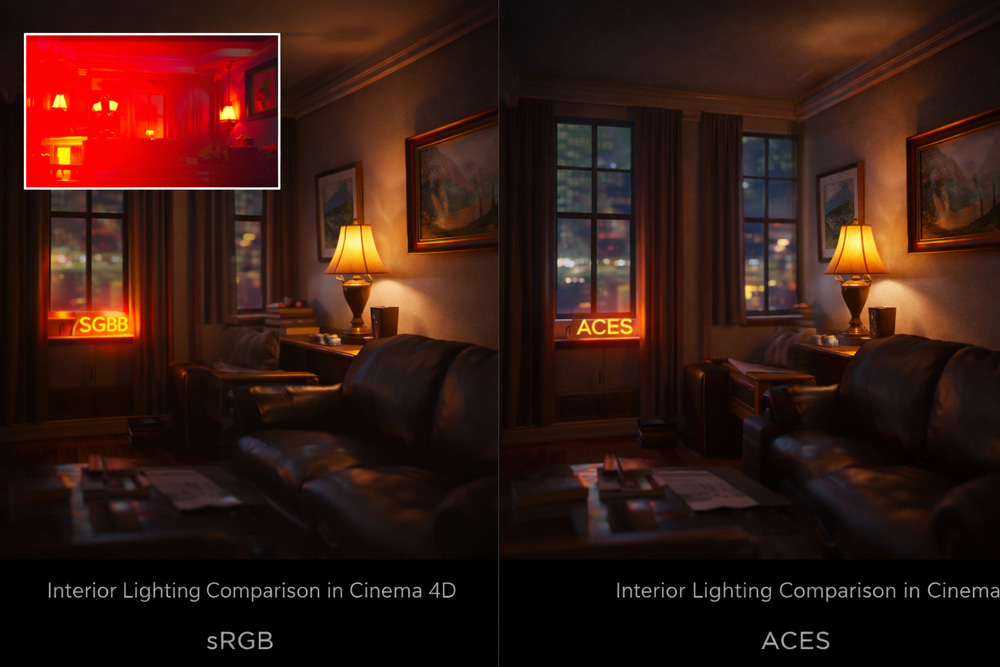
A practical example in Cinema 4D would be an interior scene lit by strong area lights and emissive materials, such as lamps, window light, or neon signs. When rendering this scene in sRGB (default view transform), highlights tend to clip very quickly. Bright areas like light bulbs, reflections on polished surfaces, or sunlit windows lose detail and appear flat or blown out.
If you enable a False Color or Exposure view in the Picture Viewer, you’ll notice large portions of the image turning red or white. This indicates that the luminance values have exceeded the displayable range of sRGB, meaning the lighting information is no longer preserved.
If you compare this with the same scene rendered using an ACES workflow in Cinema 4D. With ACES enabled, the highlights roll off more smoothly, preserving detail in bright areas while maintaining contrast in the shadows. Materials respond more naturally to light, reflections feel less harsh, and the overall image appears more balanced and cinematic.
Because ACES in C4D operates in a wider color space with higher dynamic range, artists gain greater flexibility when adjusting exposure, lighting intensity, and color grading, without breaking the image. This results in a render that feels closer to real-world lighting behavior and significantly improves photorealism.
What is the ACES Workflow?
ACES workflow handles images entirely within the Academy Color Encoding System, covering every stage of production, from camera capture or CG rendering to visual effects, color grading, final delivery, and long-term archiving. This creates a consistent and reliable color management framework across the whole pipeline.
All input sources, including cameras and CGI, are first converted into a single, shared ACES color space. Creative work is done in this unified environment before the images are transformed for final display formats. By applying the same color standards at every step, ACES preserves visual consistency and remains adaptable to emerging technologies such as HDR.
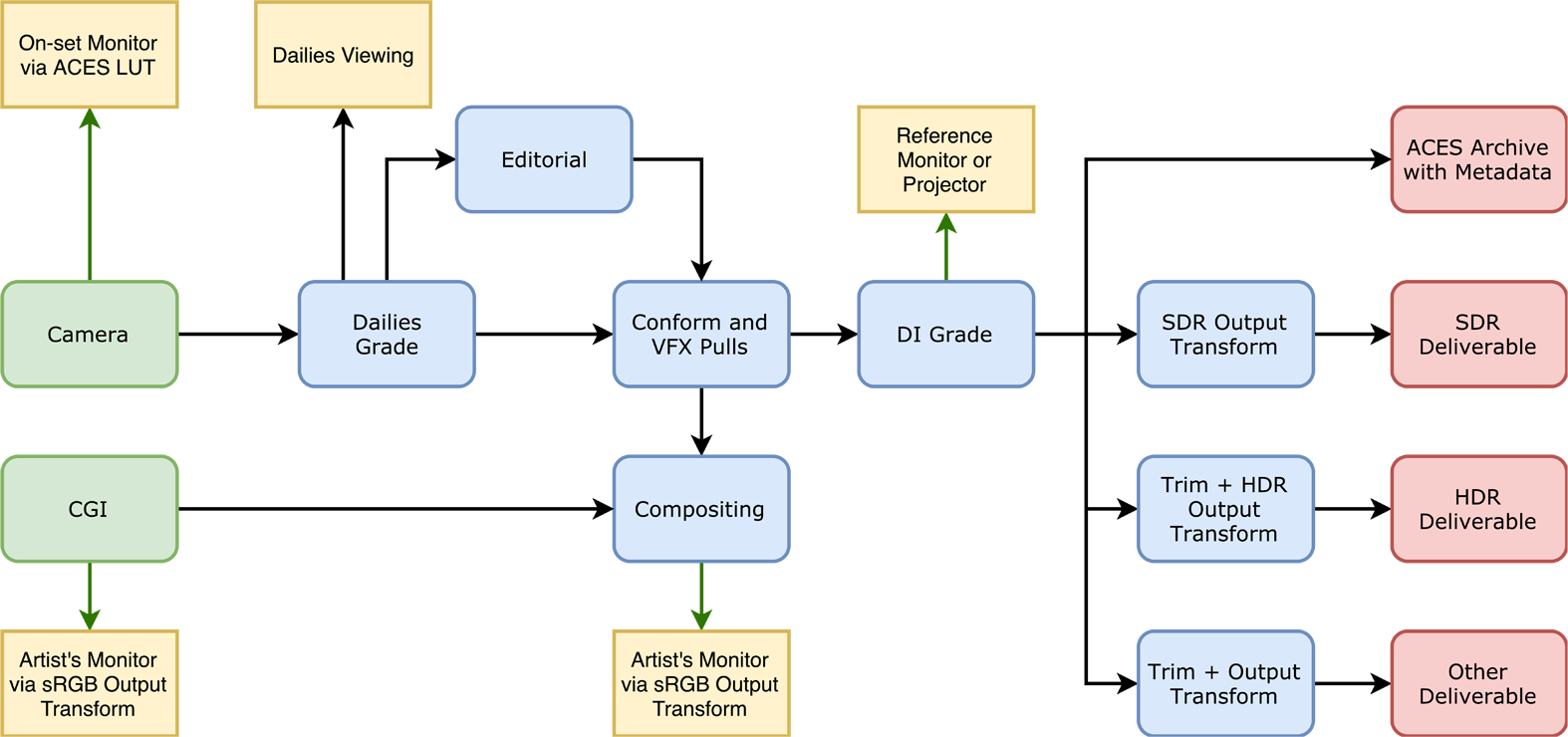
Image Source: ACES Document
The picture above shows how the ACES workflow standardizes color by converting all input sources into a single working color space, ACEScg. Once everything is unified, artists can work consistently without worrying about color mismatches.
After production, the image is then transformed into different output formats such as sRGB or Rec.709. This approach keeps colors consistent while allowing the same content to be delivered reliably across multiple platforms.
How to Use ACES in Popular Software

Image Source: InLight VFX
Most modern 3D and VFX software already supports ACES, either natively or through simple configuration. The key idea is always the same: work in an ACES color space during production and convert to your final display format at the end.
In Cinema 4D, ACES can be enabled through the Color Management settings. Once activated, textures and renders are converted into ACEScg, allowing lights and materials to behave more realistically. This is especially useful when working with Redshift or Octane, where high dynamic range lighting plays a major role.
In Blender, ACES can be set up by installing an ACES OCIO configuration and selecting ACES as the view transform. After that, all lighting and rendering take place in ACEScg, giving you smoother highlight roll-off and better color consistency when exporting to different formats.
For Unreal Engine, ACES is already integrated by default. The engine uses an ACES-based tone mapper, which helps maintain cinematic contrast and color response in real-time rendering. This makes Unreal particularly strong for film, virtual production, and game cinematics.
Across all these tools, the benefit is the same: ACES removes guesswork from color management and ensures that what you see during production closely matches the final output.
Conclusion
Color problems usually come from inconsistent workflows. ACES helps remove that uncertainty by giving you a clear and predictable way to handle color throughout the entire production process.
When everything works in the same color space, lighting reacts more realistically, highlights don’t break as easily, and what you see while working is much closer to the final result. Instead of constantly compensating for color shifts between software or displays, you can focus on making creative decisions with confidence. For anyone aiming for stable, high-quality visuals, ACES is simply a smarter foundation to build on.
Scale Up Your 3D Complex Projects with iRender Farm
iRender provides a remote machine rental service by offering flexible configurations of 1, 2, 4, 6, and 8 GPU machines using the top-tier RTX 4090. Built with powerful CPUs (AMD Ryzen™ Threadripper™ PRO 3955WX @ 3.9 – 4.2GHz and AMD Ryzen™ Threadripper™ PRO 5975WX @ 3.6 – 4.5GHz), 256GB RAM, and 2TB NVMe SSD storage, our machines can handle even the most demanding scenes in your 3D projects.
We treat your rented machines like your personal workstations – no restrictions apply. This freedom enables you, 3D artists, to realize creative visions without limitations. Moreover, iRender offers an iRender GPU app. In this all-in-one application, you can free your workflow from accessing iRender website, and just have to work on the iRender GPU app. This app is only for Windows users.

Let’s check out some new tutorial videos at iRender!


Enjoy our FREE TRIAL to try our RTX 4090 machines and boost your rendering now!
For more detailed information, please contact us via Live chat 24/7 or WhatsApp: +(84) 912-785-500 or Email: [email protected].
iRender – Happy Rendering!
Related Posts
The latest creative news from Blender Cloud rendering.





