
Unreal Engine 5.5: How AI Breathes Life into Thousands of Digital Characters
Imagine this: an urban plaza in an architectural visualization project, not just a beautifully crafted structure, but hundreds of pedestrians chatting, pausing in front of storefronts, weaving past each other, all running smoothly in real time, right inside the Unreal Engine.
That’s no longer a fantasy. With Unreal Engine 5.5, Epic Games has equipped the engine with a powerfully capable AI crowd navigation ecosystem: the Mass AI Framework combined with MetaHuman characters, enabling architecture studios and game developers to create urban environments as vibrant as the real world, without blowing up GPU resources. Let’s explore with iRender in this blog.
1. The Problem: Why Are Crowds Such a Big Challenge?
In traditional game development and ArchViz, each character is an independent Actor in Unreal with its own skeleton, animation, AI, and physics. With a few dozen characters, that’s fine. But with hundreds or thousands? The CPU and GPU will immediately hit a bottleneck. This is exactly why Epic Games rebuilt the crowd processing architecture from the ground up.
2. UE5's Solution: The Mass AI Framework
According to official Epic Games documentation, Mass is Unreal Engine’s internal ECS (Entity Component System) framework, built by Epic’s AI team specifically for large-scale crowd simulations. The system was first publicly introduced through the Matrix Awakens demo in 2021 and has been continuously refined through version 5.5.
Key components include:
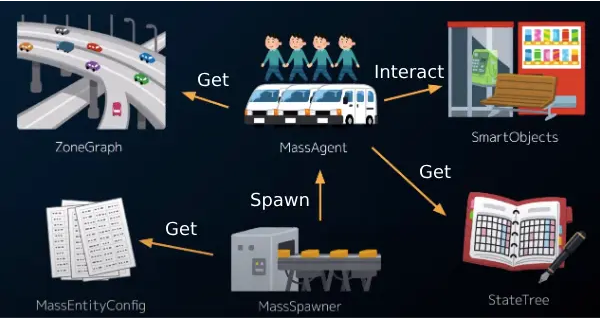
- MassEntity (ECS Core): Instead of using traditional Actors, each character is represented as an ultra-lightweight Entity, simply an integer ID pointing to data fragments. This enables parallel processing of thousands of entities thanks to a cache-friendly memory layout.
- ZoneGraph: A lightweight navigation system that uses spline-defined “lanes” to guide NPCs along sidewalks, through intersections, and into architectural spaces similar to how real-world traffic systems operate.
- StateTree: A hierarchical state machine combining the best of Behavior Trees and traditional State Machines, allowing NPCs to wait, sit, avoid collisions, and interact with Smart Objects, all with high performance.
- Mass Avoidance: A force-based avoidance system built directly into MassEntity, enabling characters to naturally steer around each other without the need for expensive per-entity pathfinding calculations.
- Smart Objects: Scene objects (park benches, lampposts, coffee shops) can be “claimed” by NPCs through a reservation system, generating natural behaviors like sitting down or stopping to window-shop.
3. MetaHuman + Mass AI: A Perfect Pairing
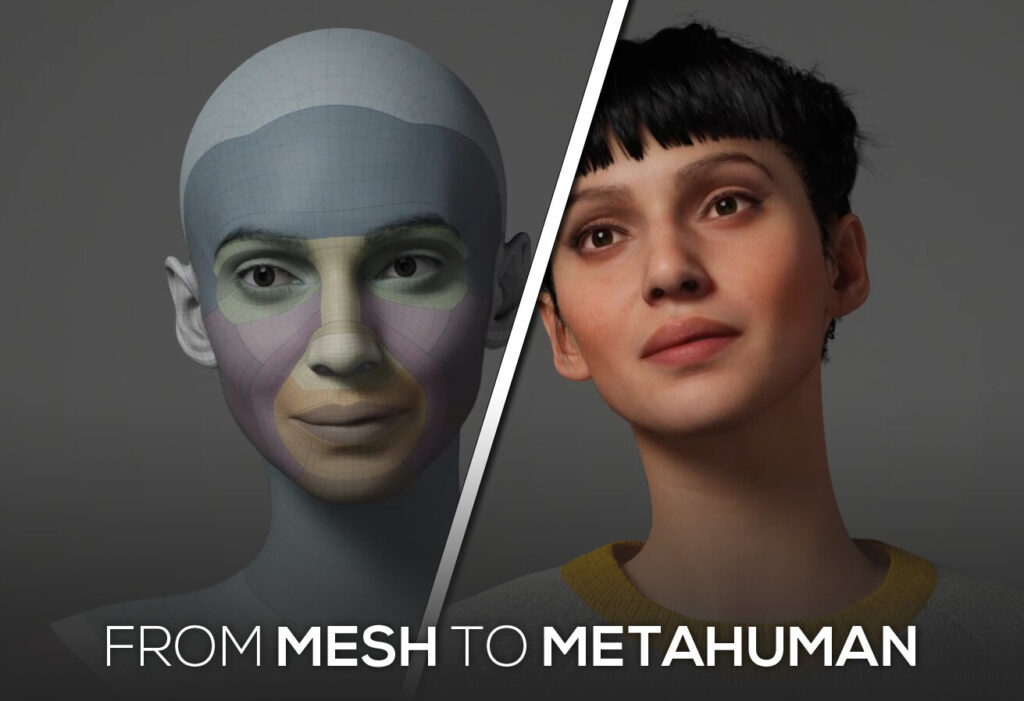
According to Epic Developer Community documentation, the City Sample Crowds system in UE5 applies an intelligent LOD (Level of Detail) strategy to MetaHuman crowds:
- Characters near the camera: Rendered as full MetaHuman’s rigged skeleton, facial animation, and cloth physics.
- Characters at mid-range: Switched to Vertex Animated Textures (VATs) static meshes with animation baked into the texture, saving significant GPU overhead.
- Distant characters: Become pure Mass Entities only positional and state data, with no detailed rendering.
4. Applications in Architectural Visualization (ArchViz)
According to the official Unreal Engine Blog, UE5 has opened new possibilities for the architecture industry, features once thought to be purely for games actually “empower new possibilities in city-scale urban redesign and digital twins.”
In practice, Mass AI + MetaHuman delivers for ArchViz:
- Living Cities in Real Time: Instead of hours of static rendering, studios can present urban planning projects with people naturally moving through the space. Clients and investors feel the “soul” of the environment immediately.
- Interaction with Architectural Space: Thanks to Smart Objects, NPCs can pause at park benches, glance into shop windows, or wait at traffic lights accurately reflecting how people actually inhabit and use a space.
- Public & Commercial Spaces: Shopping mall atriums, pedestrian plazas, and mixed-use complexes can be fully populated in minutes rather than days.
- BIM Data Integration: Combined with data from Revit/Rhino via Datasmith, studios can create a complete digital twin from structural design to how users move through and experience the space.

5. Hardware Requirements & Optimization
While Mass AI significantly reduces CPU load, rendering hundreds of high-quality MetaHuman characters in real time still demands capable hardware, particularly on the GPU side.
Key considerations:
- Ample VRAM: MetaHumans with 4K textures and Nanite geometry require a GPU with 16GB+ VRAM for complex scenes.
- Multi-core CPU: Mass AI’s parallel processing benefits greatly from high core-count processors (16+ cores).
- NVMe SSD: World Partition streaming for large crowds demands fast storage read speeds.
- Lumen + Hardware Ray Tracing: Enabling hardware ray tracing ensures accurate light interaction across the crowd.
Conclusion
Unreal Engine 5.5 is fundamentally changing how we think about architectural visualization. No longer limited to cold, static renders today, an ArchViz project can be a living, breathing world, where hundreds of MetaHumans walk, interact, and bring genuine life to urban spaces.
The Mass AI system with MassEntity, ZoneGraph, StateTree, and Smart Objects solves the performance problem in a genuinely intelligent way. Not by simplifying the crowd, but by fundamentally rethinking how data is organized and processed.
With the right hardware and a cloud rendering service like iRender, architecture studios around the world can fully harness this technology today.
iRender - The best powerful rendering solution for Unreal Engine
iRender provides enterprise-grade Multi-GPU Render Farm solutions that help you:
- Run Unreal Engine smoothly with high-quality Path Tracing.
- Accelerate V-Ray rendering far beyond the limits of a single workstation.
- Optimize costs while achieving maximum performance for your studio.
iRender is proud to provide suitable configuration packages for all software to bring you a great experience in the rendering process. With the benefits that iRender brings to you as well as the configuration that is very suitable for all versions of Unreal Engine, do not hesitate to use the service at iRender to have a great experience with your rendering time. At iRender, we provide remote workstation(s) where you can use it as your own computer. Under the IaaS (Infrastructure as a Service) model, you will have full control over the entire rendering process and use it as your personal machine. Therefore, you can install any software and plug-ins you want, add your license, and render or modify your project yourself.
Below is information about our 3S package, which is the most suitable for Unreal Engine:
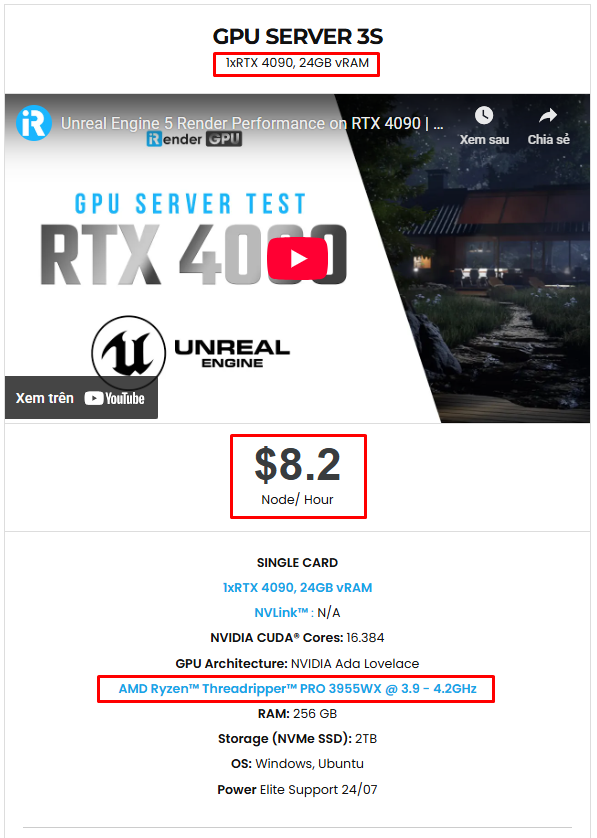
Not only does it have powerful configurations, but iRender also provides you with many more services. Free and convenient transfer tool iRender drive for macOS and Linux users. For Windows users, we recommend the iRender GPU application, you will not need to access our website anymore. The price at iRender is also very flexible with hourly rental (pay as you use), and daily/weekly/monthly rental with a 10-20% discount.
We’re always happy to help you with any questions. If you have any problems or questions, don’t hesitate to contact our 24/7 support team. Or via Whatsapp: 0912 785 500 for free advice and support.
iRender is currently offering a SPECIAL PROMOTION: enjoy a 100% bonus on your first top-up. This means your first deposit will be doubled, and your points never expire, allowing you to use them whenever you need.
Sign up for an account today to experience and enjoy our services.
Thank you & Happy Rendering!

Related Posts
The latest creative news from Unreal Engine Cloud Rendering






