
Cycles vs Eevee Render Time: When Slow Quality Beats Fast Preview
Eevee renders a frame in seconds and Cycles takes minutes, but speed is the wrong thing to compare. Eevee is a rasterizer that approximates light with screen-space tricks and light probes, so it is brilliant for previews, stylized work, and motion graphics. Cycles is a path tracer that simulates real light, so it wins when you need accurate reflections, refractions, true global illumination, and believable product or architectural finals. Use Eevee while you iterate, then move to Cycles once the look has to be physically correct. The only time render time should drive the choice is when a Cycles animation is too big for one machine, and that becomes a question of how many GPUs you can throw at it, not which engine to use.
People ask me which engine is faster like it settles the argument. It does not. I have shipped stylized explainer animations entirely in Eevee that would have been pointless to path trace, and I have watched a client reject a beautiful Eevee archviz frame because the glass looked fake and the bounce light was missing. Both engines were doing their job. The mistake was picking the wrong one for the shot.
So let me lay out what actually separates them, and then walk through the situations where each one is the right answer.
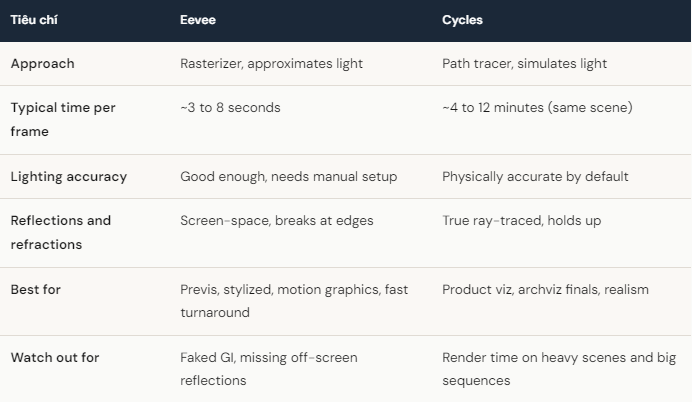
What actually separates Eevee and Cycles?
Eevee draws your scene the way a game engine does. It rasterizes geometry and fakes the expensive parts of light: reflections come from what is already on screen, global illumination leans on light probes you have to place and bake, and shadows use shadow maps. When it works, it is almost instant. When it breaks, it breaks in ways that read as wrong to a trained eye, like a reflection vanishing the moment the object leaves frame.
Cycles fires rays from the camera and follows light as it bounces around the scene. That is why it is slow, and also why a glass of water, a polished floor, or soft window light just looks correct without you babysitting it. You pay for that accuracy in minutes per frame instead of seconds.
When fast preview is the right call
For a lot of work, Eevee is not a compromise, it is the correct tool. Stylized characters, UI and motion graphics, social content, lookdev turntables, blocking out a shot before committing to lighting, any animation where the art direction tolerates approximated light. I will happily render a 200 frame stylized loop in Eevee in under a few minutes total and move on with my day.
If your local GPU is old, even Eevee can stutter on dense scenes, because EEVEE Next leans harder on the GPU than the old Eevee did. That is usually a viewport and setup issue rather than a reason to pay for cloud rendering. Fix the scene first.
When the slow render earns its time
Cycles is worth every minute when the client is paying for realism. Product shots where the material has to be convincing. Architectural interiors where the bounce light sells the space. Anything with real caustics, accurate refraction, or lighting that has to match a photographic reference. In those jobs an Eevee frame that renders in four seconds is worthless if it gets rejected, and a Cycles frame that takes eight minutes but passes review is the cheap option.
Cycles is slow and the deadline is real. What now?
Once you have settled on Cycles because the shot needs it, the time problem is no longer about the engine. A single hero frame at eight minutes is fine. A 240 frame Cycles sequence at eight minutes each is 32 hours on one machine, and you cannot touch that machine while it runs.
This is where more GPUs change the number, and where iRender fits. You are not handed a locked template that dictates your Blender version or which add-ons you may install. You get a full remote workstation with RTX 4090 GPUs, 256GB RAM and fast storage, and you set it up with your exact Blender build and your add-ons. The frames come back matching what you see locally because you configured the machine, which is the point of “your renders, your rules”.
A few things will cost you money if you are not paying attention. Billing starts when the server boots, not when Cycles starts, so pack your file before you connect. You shut the machine down yourself, and leaving an idle server running after the batch finishes is the classic way people waste a night of credit, so use auto-shutdown. The first setup runs around 15 to 30 minutes, then your image is saved and you are back in a couple of minutes. If overnight batch frames with no live desktop is all you want, a SaaS render farm can be simpler. iRender makes more sense when you want full control of your Blender environment and GPU power on demand.
Frequently Asked Questions
2. Can I preview in Eevee and final render in Cycles?
iRender – Maximize Your Blender Rendering Performance
Why iRender is a great solution:
iRender proudly offers high-performance workstation configurations optimized for Blender, giving you an incredible rendering experience without the limitations of traditional render farms. With iRender, you can enjoy full control over your remote workstation, just like using your personal computer, but on the cloud. Blender comes pre-installed and ready to go, so you can start immediately.
Fully Compatible with Blender
iRender allows you the freedom and flexibility to work the way you want, without restrictions.
- Install any version of Blender you need.
- Add your favorite plugins or specialized render tools.
- Whether you use OctaneRender, Redshift via Houdini Bridge, or export USD for Arnold, you can set up your environment exactly like your local machine.
Powerful Multi-GPU Workstations
iRender offers virtual machines with up to 8x RTX 4090, or high-VRAM GPUs for large scenes. These configurations are perfect for:
- OctaneRender: Linear scaling across multiple GPUs, ultra-fast path tracing.
- Redshift: Biased rendering optimized for animation, saving you time.
- Arnold GPU: Smooth OptiX multi-GPU support.
- V-Ray GPU: Trusted by archviz professionals for both stills and animations.
Scalable & Affordable Pricing
One of the biggest barriers to multi-GPU rendering is the upfront cost of hardware. With iRender, you pay only for the time you use, making it highly cost-effective whether you’re a freelancer rendering a single scene or a studio handling large projects with tight deadlines.
You can see the information about iRender’s service packages here.
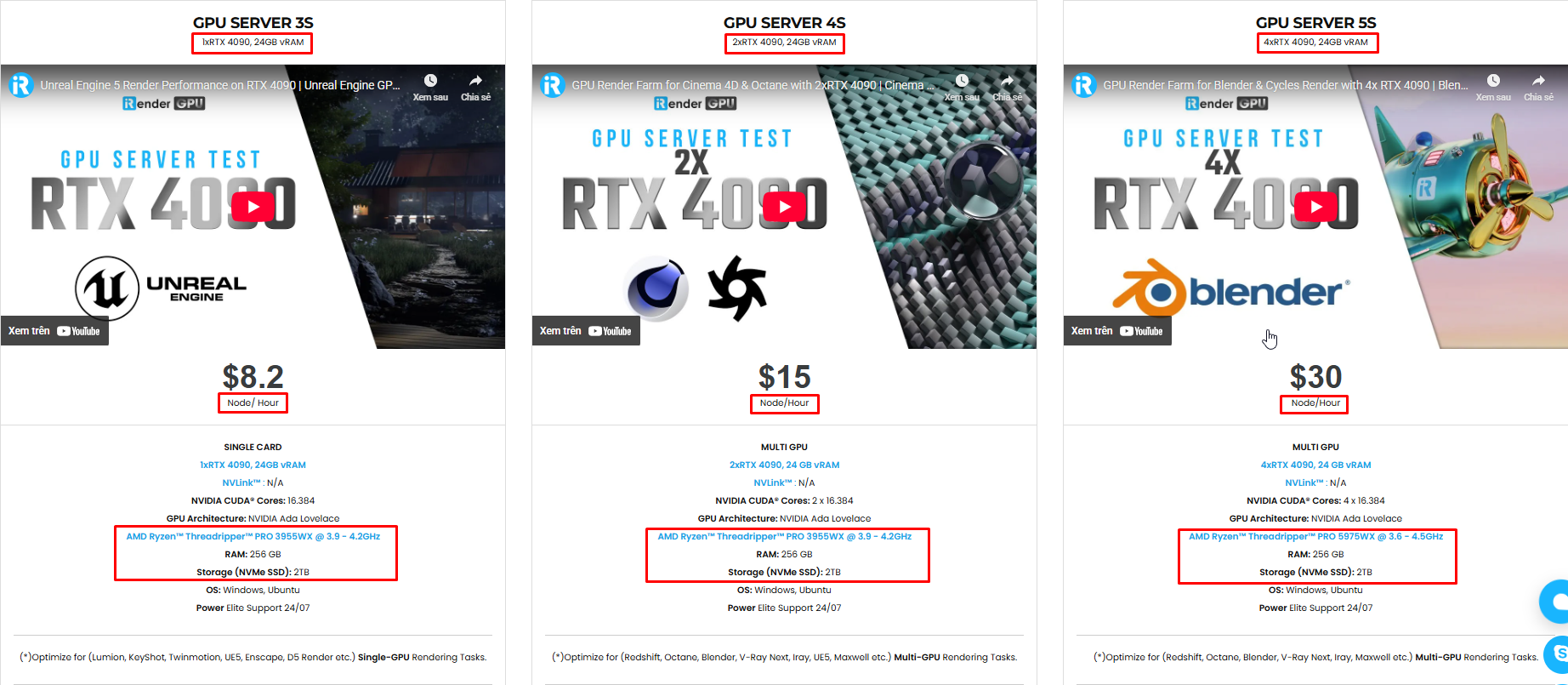
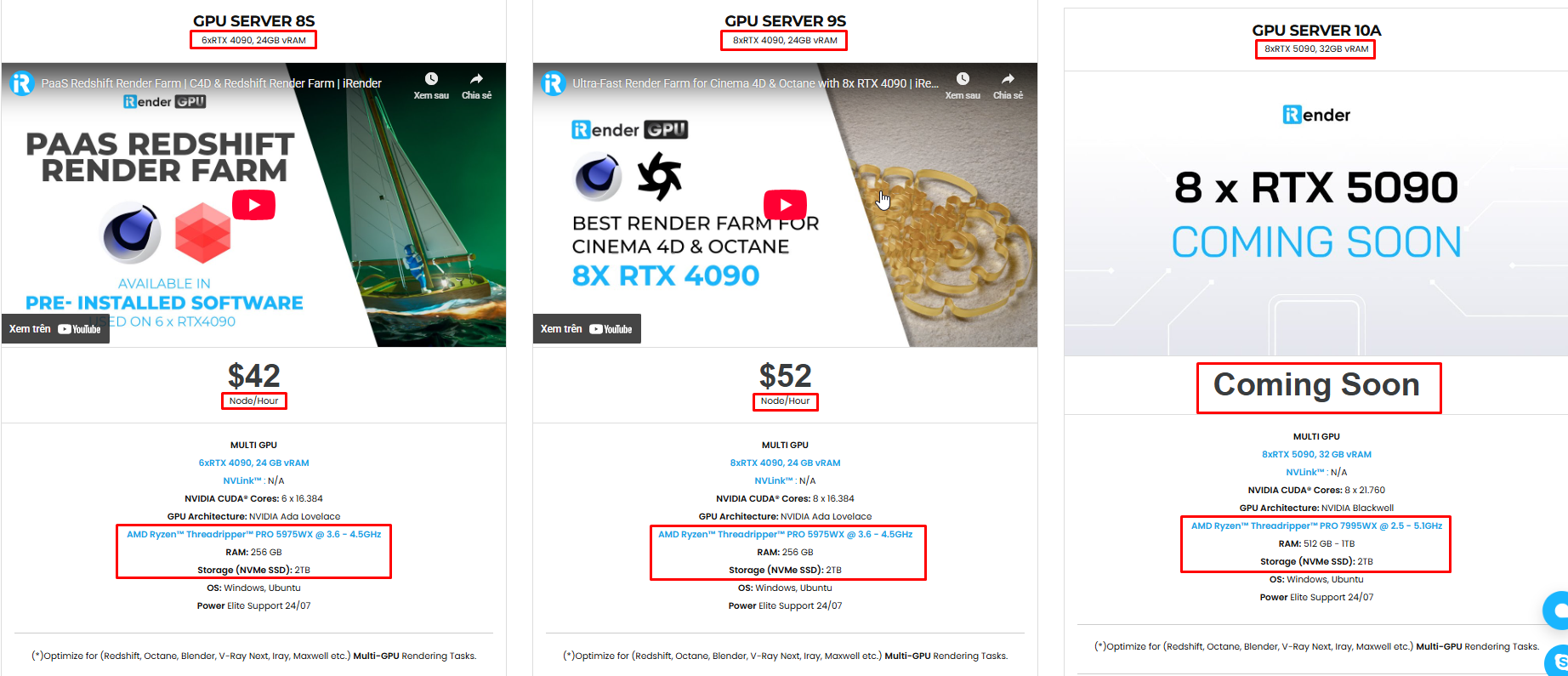
iRender is currently offering a SPECIAL PROMOTION: enjoy a 100% bonus on your first top-up. This means your first deposit will be doubled, and your points never expire, allowing you to use them whenever you need.
We’re always happy to help you with any questions. If you have any problems or questions, don’t hesitate to contact our 24/7 support team. Or via WhatsApp: 0912 785 500 for free advice and support.
Sign up for an account today to experience and enjoy our services.
Related Posts
The latest creative news from Blender Cloud Rendering





