
Houdini Cloud Rendering 2026: Multi-GPU Performance on iRender's RTX 4090
As 3D production scales in complexity, rendering is no longer just a technical step; it’s a bottleneck that defines the speed of your entire pipeline. In 2026, with heavier simulations, higher resolutions, and tighter deadlines, artists are increasingly turning to cloud-based multi-GPU rendering to stay competitive.
This blog explores how Houdini Cloud Rendering performs on iRender’s RTX 4090 infrastructure, drawing on real workflows and demonstrations from the videos.
Why Houdini artists are turning to cloud rendering?
Houdini powers major productions at Walt Disney Animation Studios, Pixar, DreamWorks, ILM, and Double Negative. Its procedural approach enables scenes of incredible complexity, but that complexity comes at a steep render-time cost.
Local workstations, no matter how powerful, hit their ceiling fast when terabytes of VDB volumes, OpenVDB smoke caches, and particle systems need to be resolved into final frames.
Cloud rendering removes that ceiling. Instead of waiting days on a local machine, artists can spin up a multi-GPU node on iRender, compress render times from several days to just a few hours, then shut the server down and pay only for what they used.
iRender uses an IaaS (Infrastructure as a Service) model, meaning you get full control of the remote machine. You install your own software, add your own license, and render exactly the way you would on your own PC: no queue, no shared nodes, no compromise.
CPU vs GPU: understanding the architecture
Houdini has traditionally been CPU-heavy. Its solver engines are designed around sequential logic chains, which CPUs handle well. However, GPU-accelerated renderers now dominate production, making the GPU the critical component for the final render stage.
Think of it this way:
- A CPU works like a small team of highly capable engineers solving complex problems one at a time.
- A GPU is like thousands of workers performing simpler calculations simultaneously.
For particle lighting, ray-tracing through volumetric smoke, and shading billions of instances, those parallel calculations are exactly what’s needed. The NVIDIA RTX 4090 delivers 16,384 CUDA cores per card, purpose-built for this type of workload.
Real-world benchmarks show GPU render engines running 10 to 50× faster than CPU equivalents for typical Houdini production scenes, particularly with engines like Redshift, Karma XPU, and OctaneRender.
The VRAM constraint and why it matters
Every RTX 4090 carries 24 GB of VRAM, impressive for a consumer card, but Houdini productions regularly exceed this limit. When a simulation dataset exceeds available VRAM, the system either stops or falls back to out-of-core techniques that use system RAM. Both outcomes hurt performance significantly.
In a multi-GPU environment, render engines like Redshift handle out-of-core rendering gracefully by distributing the load across all available cards and system memory. iRender’s 8× RTX 4090 nodes come with 256 GB of system RAM, providing substantial headroom beyond raw VRAM limits.
Important: Multi-GPU excels at the render stage, not necessarily at the simulation stage. Most Houdini solvers (FLIP fluids, Pyro, POPs) still prioritise single-GPU performance to avoid PCIe data latency. Use multi-GPU when your cache files are ready, and it’s time to produce final frames.
Karma XPU: Native Houdini Rendering in the Cloud

Karma XPU is SideFX’s own rendering solution, tightly integrated into Houdini’s Solaris USD workflow. It runs as a hybrid CPU/GPU renderer and benefits significantly from multi-GPU configurations — especially for scene types with heavy instancing and complex shading networks built natively in LOPs.
For artists already working inside Houdini’s USD pipeline, Karma XPU on iRender eliminates the need for third-party render engine licensing.
Redshift on multi-GPU: the workhorse pairing
Redshift has become the dominant render engine in Houdini pipelines for good reason. Its out-of-core architecture uses all GPU and system resources together, unlike engines constrained purely to VRAM. It also scales render speed with additional GPUs, meaning the cost difference between a 2× and 8× RTX 4090 configuration translates almost directly into render time savings.
Crucially, a single Redshift license covers unlimited GPUs on one machine, so there’s no additional licensing cost for running a full 8-card node. Artists get industrial-scale performance without industrial-scale licensing fees.
Multi-GPU systems with 4× or 8× RTX 4090 cards allow ray-tracing workloads to be split and processed in parallel, reducing render times from several days to just a few hours.

OctaneRender: unbiased GPU rendering at scale
OctaneRender was one of the world’s first physically correct GPU-accelerated renderers, and it remains a favourite for artists who prioritise absolute photorealism in Houdini scenes. Its unbiased path-tracing engine computes every ray with physical accuracy, producing images that need minimal post-production correction.
On iRender’s 8× RTX 4090 configuration, Octane can tackle:
- Complex scene lighting
- Volumetric scatter through smoke simulations
- High-sample-count stills that would be impractical on a personal workstation

Workflow: How Houdini Artists Use iRender
From the videos, the workflow is straightforward and familiar:
- Upload your Houdini project
- Launch a remote RTX 4090 server
- Connect via remote desktop
- Render using your preferred engine
- Download results
Unlike traditional render farms, iRender uses an IaaS model, meaning:
- You get a full remote machine
- You install plugins, assets, and tools freely
- No need to adapt your pipeline
This is especially important for Houdini, where custom setups and dependencies are common.
Smart Data Optimization Is the Key to Working Efficiently in Houdini with iRender
iRender is proud to provide suitable configuration packages for all software to bring you a great experience in the rendering process. With the benefits that iRender brings to you, as well as the configuration that is very suitable for all versions of Houdini, do not hesitate to use the service at iRender to have a great experience with your rendering time.
At iRender, we provide remote workstations where you can use them as your own computer. Under the IaaS (Infrastructure as a Service) model, you will have full control over the entire rendering process and use it as your personal machine. Therefore, you can install any software and plug-ins you want, add your license, and render or modify your project yourself.
Below is information about our packages, which are suitable for Houdini:
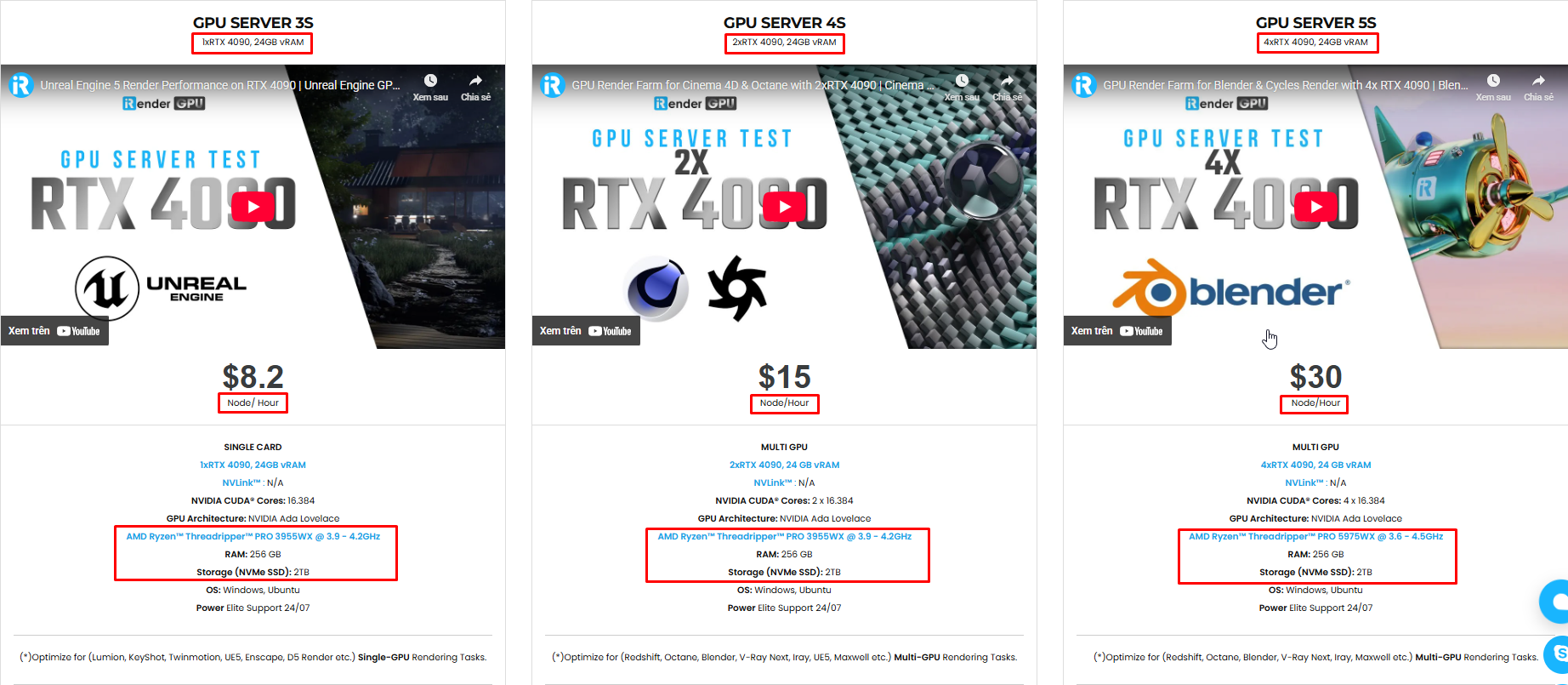
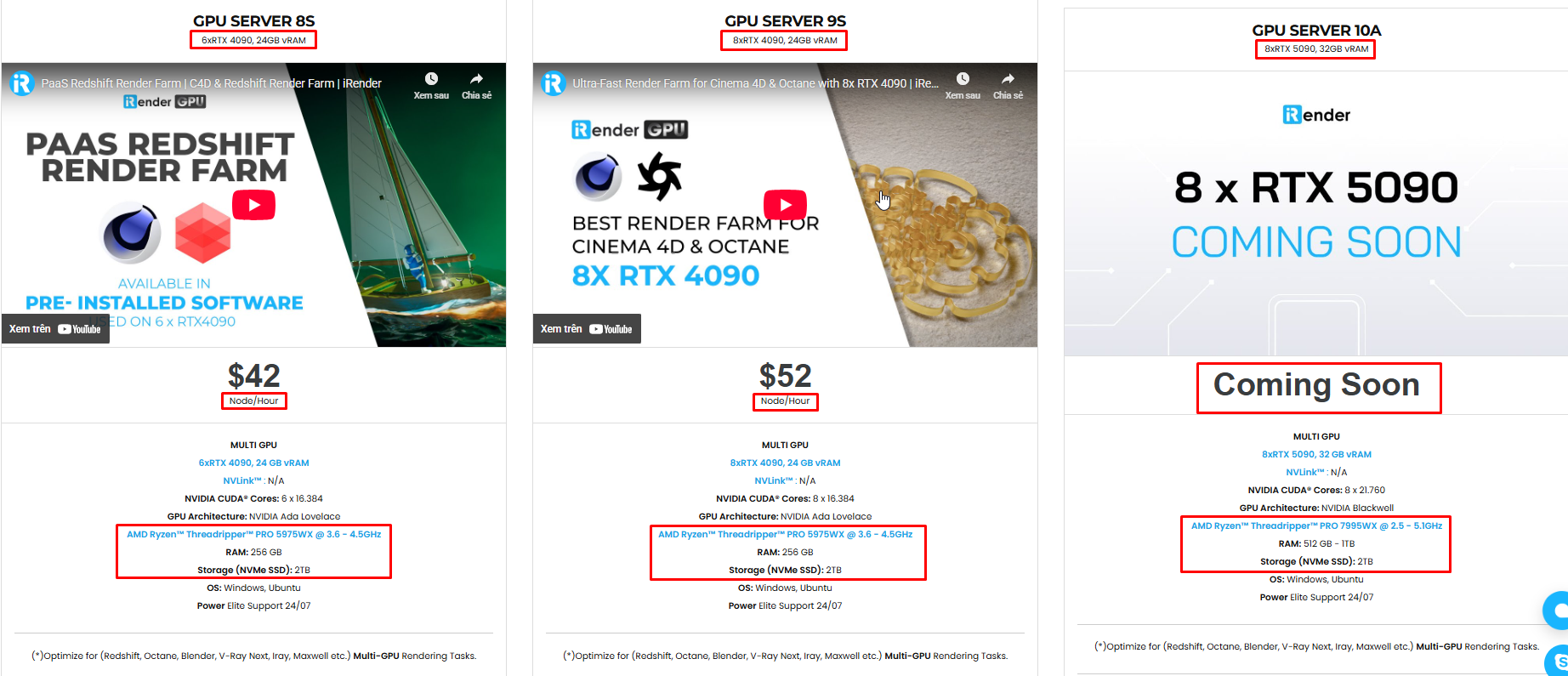
Not only does it have powerful configurations, but iRender also provides you with many more services. Free and convenient transfer tool iRender drive for macOS and Linux users. For Windows users, we recommend the iRender GPU application, you will not need to access our website anymore. The price at iRender is also very flexible with hourly rental (pay as you use), and daily/weekly/monthly rental with a 10-20% discount.
We’re always happy to help you with any questions. If you have any problems or questions, don’t hesitate to contact our 24/7 support team. Or via Whatsapp: 0912 785 500 for free advice and support.
iRender is currently offering a SPECIAL PROMOTION: enjoy a 100% bonus on your first top-up. This means your first deposit will be doubled, and your points never expire, allowing you to use them whenever you need.
Sign up for an account today to experience and enjoy our services.
Thank you & Happy Rendering!
Source and image:sidefx.com

Related Posts
The latest creative news from Houdini Cloud Rendering






